
Agents build the network.
Engineers run the agents.
NetPilot's agent designs, builds, and validates a real multi-vendor network from your prompt — you own the intent, the judgment, and the sign-off.
See It in Action
Watch the agent build a complete multi-vendor network lab from a single conversation.
What the agent does, step by step
Five steps from your prompt to a validated network — the agent runs each one, you review the result.
Designs the topology from your prompt
Tell the agent what you need — OSPF multi-area, MPLS L3VPN, BGP peering, VXLAN EVPN, leaf-spine fabric, or any combination. It designs the full topology including IP addressing, interface mapping, and protocol relationships. No diagrams or templates required.
Writes vendor-specific configs
The agent produces production-grade startup configurations for every device. Nokia SR Linux is built in, and Cisco IOL, Cisco XRd (IOS XR), Cisco NX-OS (Nexus 9300v), Juniper cRPD, Arista cEOS, Palo Alto PAN-OS, Fortinet FortiGate, Aruba AOS-CX, Dell SmartFabric OS10, and SONiC run via BYOI (you supply the image). Each config uses the correct vendor syntax, interface naming, and protocol semantics. No manual editing needed.
Builds the lab on real device CLIs
Not a simulation. The agent deploys actual network OS instances to isolated cloud VMs. SSH into any device and run show commands, configure interfaces, debug protocols — exactly like production gear. Click any node in the topology to open a terminal.
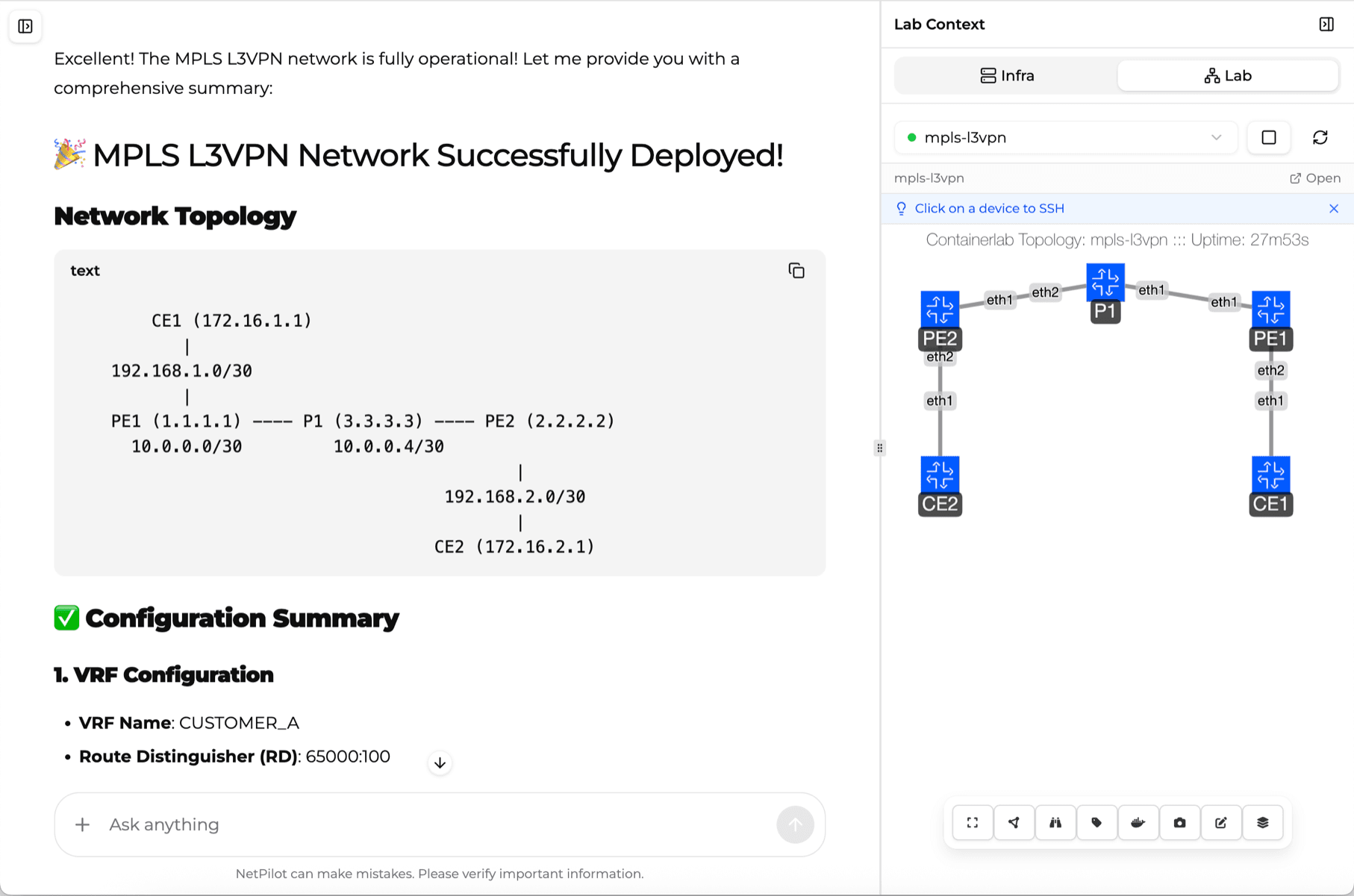
Validates connectivity — you review it
After deployment, the agent checks routing tables, protocol adjacencies, end-to-end reachability, and VPN paths — and hands you the evidence instead of making you type every show command. If something fails, it diagnoses the issue and offers fixes for you to approve.
Generates traffic to test performance
Validate throughput, latency, and failover behavior using built-in iperf3 traffic generation. Test across MPLS paths, VPN tunnels, and redundant links before anything touches production.
You run the agent. The agent runs the build.
NetPilot keeps the engineer in command. The agent takes the repetitive work — design, config, deploy, validate — and hands every result back to you to verify and own.
You direct
Describe the change, topology, or what-if in plain English — or import sanitized production configs. You set the intent; you decide what gets built.
The agent does the toil
It designs the topology, writes per-vendor configs, builds a real multi-vendor lab in ~2 minutes, and runs first-pass validation — the repetitive work, done for you.
You verify & sign off
SSH into any device, check the real CLI, and take the proven change to production yourself. The agent proposes; the engineer decides and signs off.
The work that stays yours
The agent ends the toil — typing configs, wiring topologies, running show commands. Your role moves up, from operator to orchestrator: generation is solved; judgment, direction, and ownership are the craft.
Intent & architecture
Decide what the network should do — the design, the trade-offs, the business and security requirements the agent builds to.
Verification & judgment
Generation is solved; judgment isn't. Review the agent's design and validation evidence on the real CLI, and catch what it missed.
Change ownership
Approve the change, own the blast radius, decide what's safe for production. The agent proposes; you're accountable.
Orchestrating agents
Direct several agents in parallel — build, stage, validate, draft the rollback — and set the guardrails: what runs autonomously, what needs your sign-off.
The hard 20%
Novel designs, gnarly multi-vendor interop, ambiguous requirements, the debugging the agent can't finish — the work only you can do.
“Should we,” not just “can we”
Risk tolerance, compliance, and the judgment calls AI shouldn't own.
What makes the agent different
Not a chatbot that writes configs, and not a black box — an agent your engineers direct, with the real CLI as the trust layer.
Agentic, not a chatbot
Plans, builds, deploys, and validates a real multi-vendor lab end to end — then hands you the CLI to verify.
The alternative
A chatbot writes config text you still wire up, deploy, and debug yourself.
Engineers run the agents
You own the intent and the sign-off; the agent does the build-and-validate toil across every device.
The alternative
Hand-build each device and hand-check every change — the toil stays yours.
Real CLIs are the trust layer
SSH into the real NOS and confirm routing and protocol state — the agent's work is always verifiable, never a black box.
The alternative
Trust a model's text output with no real device state to check it against.
Multi-vendor from one prompt
One prompt yields correct per-vendor configs across Cisco, Juniper, Arista, and Nokia at once — no syntax lookups.
The alternative
Translate every change by hand, vendor by vendor, then wire it together.
What you can have the agent build
From a quick OSPF check to a full EVPN fabric — describe it and the agent designs, configures, deploys, and validates it on real multi-vendor network OSes.
Build a topology from a prompt
Describe the network in plain English and the agent designs nodes, links, IP addressing, and protocol relationships — agentic network engineering, no diagrams or templates.
Generate multi-vendor configs
Ask for "eBGP between the Cisco edge and the Juniper transit" — the agent writes correct IOS, Junos, EOS, and SR Linux syntax for every device at once.
Test a change before production
Import sanitized configs, let the agent build a digital twin, then run the change against it and review the validation evidence before it touches prod.
Stand up OSPF, BGP & MPLS
Multi-area OSPF with summarization, eBGP/iBGP with route reflectors and route-maps, MPLS L3VPN with VPNv4 and customer VRFs — built and adjacency-checked.
Spin up a VXLAN/EVPN fabric
A leaf-spine data-center fabric with an eBGP underlay and EVPN overlay — the agent wires the fabric and confirms the overlay comes up.
Stage firewall & security policy
Palo Alto or Fortinet zones, security rules, and NAT between Cisco segments (via BYOI) — staged and reachability-tested in an isolated lab.
Validate connectivity & protocol state
After the build the agent checks routing tables, adjacencies, end-to-end reachability, and VPN paths, then hands you the report — you SSH in and verify on the real CLI.
Verify multi-vendor interop
Put Nokia SR Linux (built in) alongside Cisco, Juniper, and Arista (via BYOI) in one topology and have the agent reproduce and confirm cross-vendor behavior before you commit to it.
More built-in capabilities
Beyond the core loop — everything else the agent brings to your lab environment.
Digital Twin Import
Import your production network configurations to create an exact virtual replica. Test changes in a sandbox that mirrors your live environment — before they touch prod.
Bring Your Own Images
Upload your own vendor device images (BYOI) for commercial NOSes. The agent configures them within your topologies just like the built-in images.
MCP-Connectable, Both Ways
Connect your own AI agents — Claude, Cursor, or in-house — to NetPilot's MCP server and they build labs on demand. NetPilot's agent connects to the tools you already run (inventory, config repos, ticketing, CI/CD — or any tool with an API, custom-built to fit your workflow) and builds pre-change validation labs from your real configs.
Multi-Vendor Native
The agent understands each vendor's CLI syntax, interface naming, and protocol semantics natively — so multi-vendor interop is a prompt, not a week of syntax lookups.
Isolated Cloud Environments
Every lab runs in a dedicated cloud VM. No shared infrastructure, no conflicts between labs. Test sensitive scenarios without exposing production.
Template Library
Save any lab as a reusable template. Duplicate and modify to create variations — perfect for repeatable team demos, runbooks, or onboarding environments.
Packet Tracer Export
Export complete topologies as .pkt files for Cisco Packet Tracer — a portable interchange format for sharing or archiving a lab outside NetPilot.
Works with any vendor
NetPilot is built on ContainerLab. Nokia SR Linux, FRR, and Linux are built in; commercial NOSes run via bring-your-own-image. If a device image runs in a container, the agent can deploy and configure it.
Frequently Asked Questions
How an agent your engineers run fits the way your team already works
Explore NetPilot
AI Network Emulator
The agent's workspace — how it builds a real multi-vendor lab from a prompt.
Network Change Validation
Validate a change against an AI-built digital twin before it touches prod.
AI for Network Engineers
Where the agent fits among the AI tools network engineers use in 2026.
Network Lab Online
Run the agent-built lab in your browser — no install, no VM, no server.
POC Network Lab
Spin up a customer-matched multi-vendor demo, then tear it down.
Network Research Lab
On-demand multi-vendor topologies for R&D and protocol work.