
Cisco Packet Tracer Wireless
Describe a Cisco Packet Tracer wireless lab and get a working .pkt in your browser, with every setting explained.
See It in Action
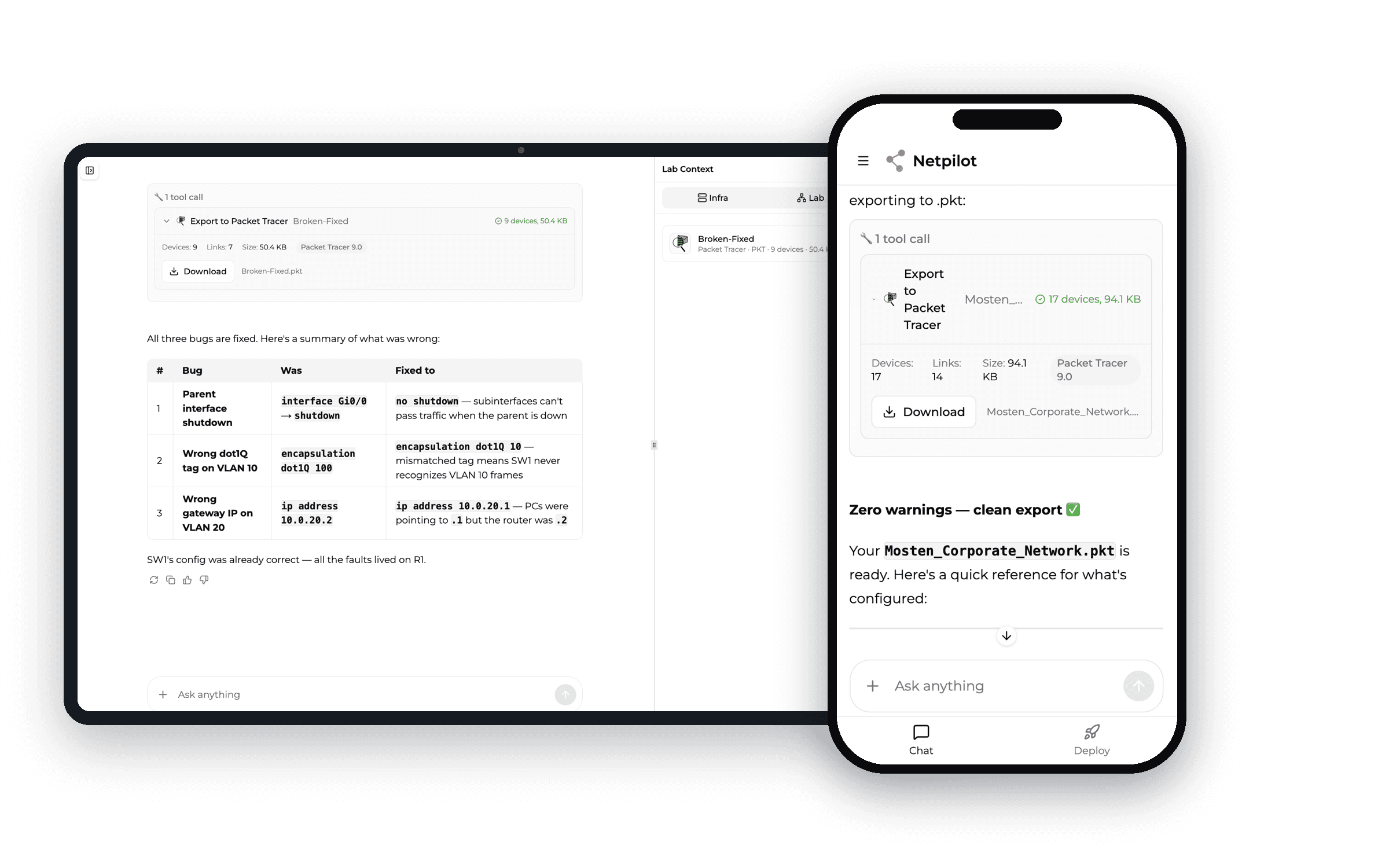
Describe a wireless lab, get a configured .pkt — WRT300N, WLAN, or WLC — all from your browser. No Packet Tracer download required.
Trusted by network engineers worldwide
Why NetPilot, not just an AI chatbot
Three things a general chatbot structurally can't do for a Cisco Packet Tracer assignment.
.pkt round-trip — not just text
Import your broken .pkt; NetPilot diagnoses it, fixes the config, and hands you back a working .pkt to open and submit. General AI chatbots are text-only — they structurally can't read or write Packet Tracer's binary format.
Explains why, at your level
It walks you through the CCNA/CCNP/CCIE concept behind the fix in tutor voice — so you understand it and pass the exam, not just hand something in. The understanding is the deliverable; the working file is the proof.
Knows Packet Tracer's quirks
Tested against hundreds of Packet Tracer scenarios — it knows which commands the simulator won't run, which OSPF LSA types are missing, and why DHCP behaves differently. ChatGPT was trained on real IOS docs, not the simulator.
Build and fix Cisco Packet Tracer wireless labs — from any browser
Generate a configured wireless .pkt from a prompt, repair a broken one with AI, and do it all without installing anything.
Build a wireless topology from a prompt
Describe it — "WRT300N home Wi-Fi with WPA2 and three laptops" or "a WLC with two WLANs mapped to VLANs" — and NetPilot hands you a fully configured .pkt with SSIDs, security, and DHCP set up.
Fix a broken wireless lab
Import a .pkt where clients won't associate — NetPilot finds the SSID/WPA2/DHCP mismatch, fixes the configuration, explains the reason in plain English, and exports a working .pkt back to you.
Runs on any device, nothing to install
No 870 MB download, no NetAcad account, no disk space. Chromebook, tablet, library PC, or a locked-down school laptop — if it has a browser, you can build the wireless lab.
Every Cisco Packet Tracer Wireless Lab — Online
From a home WRT300N to an enterprise WLC — describe any wireless lab and get a working .pkt file, or practice on real CLIs.
Home Wi-Fi Lab (WRT300N)
Describe a home network with a Linksys WRT300N — SSID, WPA2 security, DHCP, and wireless PCs and laptops connecting. Get a working .pkt, no download.
Get This LabWLC & WLAN Controller Lab
Generate a Wireless LAN Controller lab — WLAN creation, SSID-to-VLAN mapping, lightweight APs, and WPA2-PSK / Enterprise security. The hardest CCNA wireless topic, built for you.
Get This LabConnect Laptops & Phones to Wi-Fi
Wireless laptops (WPC300N card), smartphones, and tablets associating to an SSID over WPA2. NetPilot wires the cards and security so you focus on the concept.
Get This LabWPA2 Wireless Security Lab
Secure a wireless network with WPA2-PSK, set passphrases, and add MAC filtering. AI configures it and explains what each control actually protects against.
Get This LabAccess Point (AP-PT) Lab
Bridge wireless clients to the wired LAN with a standalone access point — SSID, security, and uplink to a switch. Understand how an AP differs from a WRT300N.
Get This LabTroubleshoot a Wireless Network
The CCNA Module 12 troubleshooting labs — diagnose association, security-mismatch, and DHCP failures. NetPilot finds the break and walks you through the fix.
Get This LabThree Ways to Build a Cisco Packet Tracer Wireless Lab
Packet Tracer is where your lab runs. The difference is how you get it built — by hand, with ChatGPT, or with NetPilot.
Doing your Cisco Packet Tracer lab: the realistic options
Cisco Packet Tracer is where you open and submit your file — the companion, not a competitor.
Frequently Asked Questions
Common questions about wireless labs in Cisco Packet Tracer
Wireless Tutorials & Troubleshooting
How to Configure Wireless (WRT300N, AP & WLC)
Step-by-step: home Wi-Fi, an access point, and a Wireless LAN Controller — with the why explained.
CCNA Module 12 & 13 Wireless Labs
Tutor-voice walkthroughs of the NetAcad wireless labs — understand what each one tests.
Why Won't Devices Connect?
Fix clients that won't associate, no-IP issues, and the WLC 'server reset connection' quirk.
Connect a Wired and Wireless LAN
The cable-selection rules behind the 4.6.5 activity — straight-through, crossover, and serial, explained.
Explore Packet Tracer Resources
Cisco Packet Tracer Download
Download PT for Windows, Mac & Linux — or skip the 870MB install and build labs in your browser.
Cisco Packet Tracer Online
Build any Packet Tracer lab in your browser — no download.
Cisco Packet Tracer AI Tutor
Paste your assignment — get step-by-step commands, the why explained, and .pkt export.
Cisco Packet Tracer Projects
Describe an office, hospital, or campus network — get a working .pkt project with the design explained.
Cisco Packet Tracer IoT
Build smart home & IoT labs — Home Gateway, sensors, and conditions — in your browser.
Cisco Packet Tracer VoIP
Configure IP phones, Call Manager Express, and dial-peers in your browser.
Packet Tracer vs Real IOS
Every command and protocol where the simulator differs from real IOS.
Packet Tracer Alternative
Outgrowing Cisco Packet Tracer? See why students switch to AI-powered labs.
Free CCNA Practice Lab
Practice with AI-powered labs covering OSPF, EIGRP, VLANs, and STP.
Free CCNP Practice Lab
Level up to CCNP ENCOR & ENARSI with AI-generated lab scenarios.
CCIE Practice Lab
Build enterprise-scale CCIE topologies on real Cisco IOL CLIs in minutes.
Build Your Wireless Lab. Understand Every Step.
Describe a WRT300N, WLAN, or WLC lab and get a fully configured .pkt in your browser — with the configuration explained, free.