
To prove a Cisco to Arista migration before the purchase order, build the network you run today on real Cisco, run the checks you would sign off a change with, then swap in Arista with the configs translated and run exactly the same checks. Usually that means a Cisco baseline lab, an Arista candidate lab, a feature map, a test plan and a stopwatch: days of lab work, or a consultant's quote. This post runs it from two prompts. NetPilot built a Cisco campus network, recorded the baseline, swapped the distribution switches for Arista and gave a verdict, in about 34 minutes. One of the six checks failed, and that one check is why you run the swap first.
The network being replaced
A core router, two distribution switches with HSRP for a users VLAN and a servers VLAN, OSPF up to the core, an access list that stops users from reaching the servers on the web port, and an access switch with one user and one server. The plan is to replace the distribution pair with Arista and leave the rest alone.
The prompt gave none of the addresses. The agent planned them, the OSPF areas and the HSRP priorities itself.
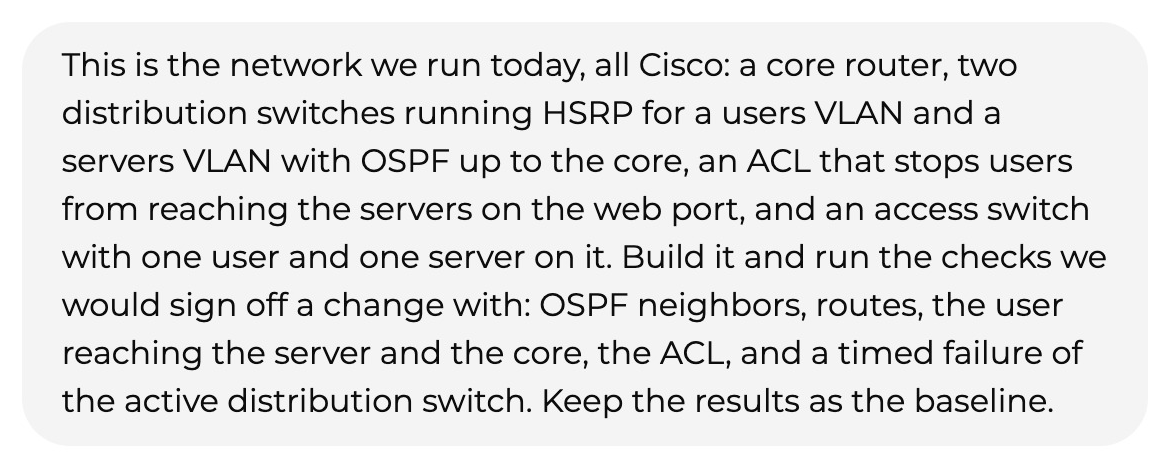
The first prompt: build it on Cisco and check it
The agent wrote the Cisco configs, deployed the lab and named six checks, C1 to C6. Its first failure test lost traffic for 36 seconds, far more than HSRP explains. It traced the gap to the access switch: the Cisco IOL-L2 image rejected spanning-tree portfast edge and dropped the line from the startup file without a word, so the host ports went back through spanning tree on every change. It fixed the line, redeployed and ran the baseline again. Its own advice: audit your production access ports for the same thing.
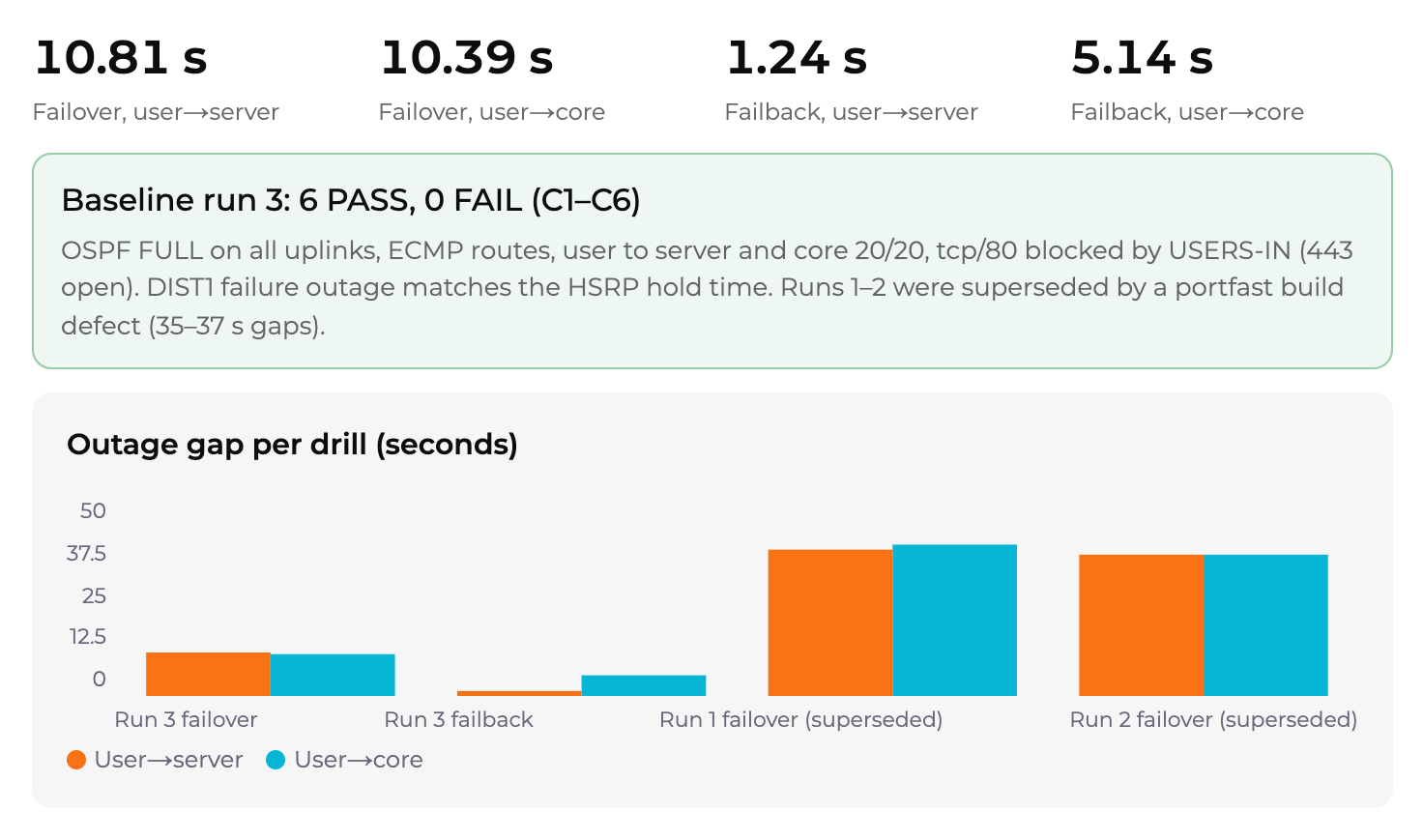
The Cisco baseline, 6 of 6. OSPF full on both uplinks, equal-cost routes to both VLANs on the core, the user reaching the server and the core, the web port refused 3 of 3, and a failover of 10.81 seconds when the active distribution switch froze, the HSRP hold time.
The second prompt: swap in Arista, same checks

The agent built a second lab beside the first, with the core and access switch startup files hash-identical to the baseline, and translated the distribution pair.
| Cisco IOS | Arista EOS in the run |
|---|---|
standby 10 ip 10.10.10.1, standby 10 priority 110 | vrrp 10 ipv4 10.10.10.1, vrrp 10 priority-level 110 |
ip access-list extended USERS-IN, wildcard masks | ip access-list USERS-IN, prefix lengths, counters per-entry |
network 10.0.1.0 0.0.0.3 area 0 | network 10.0.1.0/30 area 0.0.0.0 |
spanning-tree vlan 10,20 priority 4096 | spanning-tree vlan-id 10,20 priority 4096 |
interface Ethernet0/1, no switchport | interface Ethernet1/1, no switchport |
What changes when you move from Cisco to Arista
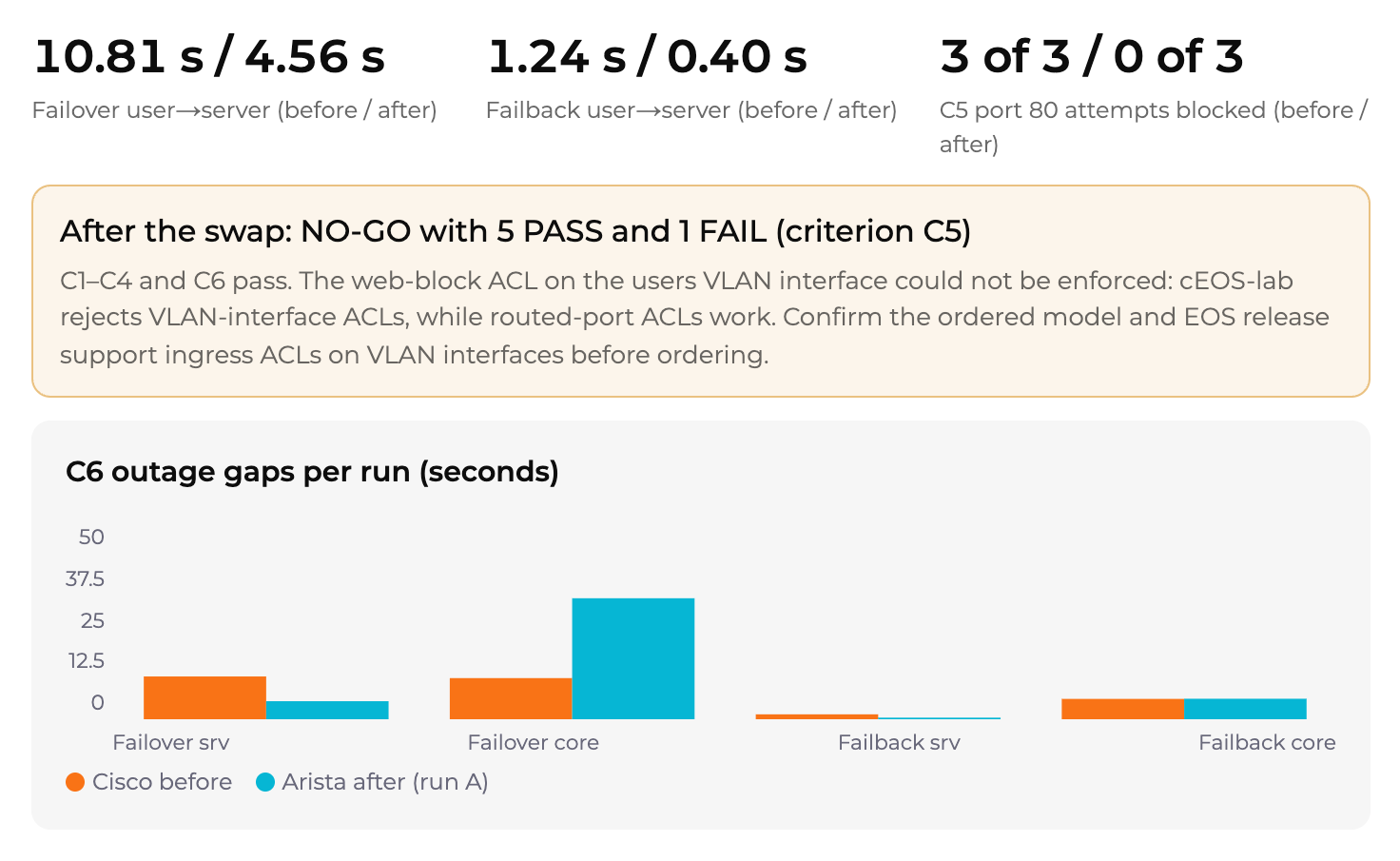
After the swap, 5 of 6. Routing, reachability and the failure test passed, and failover got faster: 4.56 seconds against 10.81, failback 0.40 seconds against 1.24, because VRRP took over about 2 seconds after the freeze. The fail was C5. The web request from the user got through on Arista every time.
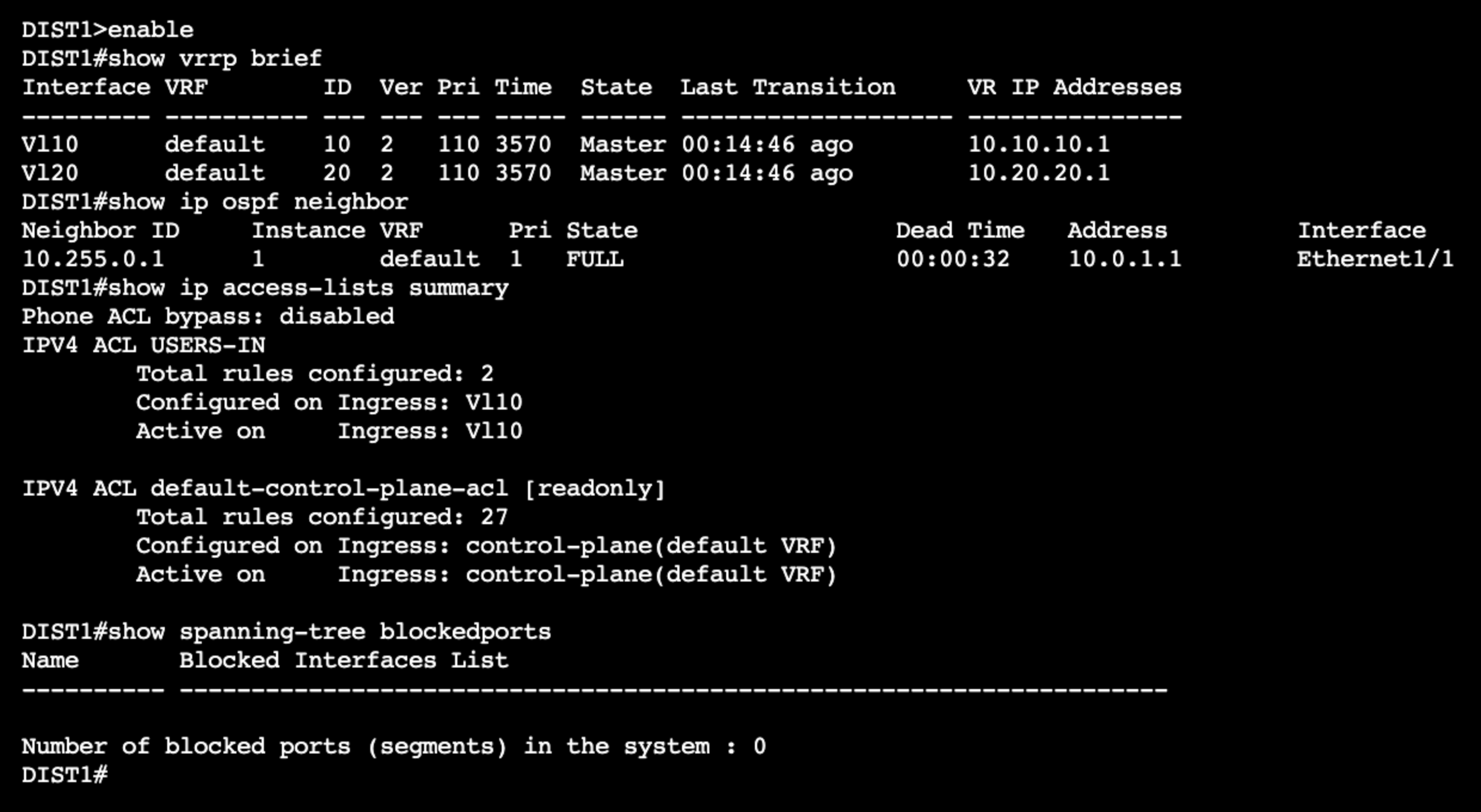
Typed by hand on the Arista distribution switch, VRRP is master on both VLANs, OSPF is full to the core, and the access list reads active on the users VLAN:
And from the user, the same web request in both labs. Arista first, then Cisco:
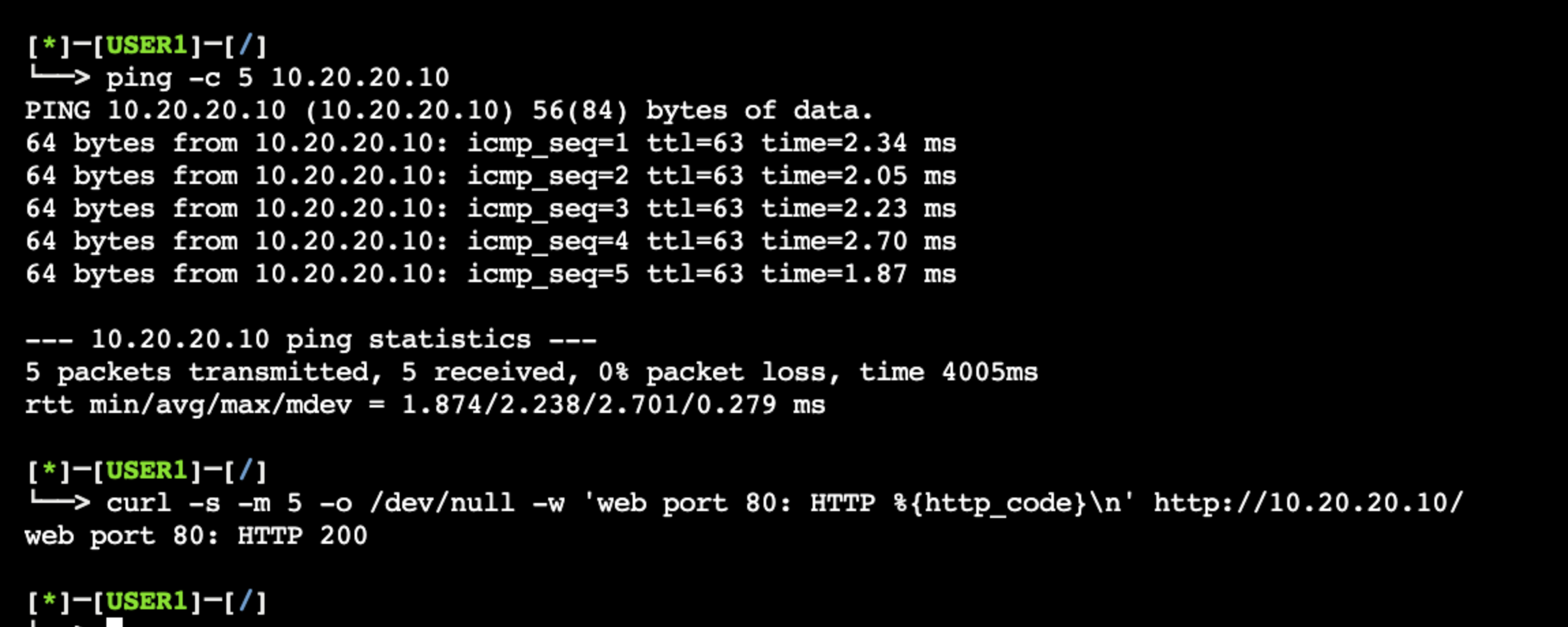
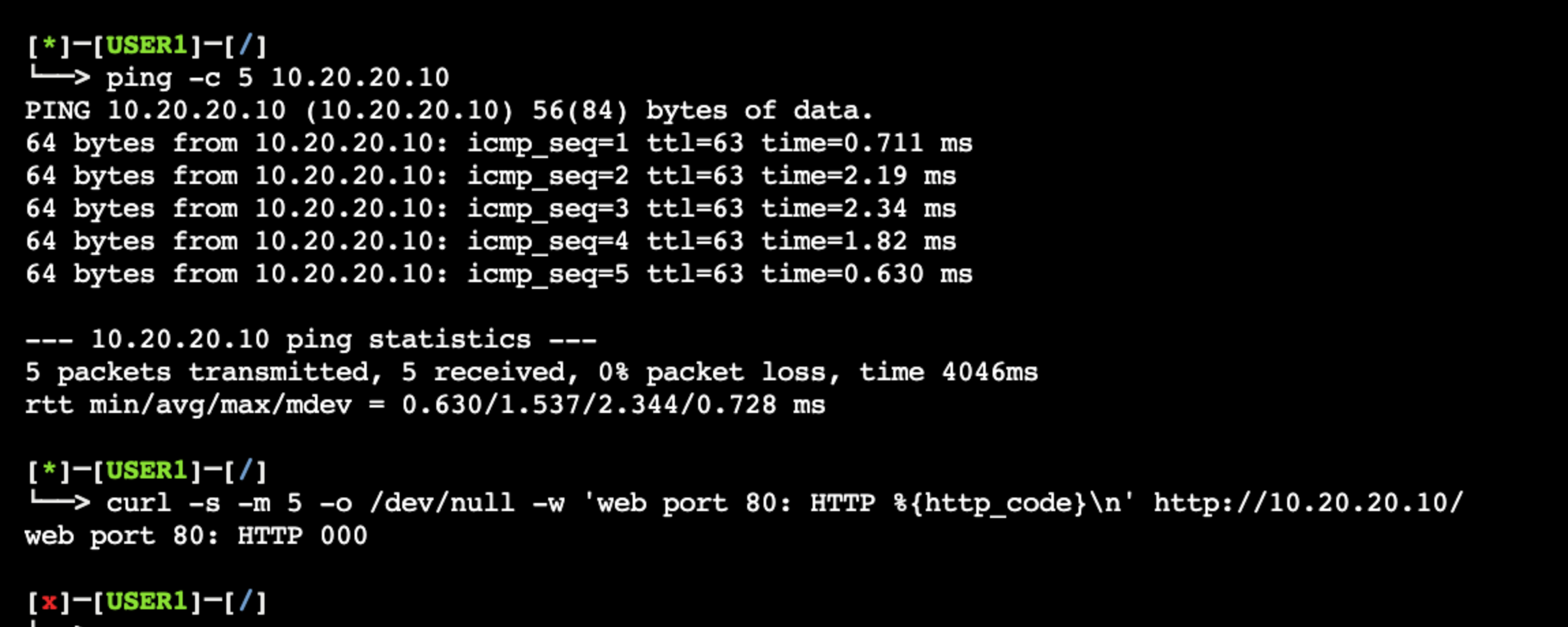
A config that loads clean is not proof. The agent tested further: typed live, the command answered that it was not supported on this platform, and a test access list on a routed port did filter. So it held the order on one line: confirm that the exact Arista model and EOS release enforce an inbound access list on a VLAN interface, ideally on an evaluation unit.
Two more things changed that a cutover plan needs. The gateway MAC moves from the HSRP address 0000.0c07.ac0a to the VRRP address 0000.5e00.010a, so hosts re-learn it. And the spanning-tree blocked port moved from the access switch to DIST2, because EOS and IOL price a link differently. Still loop-free, but no longer the drawing.
Arista vs Cisco, the part that matters for the order
The comparison that decides a purchase is not a feature sheet. It is whether the network you run today behaves the same on the new vendor, check by check, with a number on the failover. In this run that came down to one security rule and two cutover details, each found in the lab and none visible in a config diff.
| Check | Cisco before | Arista after |
|---|---|---|
| C1 OSPF neighbors | pass | pass |
| C2 routes | pass | pass, metric 20 against 11 |
| C3 user to server | pass, 20 of 20 | pass, 20 of 20 |
| C4 user to core | pass, 20 of 20 | pass, 20 of 20 |
| C5 web block | pass, 3 of 3 refused | fail, HTTP 200 |
| C6 failover | 10.81 s | 4.56 s |
Try it on your own network
Describe the network you run today in plain words, or paste the Cisco configs, and name the checks you sign off with. Then ask for the swap and the same checks. The agent writes both vendors' configs, runs both labs side by side on real network operating systems, and gives you the table and the verdict. Every device has its own CLI, so you can type any check yourself. Cisco IOL and Arista cEOS are your own images, uploaded once.
Copy-paste ready: the two prompts from this run, and both labs with their configs to run in containerlab yourself.
For other vendor pairs and the cutover itself: the network migration lab, Cisco to Aruba, rehearsed the same way, the switch migration checklist and running Arista cEOS in containerlab.
Open the first prompt in NetPilot
FAQ
How do I prove a Cisco to Arista migration before buying the switches?
Build the network you run today on real Cisco in a lab, record the checks you would sign off a change with, then swap the switches you plan to buy for Arista with the configs translated and run exactly the same checks. In the run on this page that took two prompts and about 34 minutes: the Cisco baseline passed 6 of 6, the Arista swap passed 5 of 6, and the one fail held the order until the vendor confirmed it.
Can I convert a Cisco config to Arista automatically?
Yes, an agent or a converter will translate most of it, and in this run the translated Arista configs loaded without an error. That is not proof. The access list was accepted at boot and showed as active on the users VLAN, yet the user's web request still got through. Only traffic run against the translated config shows what it really does.
Does HSRP work on Arista?
No. Arista EOS runs VRRP, or its own VARP, for gateway redundancy. In this run the agent moved both gateways from HSRP to VRRP with the same priorities, and failover got faster, 4.56 seconds against 10.81, because VRRP took over in about 2 seconds. The gateway MAC changes from the HSRP address to the VRRP one, so hosts re-learn it at cutover.
How do I test a Cisco to Arista migration without hardware?
Run both sides on their real network operating systems: Cisco IOL for the network you have and Arista cEOS for the one you plan to buy, in containerlab or from one prompt in NetPilot. Keep the core and access switches identical in both labs, run the same checks on each vendor's own CLI, and fail the active switch on both with a ping running. What a lab cannot settle, such as optics, PoE or a feature tied to the switch hardware, goes on the list for the vendor or an evaluation unit.