
On November 13, 2026, a nationwide FAA ground stop kept US flights on the ground for more than four hours. Officials say the trigger was a router swap: a newly installed router flooded the network with connection attempts. That is a class of failure every network engineer can rehearse. We rebuilt it on real Cisco and Arista routers, measured what the flood did to an OSPF core, traced it to the flooding site and contained it.
The short answer from the lab: at the reported rate, the flood alone did not hurt a modern core. CPU stayed at 1 % or under, no OSPF neighbor dropped and no ping was lost. With no controls and about 6,447 attempts a second delivered, CPU reached 8 %. Control plane policing dropped 99.4 % of that flood, and the trace to the flooding site took about a minute. Your oldest box is the one that decides the outcome, so it is the one to rehearse against.
What officials say happened
- The stop: at 2:54 p.m. ET on November 13, the FAA stopped departures nationwide for more than four hours. More than 2,500 flights were canceled the next day (NBC News live blog, 2026-11-14).
- The cause, per officials: a newly installed router at El Dorado, Arkansas, put in during a copper-to-fiber conversion, generated more than 1,000 connection attempts every four to five seconds. A router in Amarillo, Texas, swapped about three weeks earlier, began the same (the Transportation Secretary, reported by CNBC and Scripps, 2026-11-14).
- The reach: radar and communications were affected at 17 of 22 en-route centers (USA Today, 2026-11-14). Tracing the two sites took about 45 minutes (CellStream, 2026-11-15).
- What is disputed: the router maker says its routers did not fail, and officials point at the legacy equipment. Officials see no sign of an attack, and the FBI is assisting (Fortune, 2026-11-15).
We do not know the FAA's network or its protocol, and this lab does not reproduce it. It reproduces the class of failure: a new router at one site flooding the old routers around it.
The lab: an old core and a new edge
Three Cisco IOL routers are the existing core on OSPF area 0, with a Linux host on two of them. An Arista cEOS router takes over one site, linked to two of the core routers. Behind it, a host plays a planted misconfiguration: TCP connection attempts to port 179 on every core address, at a rate we set.
The whole lab came from one prompt in NetPilot:
I'm about to replace a site router on our network and I want to rehearse it first. Build three Cisco routers as the existing core running OSPF area 0, with a Linux host on two of them so we can ping across the core. Then add the replacement: an Arista router taking over one site, connected to two of the Cisco routers. Plant one misconfiguration on the new site: a Linux host behind the Arista router that sends about 250 TCP connection attempts a second to the Cisco routers' addresses. Measure the Cisco routers' CPU, the OSPF neighbors and ping loss between the two hosts before and during the flood. Then show me how I would find which site is flooding, add control plane policing on the Cisco routers and an inbound filter on the Arista edge, and measure everything again.
The agent planned the addressing, wrote the Cisco and Arista configurations, deployed the lab on real images and verified the baseline in about 5 minutes: all five OSPF adjacencies FULL and host-a to host-b answering both ways. The full run, flood, trace and fix included, took 13 minutes 55 seconds.
The flood at the reported rate
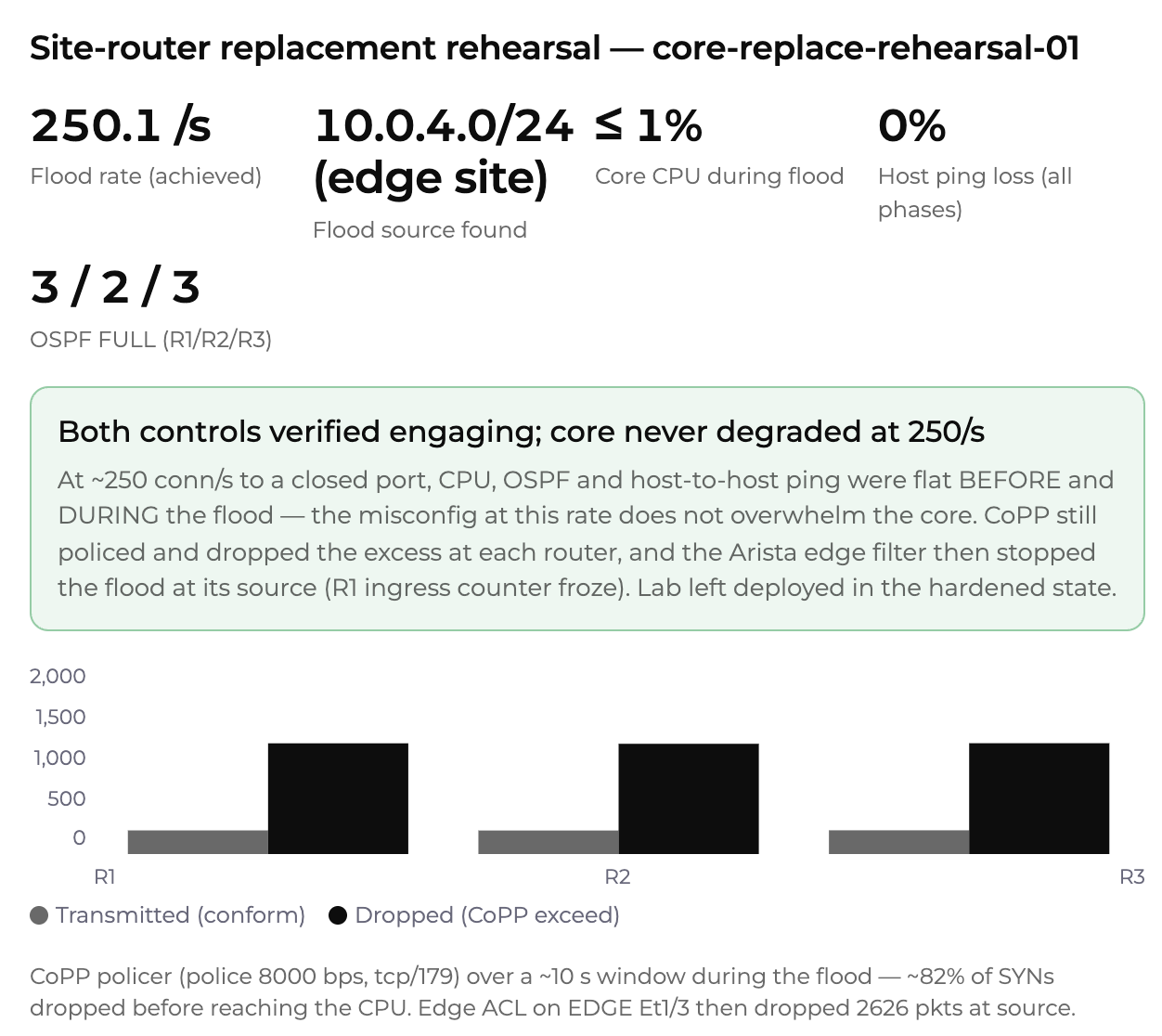
The agent started the flood at 250.1 attempts a second, close to the rate officials described, and measured the same three things it measured at baseline.
| Measure | Baseline | During the flood |
|---|---|---|
| Core CPU, 5 seconds | 0 % on R1, R2, R3 | R1 0 %, R2 1 %, R3 1 % |
| OSPF neighbors FULL | R1 3, R2 2, R3 3 | unchanged |
| host-a to host-b, 5 pings a second | 188 replies, no loss | 221 of 221, largest gap 0.21 s |
The flood did reach the control plane: on R1 the top process was IP Input, the path that hands packets to the CPU, at 0.95 %.
R1# show processes cpu sorted 5sec
CPU utilization for five seconds: 1%/0%; one minute: 0%; five minutes: 0%
 PID Runtime(ms)     Invoked      uSecs   5Sec   1Min   5Min TTY Process
  81         304        3974         76  0.95%  0.32%  0.08%   0 IP Input
Finding the flooding site in about a minute
Interface input rates on R1 pointed at the uplink to the new router: 59 packets a second on Ethernet1/0, against 31 on the link to R2 and 0 on the host LAN. A counting access list scoped to the new site's subnet named it.
R1# show access-lists DETECT
Extended IP access list DETECT
    10 permit tcp 10.0.4.0 0.0.0.255 any eq bgp (2967 matches)
    20 permit tcp any any eq bgp
    30 permit ip any any (1 match)
From the first command to the named site took about a minute. Officials say the FAA's trace took about 45 minutes, on a network far larger than three routers. A rehearsal is where you work out which counters you will read on the night.
Containing it: CoPP on the core, a filter at the edge
The agent applied control plane policing on all three Cisco routers, with OSPF in its own class and TCP port 179 policed to 8,000 bits a second:
policy-map COPP-PROTECT
 class CM-OSPF
 class CM-TCP179
  police 8000 conform-action transmit exceed-action drop
control-plane
 service-policy input COPP-PROTECT
Over about 10 seconds, each router passed about 245 packets to the CPU and dropped about 1,147, close to 82 %. Then an inbound filter on the Arista edge stopped the flood where it entered:
ip access-list EDGE-IN
 10 deny tcp any any eq bgp
 20 permit ip any any
interface Ethernet1/3
 ip access-group EDGE-IN in
The filter matched 2,626 packets and R1's flood counter stopped climbing. With both controls in, core CPU read 0 % on all three routers, OSPF was unchanged and the ping ran 203 of 203.
Pushing the rate: where the core starts to notice
A rehearsal that only proves the easy case is half a rehearsal, so we asked for more: both controls off, 5,000 attempts a second, then 20,000.
| Offered rate, no controls | Core CPU, 5 seconds | OSPF | Ping loss |
|---|---|---|---|
| 5,000 a second | R1 7 %, R2 8 %, R3 7 % | FULL | 0 of 201 |
| 20,000 a second attempted | R1 7 %, R2 8 %, R3 6 % | FULL | 0 of 197 |
CPU did not climb with the offer, so the last run read the delivered rate on the core's edge-facing links: about 6,447 packets a second reached the core (3,231 on R1, 3,216 on R3). One sender caps what goes on the wire, so 20,000 a second never arrived. With CoPP alone, each router passed 756 packets to the CPU and dropped about 135,200, 99.4 % of the flood. CPU went back to 0 % and the ping ran 169 of 169.
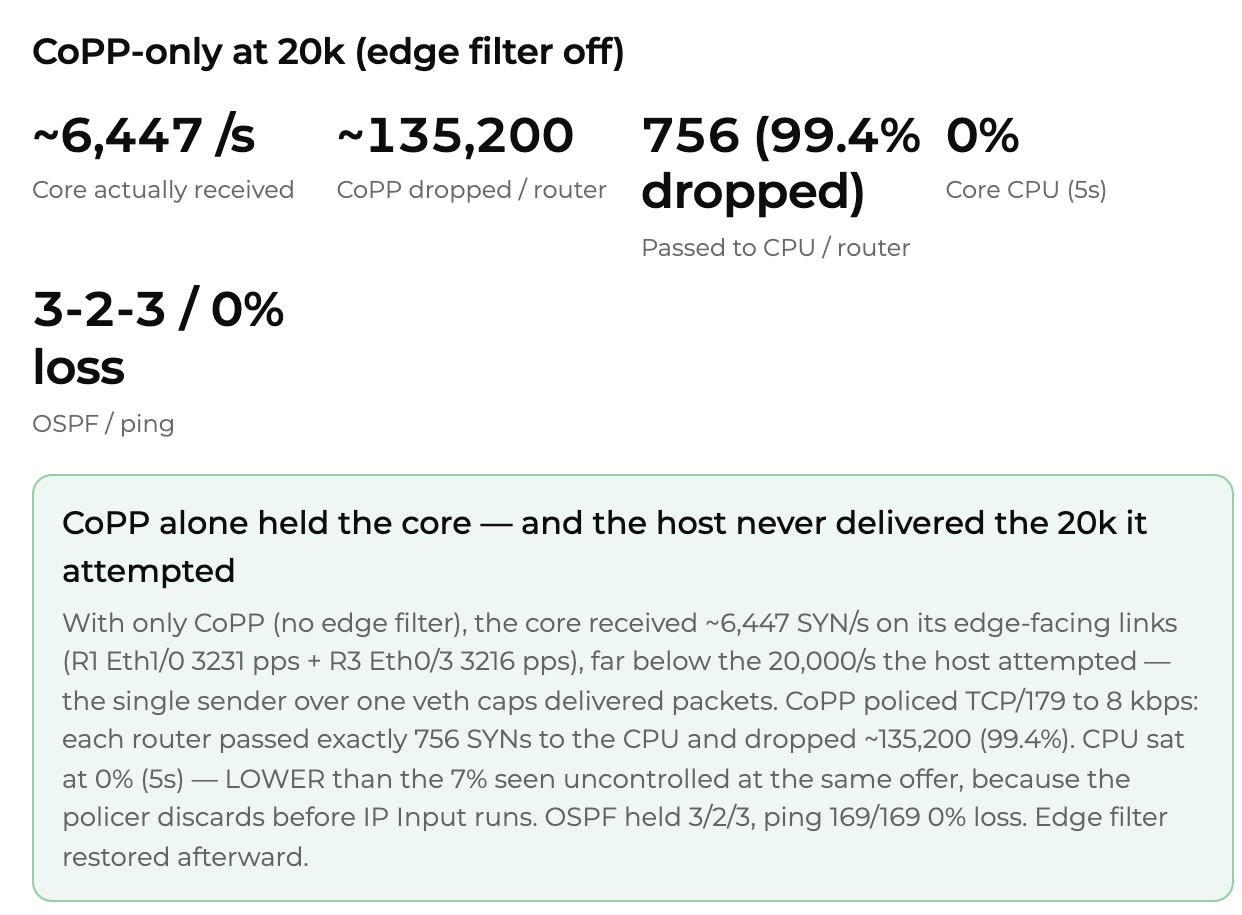
What the lab shows: connection attempts alone, at the reported rate and well above it, did not take down a modern core. Officials point at the legacy equipment's response. What decides your outcome is your oldest router on your own images, and that is exactly what a rehearsal tests before the window.
A router swap cutover plan: seven checks against the old network
- Build the old network as it is, with the oldest images you run, not the newest ones you wish you ran.
- Measure three numbers before you touch anything: routing neighbors, CPU on the old routers, host-to-host loss.
- Bring up the new router and leave it running while you measure again. Misbehavior often starts later, not at first link-up.
- Plant the mistakes you fear: a stray service, a host behind the new site that floods, a missing filter.
- Know your trace: which counters name the flooding site, and how long that takes.
- Test the controls you will rely on, CoPP on the old routers and a filter at the new edge, and read their counters, not just the config.
- Carry the validated configs into the window, with the before and after numbers in the change record.
Agent first, CLI always
The agent ran every command above across all four routers in parallel, in each vendor's syntax, and returned the numbers as one card. Every device in the lab is also yours on the CLI: open R1 and run show policy-map control-plane yourself, or show ip access-lists EDGE-IN on the Arista edge, and read the same counters by hand.
FAQ
What caused the FAA ground stop on November 13, 2026?
Officials say a newly installed router at a site in El Dorado, Arkansas, generated more than 1,000 connection attempts every four to five seconds during a copper-to-fiber conversion, and a router in Amarillo, Texas, swapped about three weeks earlier began the same. The router maker says its routers did not fail and officials point at the legacy equipment. Officials see no sign of an attack. The investigation is open.
Can one new router flood a network with connection attempts?
Yes, if it or a host behind it is misconfigured. In our lab a host behind a new Arista edge sent TCP connection attempts to port 179 on every core address. At 250 a second the Cisco core stayed at 1 % CPU or under. With no controls and about 6,447 a second delivered, CPU rose to 6 to 8 %, all of it in the IP Input process, and OSPF held. Older or busier routers can behave differently, which is why the rehearsal runs against your own images.
What is control plane policing?
Control plane policing (CoPP) is a QoS policy on the control plane that limits the traffic a router hands to its own CPU. In the lab a policy that policed TCP port 179 to 8,000 bits a second and kept OSPF in its own class dropped 99.4 % of the flood on each Cisco router, and core CPU went from 6 to 8 % back to 0 %.
How do you find which site is flooding the network?
Read the input rate on each interface of a core router to find the link that carries the extra packets, then apply a counting access list scoped to the suspect site's subnet. In the lab the access list matched 2,967 packets from 10.0.4.0/24 and the uplink to the new router carried the input. The trace took about a minute.
How do I test a router replacement before the cutover window?
Build the old network and the new router in a lab on the same operating systems, measure CPU, routing neighbors and host-to-host loss before and during the change, then test the controls you plan to rely on. NetPilot builds that lab from one plain-English prompt, runs the measurements and the fix, and gives you CLI access to every device.
Related
- Network change validation: test any change against a lab copy of your network
- Network cutover rehearsal: practice the maintenance window before it is real
- Switch migration checklist
- Carrier outage forensics in a virtual lab
Copy-paste ready: the router swap flood rehearsal prompt and the lab folder with its configs, the flood script and both controls.