
This Juniper EVPN-VXLAN lab is the smallest fabric that proves all three layers on real Junos: one spine on vJunos-router, two leaves on vJunos-switch and a Linux host on each leaf. OSPF joins the loopbacks, BGP EVPN tells each leaf which MAC address sits behind which VTEP, and VXLAN carries VLAN 10 between the leaves in VNI 10010.
Juniper is retiring vLabs, the free place a lot of us practiced Junos, so we built this one on the free vJunos images instead and read each layer on the CLI. Every output below comes from one recorded run on Junos 26.2R1.7. The topology and the three Junos configs are in our public juniper-labs repository.
Results at a glance
| Check | Command | Result |
|---|---|---|
| OSPF underlay | show ospf neighbor on spine1 | ✅ 2 neighbors, both Full |
| Leaf loopbacks | show route protocol ospf on spine1 | ✅ 10.255.0.11/32 and 10.255.0.12/32 |
| BGP EVPN overlay | show bgp summary on spine1 | ✅ 2 peers Establ, 6 routes in bgp.evpn.0 |
| Remote VTEP | show ethernet-switching vxlan-tunnel-end-point remote on leaf1 | ✅ 10.255.0.12, VNID 10010 |
| Remote MAC | show evpn database on leaf1 | ✅ host2's MAC from 10.255.0.12 |
| Data plane | ping -c 5 host1 to host2 | ✅ 5 of 5, 0% loss |
Bottom line: a three-node vJunos fabric is enough to see OSPF, BGP EVPN and VXLAN each do their job. NetPilot builds this lab on real Junos from one prompt, waits out the boot, runs the checks, and you read every layer on the switch's own CLI.
The lab
| Item | Value |
|---|---|
| Images | vJunos-router and vJunos-switch 26.2R1.7, free from Juniper, uploaded once (BYOI) |
| Underlay | OSPF area 0, point-to-point fabric links with MTU 9000, loopbacks passive |
| Overlay | iBGP in AS 65000, family evpn signaling, spine1 as route reflector (cluster 10.255.0.1) |
| Service | VLAN 10 mapped to VNI 10010, route target target:65000:10010 on both leaves |
| Hosts | Linux endpoints, one per leaf, in the same /24 |
| Host | a 16 vCPU lab VM, 4 vCPU and 5 GiB per vJunos node, 12 vCPU for the fabric |
This is a bridged overlay only: no IRB and no type-5 routes. The two hosts share one subnet, so a ping between them can only succeed if VXLAN carries the frame from leaf to leaf.
How the three layers fit
- OSPF, the underlay. Each switch learns a route to every loopback. The VXLAN tunnels and the BGP sessions both run between loopbacks, so nothing above works until OSPF is Full.
- BGP EVPN, the overlay control plane. Each leaf peers with the spine over iBGP and advertises the MAC addresses it learned locally as EVPN type-2 routes, plus a type-3 route that says "I am a VTEP for VNI 10010". The spine reflects them to the other leaf. The spine has no EVPN instance of its own.
- VXLAN, the data plane. When host1 sends a frame to host2, leaf1 looks up host2's MAC, finds it behind 10.255.0.12, wraps the frame in VXLAN with VNI 10010 and sends it across the underlay to leaf2.
Build the lab from one prompt
Open it prefilled in NetPilot, or paste it:
Build a Juniper EVPN-VXLAN lab: one spine on vJunos-router and two leaves on vJunos-switch, with a Linux host on each leaf. Use OSPF area 0 as the underlay between the loopbacks, iBGP in AS 65000 with the spine as route reflector for the EVPN overlay, and map VLAN 10 to VXLAN VNI 10010 on both leaves. Put host1 at 192.168.10.11/24 and host2 at 192.168.10.12/24 in VLAN 10. Deploy it, wait for every node to boot, then prove it: OSPF neighbors on the spine, BGP EVPN sessions, the remote VTEP on each leaf, the host MACs in the EVPN database, and a ping from host1 to host2.
The agent read the vJunos device guides, designed the topology, wrote the three Junos configs as startup configs, deployed the lab on containerlab and waited for every line card. Then it ran the checks on all three switches in one pass and reported 5 checks PASS, 0 FAIL.
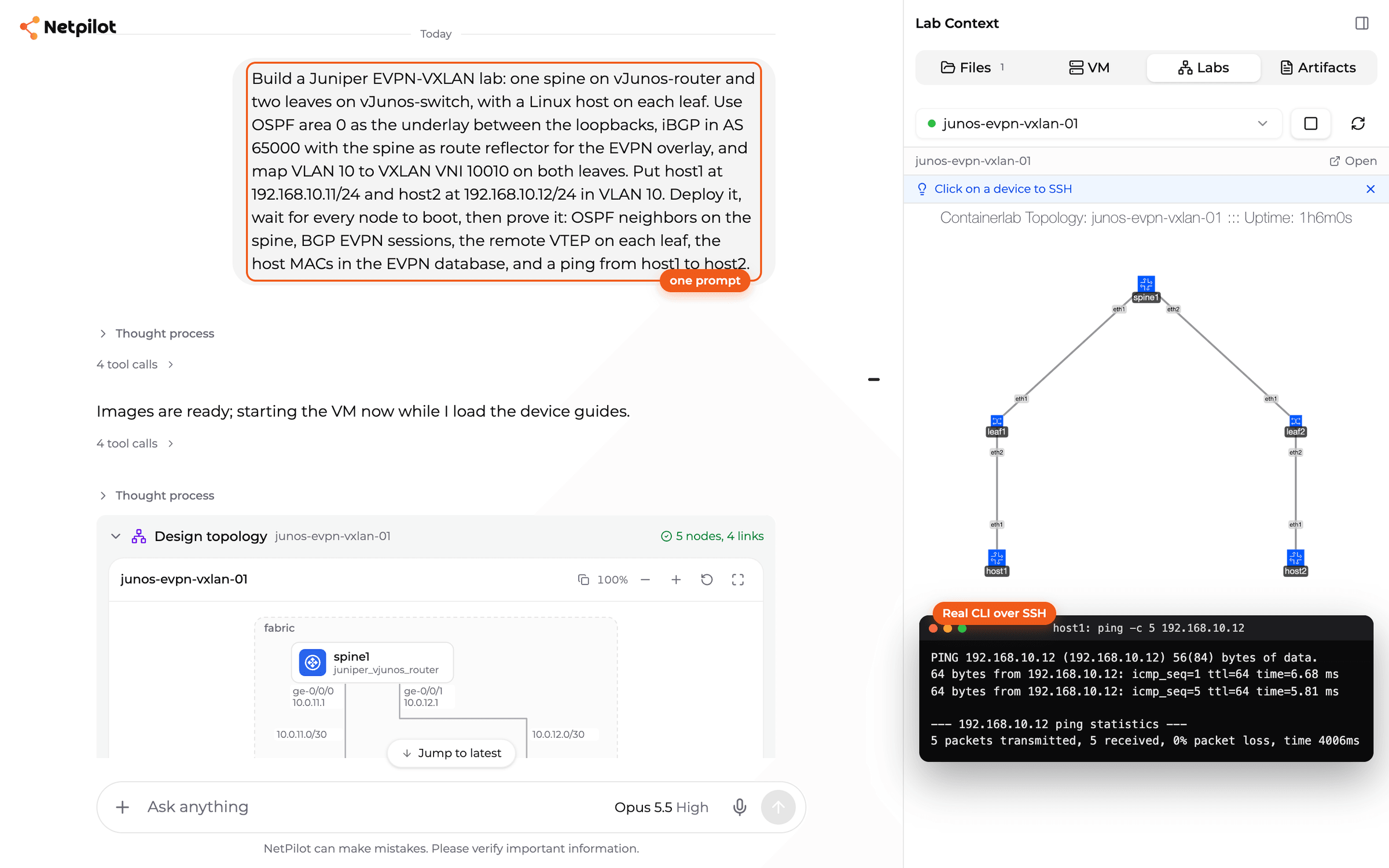
The prompt, the design and the running fabric, with the agent's stored ping from host1 to host2.
The agent wrote this for each leaf. The VXLAN part is short:
protocols {
    evpn {
        encapsulation vxlan;
        extended-vni-list 10010;
    }
}
switch-options {
    vtep-source-interface lo0.0;
    route-distinguisher 10.255.0.11:1;
    vrf-target target:65000:10010;
}
vlans {
    VLAN10 {
        vlan-id 10;
        vxlan {
            vni 10010;
        }
    }
}
And this for the spine's side of the overlay, the route reflector:
protocols {
    bgp {
        group EVPN-RR-CLIENTS {
            type internal;
            local-address 10.255.0.1;
            family evpn {
                signaling;
            }
            cluster 10.255.0.1;
            neighbor 10.255.0.11 {
                description leaf1;
            }
            neighbor 10.255.0.12 {
                description leaf2;
            }
        }
    }
}
Direct CLI is always available too. Click any node in the lab panel for a terminal on the real Junos CLI. Every check below was also typed by hand after the run, with the same results.
The boot, and the leaf whose uplink did not exist
During the boot, leaf2 showed the one trap worth knowing:
| Step | leaf2 |
|---|---|
| 1 | reads healthy and gives a Junos prompt |
| 2 | show interfaces ge-0/0/0 terse answers error: device ge-0/0/0 not found |
| 3 | show chassis fpc 0 reads Present |
| 4 | FPC 0 reads Online |
| 5 | ge-0/0/0 up up with 10.0.12.2/30 |
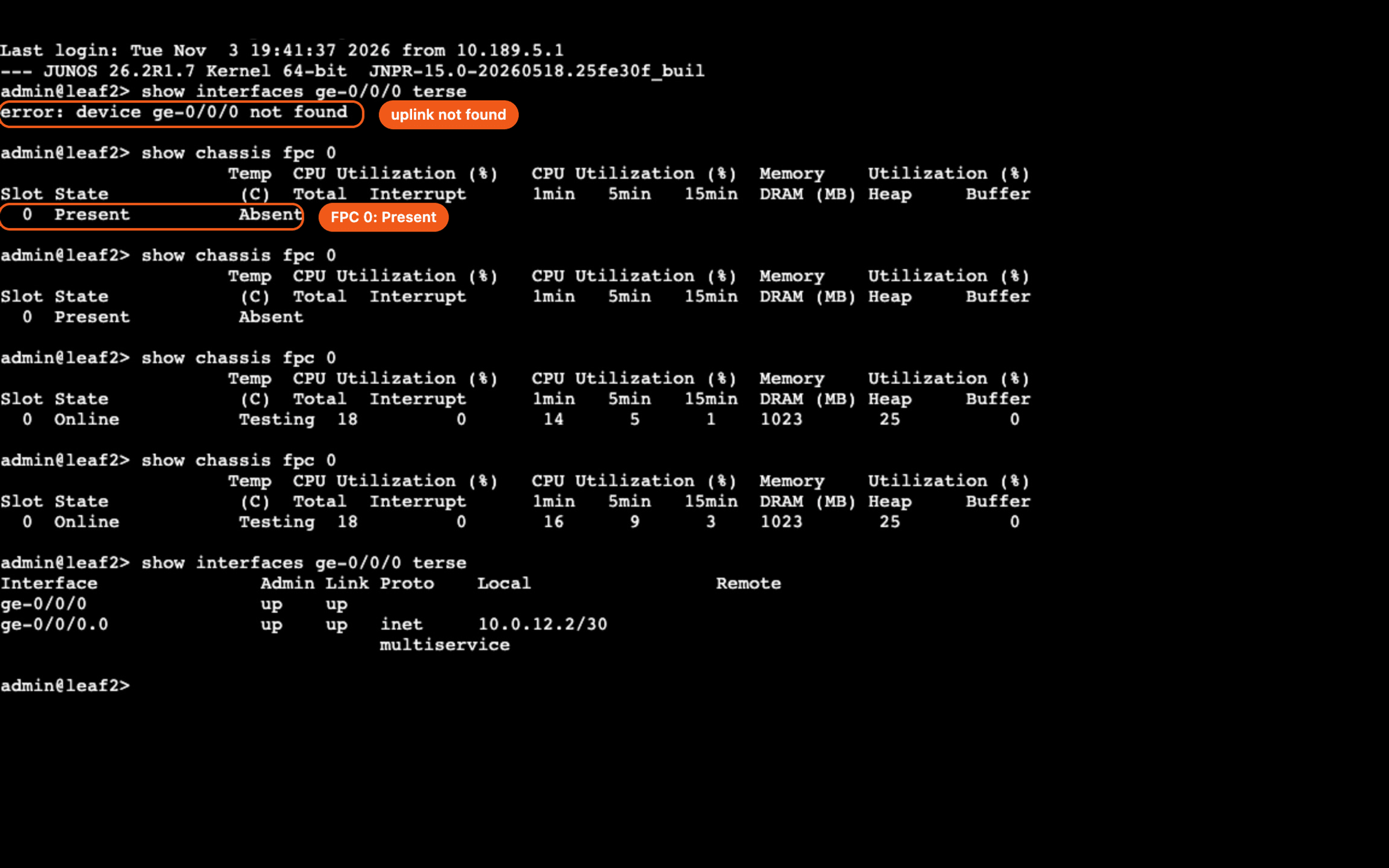
leaf2, typed by hand during the boot: the uplink does not exist while the line card reads Present.
A healthy container and a Junos prompt do not mean the switch is ready. On vJunos the ge-0/0/N interfaces exist only after FPC 0 reads Online, so a check taken a few minutes early looks like a missing cable or a bad config. It is neither. Poll show chassis fpc 0, and debug only after it reads Online. The leaves also print Warning: License key missing; requires 'BGP' license on show bgp summary, and the sessions come up anyway.
Give the switches time to boot before the first check. Our vJunos in containerlab post has the other boot traps.
Check the Junos OSPF underlay
On spine1, both leaves are Full on their point-to-point links, with router IDs that match their loopbacks:
admin@spine1> show ospf neighbor
Address          Interface              State           ID               Pri  Dead
10.0.11.2        ge-0/0/0.0             Full            10.255.0.11      128    38
10.0.12.2        ge-0/0/1.0             Full            10.255.0.12      128    32
show route protocol ospf on the spine lists 10.255.0.11/32 and 10.255.0.12/32, the two leaf loopbacks the overlay peers with.
Check the Junos BGP EVPN overlay
On spine1, both route reflector clients are Established, and each sends 3 EVPN routes: 6 in bgp.evpn.0.
admin@spine1> show bgp summary
Threading mode: BGP I/O
Default eBGP mode: advertise - accept, receive - accept
Groups: 1 Peers: 2 Down peers: 0
Table          Tot Paths  Act Paths Suppressed    History Damp State    Pending
bgp.evpn.0
                       6          6          0          0          0          0
Peer                     AS      InPkt     OutPkt    OutQ   Flaps Last Up/Dwn State|#Active/Received/Accepted/Damped...
10.255.0.11           65000          5          4       0       0          20 Establ
  bgp.evpn.0: 3/3/3/0
10.255.0.12           65000         40         38       0       0       15:33 Establ
  bgp.evpn.0: 3/3/3/0
The six are a type-3 route per leaf (the VTEP for VNI 10010) and two type-2 routes per host (MAC, and MAC with IP). Two of them, from show route table bgp.evpn.0:
2:10.255.0.12:1::10010::aa:c1:ab:67:27:fd::192.168.10.12/304 MAC/IP
                   *[BGP/170] 00:00:18, localpref 100, from 10.255.0.12
                      AS path: I, validation-state: unverified
                    >  to 10.0.12.2 via ge-0/0/1.0
3:10.255.0.12:1::10010::10.255.0.12/248 IM
                   *[BGP/170] 00:15:35, localpref 100, from 10.255.0.12
                      AS path: I, validation-state: unverified
                    >  to 10.0.12.2 via ge-0/0/1.0
Check VXLAN: the remote VTEP and the EVPN database
On leaf1, the type-3 route became a tunnel: leaf2's loopback is a remote VTEP for VNI 10010.
admin@leaf1> show ethernet-switching vxlan-tunnel-end-point remote
Logical System Name       Id  SVTEP-IP         IFL   L3-Idx    SVTEP-Mode    ELP-SVTEP-IP
default                   0   10.255.0.11      lo0.0    0
 RVTEP-IP         L2-RTT                   IFL-Idx   Interface    NH-Id   RVTEP-Mode  ELP-IP        Flags
 10.255.0.12      default-switch           391       vtep.32769   594     RNVE
    VNID          MC-Group-IP
    10010         0.0.0.0
And the type-2 routes became MAC entries: host1 is local on ge-0/0/1.0, host2 sits behind 10.255.0.12.
admin@leaf1> show evpn database
Instance: default-switch
VLAN  DomainId  MAC address        Active source                  Timestamp        IP address
     10010      aa:c1:ab:67:27:fd  10.255.0.12                    Nov 03 20:02:12  192.168.10.12
     10010      aa:c1:ab:fc:13:cc  ge-0/0/1.0                     Nov 03 20:02:11  192.168.10.11
leaf2 shows the mirror image: leaf1's loopback as its remote VTEP and host1's MAC behind 10.255.0.11.
Ping across VXLAN
Two hosts in one subnet, on two different switches, with no cable between them:
host1$ ping -c 5 192.168.10.12
PING 192.168.10.12 (192.168.10.12) 56(84) bytes of data.
64 bytes from 192.168.10.12: icmp_seq=1 ttl=64 time=6.68 ms
64 bytes from 192.168.10.12: icmp_seq=2 ttl=64 time=2.82 ms
64 bytes from 192.168.10.12: icmp_seq=3 ttl=64 time=3.10 ms
64 bytes from 192.168.10.12: icmp_seq=4 ttl=64 time=3.17 ms
64 bytes from 192.168.10.12: icmp_seq=5 ttl=64 time=5.81 ms

--- 192.168.10.12 ping statistics ---
5 packets transmitted, 5 received, 0% packet loss, time 4006ms
rtt min/avg/max/mdev = 2.819/4.315/6.681/1.603 ms
The reverse ping from host2 to host1 also returned 5 of 5 with 0% loss. The frame left host1 on VLAN 10, leaf1 found host2's MAC behind 10.255.0.12, wrapped it in VNI 10010 and sent it across the OSPF underlay to leaf2.
Run it on your own containerlab host
The 02-evpn-vxlan-spine-leaf lab has the topology file and the three startup configs from this run. You need containerlab, a Linux host with KVM, about 12 vCPU and 15 GiB for the three vJunos nodes, and the vJunos-router and vJunos-switch images, which you download from Juniper and build with vrnetlab yourself.
git clone https://github.com/netpilot-labs/juniper-labs
cd juniper-labs/02-evpn-vxlan-spine-leaf
sudo containerlab deploy -t evpn-vxlan-spine-leaf.clab.yml
What to try next
- Shut leaf2's uplink (
set interfaces ge-0/0/0 disable, thencommit) and watch leaf2's routes leavebgp.evpn.0on the spine and the remote VTEP disappear from leaf1. - Add VLAN 20 on VNI 10020 and a second host per leaf.
- Add IRB interfaces for routing between VLANs, and read the type-2 MAC/IP routes change.
- Swap one leaf for another vendor's switch and debug the interop, as in Debugging Cisco-Juniper EVPN interop.
FAQ
What does each layer do in a Junos EVPN-VXLAN fabric?
OSPF is the underlay: it gives every switch a route to every loopback. BGP EVPN is the overlay control plane: each leaf tells the others which MAC addresses sit behind its VTEP. VXLAN is the data plane: it carries the Ethernet frame between leaf loopbacks inside UDP, here in VNI 10010 for VLAN 10.
Can vJunos-switch run EVPN-VXLAN?
Yes. In our lab two vJunos-switch leaves on Junos 26.2R1.7 ran an EVPN-VXLAN bridged overlay with a vJunos-router spine as the BGP route reflector. Each leaf listed the other as a remote VTEP for VNI 10010, and host1 pinged host2 with 0% loss.
Why does a vJunos leaf say device ge-0/0/0 not found?
The line card is still booting. On vJunos the ge interfaces exist only once show chassis fpc 0 reads Online. In our run leaf2 answered device ge-0/0/0 not found while its FPC read Present, and the uplink read up less than two minutes after the FPC went Online. Nothing is broken, so wait for Online before you debug.
Where can I practice a Junos EVPN-VXLAN lab now that vLabs is retiring?
Juniper set October 31 as the day vLabs retires. The free path is the vJunos-router and vJunos-switch images on a host with KVM, run with containerlab, EVE-NG or GNS3. NetPilot runs the same images on a hosted lab VM and builds the fabric from one prompt, and the lab files from this post deploy on your own containerlab host.
Related
- Juniper lab online: real vJunos labs in the browser
- Juniper vLabs alternatives: six ways to keep a Junos lab
- Run vJunos in containerlab: the image build and the traps
- JNCIA-Junos practice lab: seven Junos exercises on vJunos-router
- EVPN-VXLAN data center fabric guide: IRB, multi-tenancy and multi-site
- Spine-leaf architecture lab: the BGP underlay version of this fabric
Watch the Short: the leaf that said its uplink did not exist, in under a minute, at youtube.com/shorts/AFM3BGccg3k.
Copy-paste ready: the Juniper EVPN-VXLAN prompt is the one from this post, as it ran.