
A MikroTik firewall is what stands between your router's management services and the internet, and a software update does not build one for you. MikroTrick, the RouterOS takeover chain disclosed in September 2026, needs SSH to be reachable. We took a router running RouterOS 7.24.5, past every fix, set it up the way many edge routers end up, and scanned it from outside: 8 TCP ports answered.
This tutorial audits that router against the advisory, builds the input chain, and proves from outside that all 8 ports are filtered while the LAN keeps working. No exploit is run. The lab files are in our public mikrotik-labs repository.
Before and after at a glance
| Check | Before | After |
|---|---|---|
| RouterOS version | ✅ 7.24.5, past the 7.24.3 complete fix | ✅ unchanged |
| TCP ports answering from the WAN | ❌ 8 | ✅ 0, all 8 filtered |
| Input chain | ❌ empty | ✅ 7 rules ending in drop |
| IP services | ❌ 7 enabled, reachable from any address | ✅ Telnet, FTP and the API off, the rest LAN only |
| Audit checks passed | ❌ 5 of 9 | ⚠️ 8 of 9 |
| PC on the LAN | not measured | ✅ 5 of 5 pings, HTTP 200 through NAT |
Bottom line: patched is not the same as closed. Check the version, then prove from outside that management does not answer. NetPilot builds this lab on real RouterOS from one prompt, runs the audit and the hardening, and you check every step on the router's own CLI.
What MikroTrick needs
MikroTik's advisory lists six CVEs, fixed in 7.24.2, 7.23.4 and 6.49.21. The fix for CVE-2026-67278 in 7.24.2 and 7.23.4 was incomplete, so the complete fix is 7.24.3 or 7.23.6. CERT Polska describes MikroTrick as two of these flaws combined for an unauthenticated takeover where SSH is reachable, and CISA added three of the CVEs to its Known Exploited Vulnerabilities catalog in September.
Two points from those sources shape this lab:
- The update does not remove an attacker already in. Bishop Fox makes this point, and CERT Polska asks admins to check users, scripts, scheduler tasks, proxies and tunnels.
- Reachable SSH is the precondition. MikroTik's own first step is to keep SSH and WebFig off untrusted networks.
So the job is three checks: the version, what an outsider can reach, and what is on the router that should not be.
The lab
OUT-HOST 203.0.113.1 ── ether2 EDGE-RTR ether3 ── PC1 192.168.88.10EDGE-RTR runs RouterOS 7.24.5 with NAT for the LAN and no firewall rules, so SSH, WebFig, WinBox and the bandwidth test server answer on its WAN address. OUT-HOST plays the internet. PC1 is a user on the LAN.
Build it with the agent
"Build a small lab on real MikroTik RouterOS: EDGE-RTR with a LAN PC behind it and an outside host on the WAN side. Set EDGE-RTR up the way many routers really end up: NAT for the LAN but no firewall rules. From the outside host, scan the router. Then audit it against MikroTik's September 2026 MikroTrick advisory, harden it, keep management reachable from the LAN only, and prove it from outside."
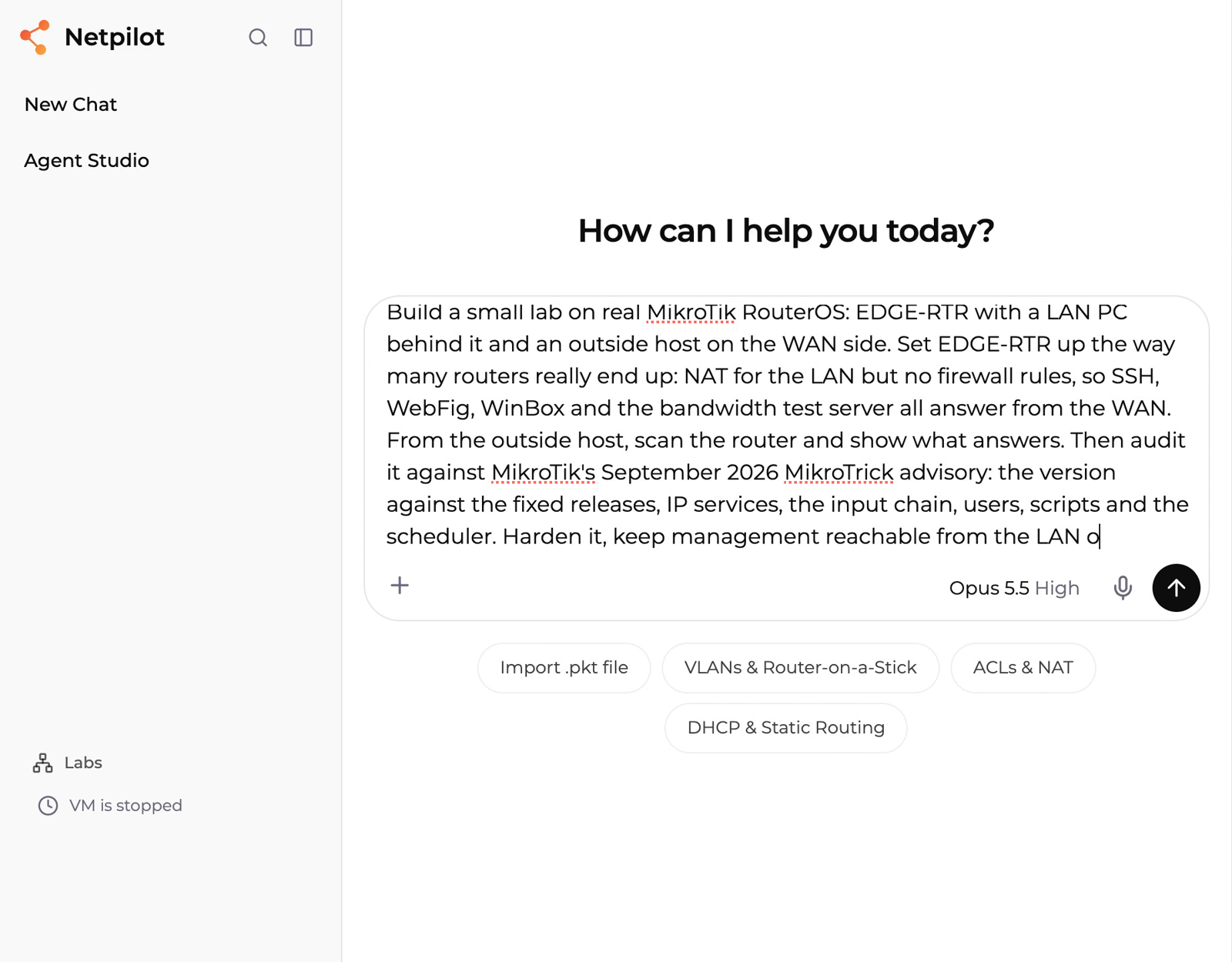
Open the full prompt in NetPilot. In our run the agent designed the three nodes, deployed them, scanned, audited, hardened and checked the result in 36 minutes and 65 tool calls. Direct CLI is always available too: the version, the input chain and the final scan below were also checked by hand in a terminal on the devices.
Or run it yourself
On a Linux host with containerlab v0.82.0 or newer:
git clone https://github.com/netpilot-labs/mikrotik-labs
cd mikrotik-labs/04-mikrotrick-hardening
sudo containerlab deploy -t mikrotrick-hardening.clab.yml
Step 1: scan from outside
From the outside host, scan the router's WAN address:
nmap -Pn -sT -p 21,22,23,80,2000,8291,8728,8729 203.0.113.2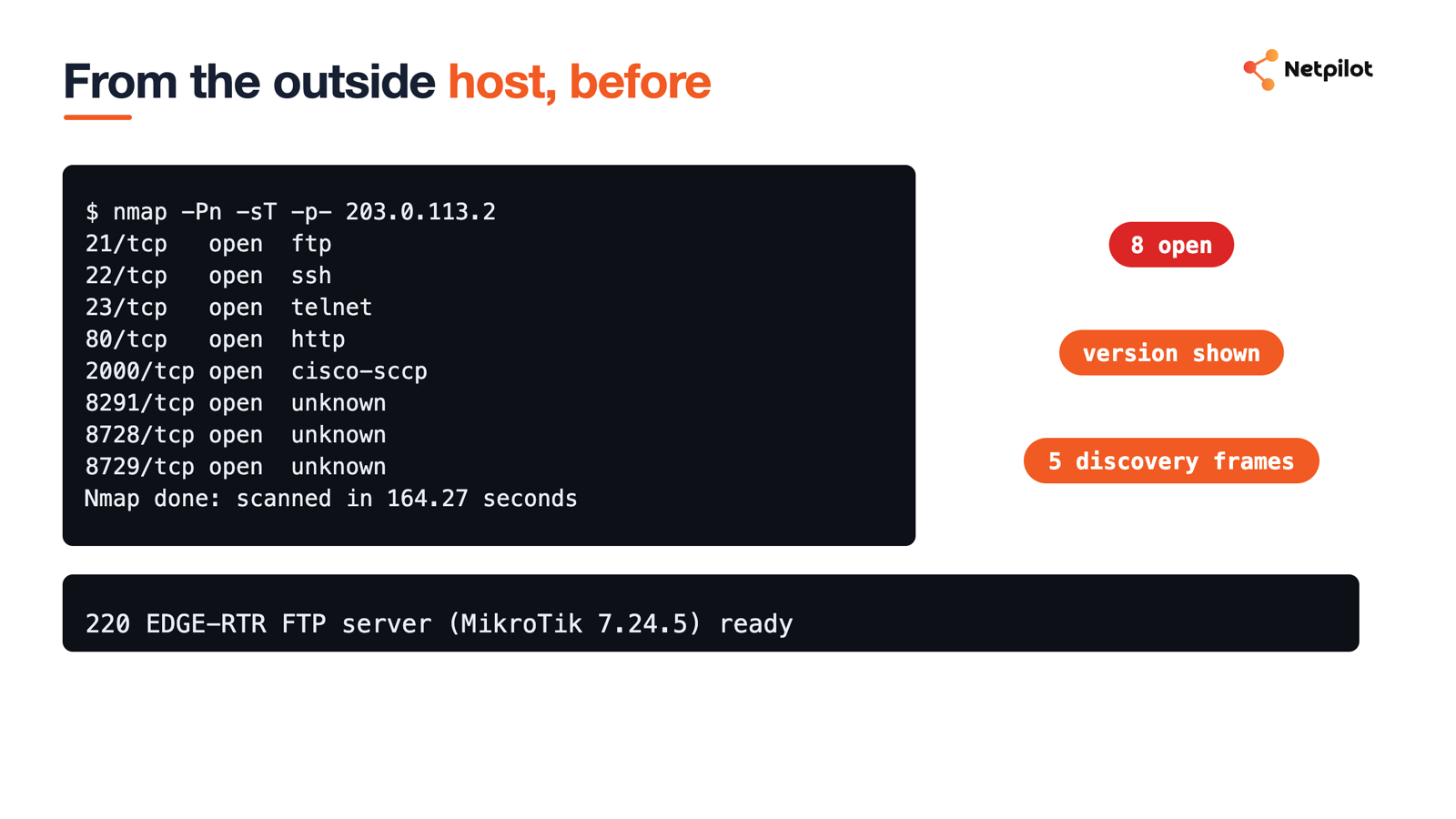
Eight ports answered: FTP, SSH, Telnet, WebFig, the bandwidth test server, WinBox, and the API on 8728 and 8729. The FTP banner even names the RouterOS version. The router also sent 5 neighbor discovery frames out of its WAN port during the capture.
Step 2: audit against the advisory
Ask the agent to audit the router, or read it yourself on the RouterOS CLI:
/system resource print
/ip service print
/ip firewall filter print
/user print
/system script print
/system scheduler print
/ip socks print
/ip proxy print
The agent checked 9 items and returned 5 pass, 4 fail. The version passed: 7.24.5 is past the complete fix. Users, scripts and the scheduler were clean. The failures were the empty input chain, 7 services reachable from any address, the bandwidth test server on TCP 2000, and the default admin login.
Step 3: build the input chain
The rules below are the order the agent applied. RouterOS reads the input chain from the top and stops at the first match, so the final drop only catches what nothing above it accepted.
/ip firewall address-list add list=MGMT-ALLOWED address=192.168.88.0/24 comment="LAN admins"
/ip firewall filter add chain=input action=accept connection-state=established,related,untracked
/ip firewall filter add chain=input action=drop connection-state=invalid
/ip firewall filter add chain=input action=accept protocol=icmp
/ip firewall filter add chain=input action=accept dst-address=127.0.0.1
/ip firewall filter add chain=input action=accept in-interface-list=LAN src-address-list=MGMT-ALLOWED
/ip firewall filter add chain=input action=drop comment="drop all other input"
The lab adds one more accept, for the lab platform's own management port, which a real router does not need. The forward chain gets the same shape: accept established, drop invalid, and drop new connections from the WAN that are not port forwards:
/ip firewall filter add chain=forward action=accept connection-state=established,related,untracked
/ip firewall filter add chain=forward action=drop connection-state=invalid
/ip firewall filter add chain=forward action=drop connection-state=new connection-nat-state=!dstnat in-interface-list=WAN
Then close the services themselves, so a rule mistake later does not reopen them:
/ip service set telnet disabled=yes
/ip service set ftp disabled=yes
/ip service set api disabled=yes
/ip service set api-ssl disabled=yes
/ip service set ssh available-from=192.168.88.0/24
/ip service set winbox available-from=192.168.88.0/24
/ip service set www available-from=192.168.88.0/24
/tool bandwidth-server set enabled=no
/ip neighbor discovery-settings set discover-interface-list=LAN
/tool mac-server set allowed-interface-list=LAN
/tool mac-server mac-winbox set allowed-interface-list=LAN
/ip ssh set strong-crypto=yes
Before you paste this on a real router: apply it from the LAN side, and keep a second session open. A drop rule above your own management path locks you out.
Step 4: prove it from outside
Run the same scan from the outside host:
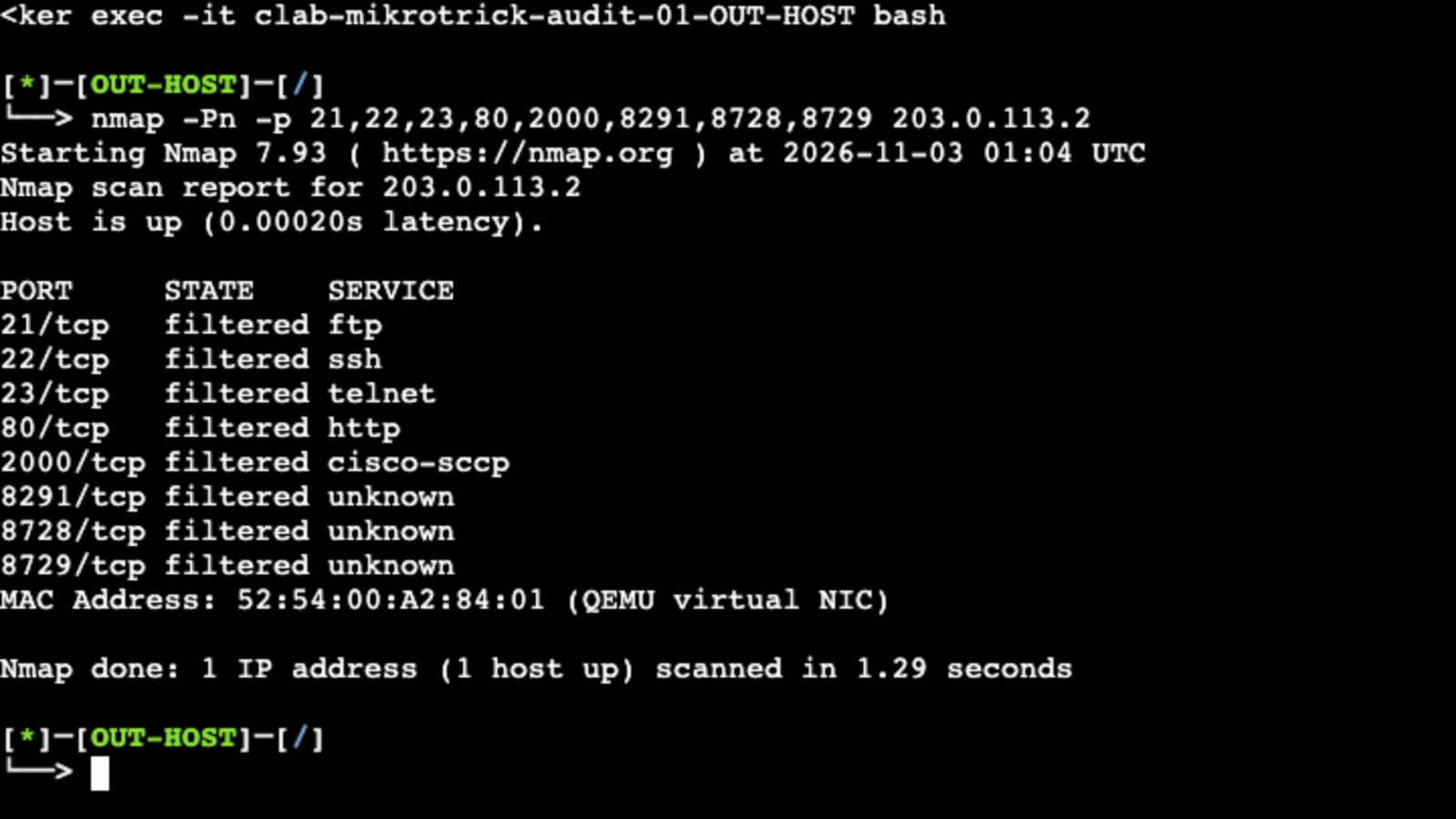
All 8 ports read filtered. Nothing answers, not even a reset. The discovery frames out of the WAN dropped from 5 to 0 in 70 seconds. From the LAN, PC1 sent 5 of 5 pings to the outside host, got HTTP 200 through NAT, and still reached SSH, WebFig and WinBox on the router.
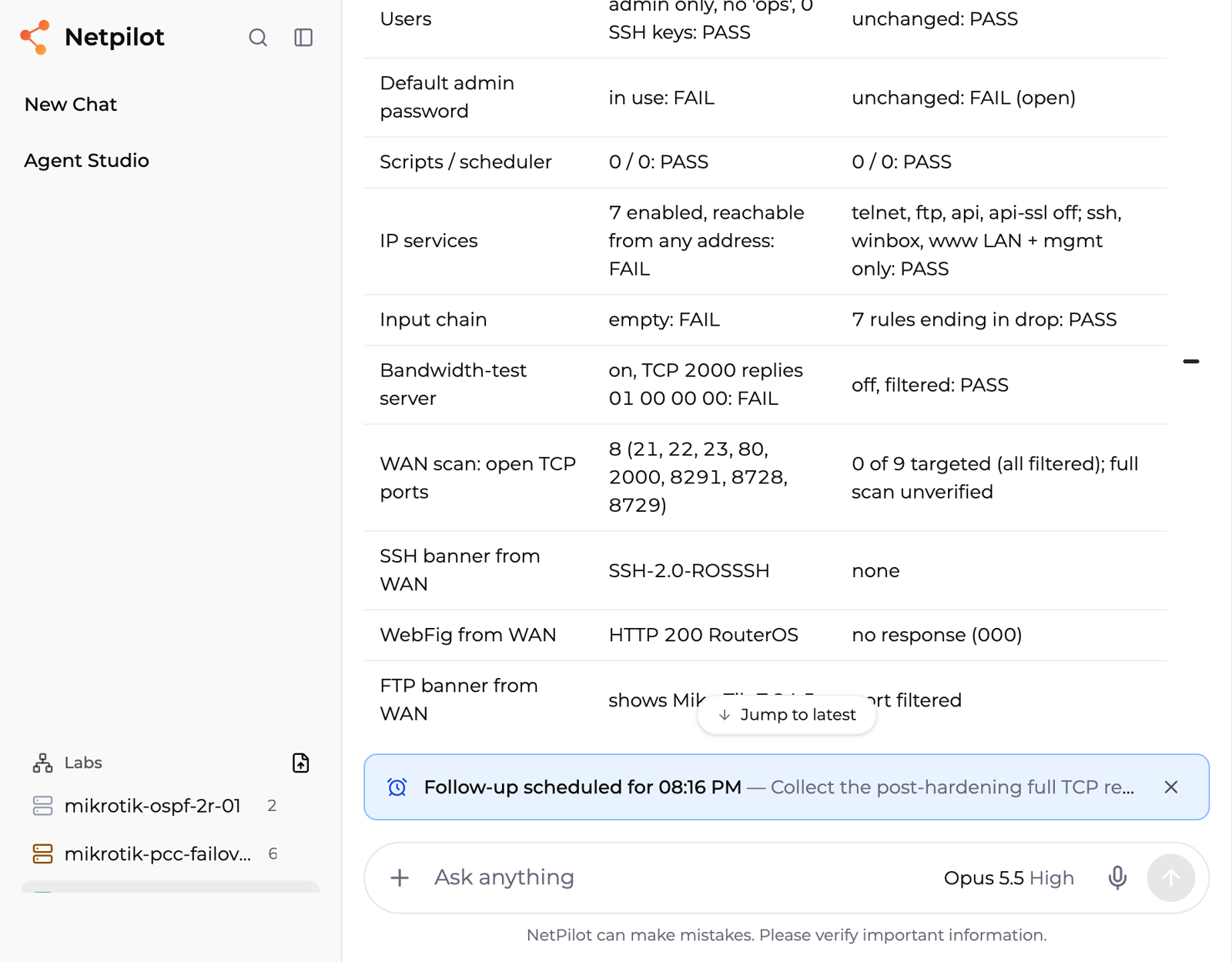
The agent's report puts the before and after side by side:
What stayed open
One check still fails after hardening: the default admin login. The lab platform signs in with it, so the lab keeps it. On a real router, create your own account in the full group, log in with it, then disable or remove admin. Our scan also covered the 8 ports that answered, not all 65,535: run a full scan from outside on your own router.
FAQ
Is my MikroTik safe from MikroTrick once it is updated?
Updating closes the flaws, but it does not close management that is open to the internet, and it does not remove an attacker who got in before the update. MikroTik lists 7.24.3 and 7.23.6 as the releases with the complete fix. After updating, check users, scripts and the scheduler, and confirm from outside that SSH, WebFig and WinBox do not answer on the WAN.
What are the basic MikroTik firewall rules for the input chain?
Accept established, related and untracked connections, drop invalid ones, accept ICMP, accept management only from a LAN address list, then drop everything else. Order matters: RouterOS reads the input chain from the top and stops at the first match.
Which ports does a MikroTik router expose by default?
It depends on the setup. In our lab, a router with NAT and no firewall rules answered on 8 TCP ports from the WAN: FTP 21, SSH 22, Telnet 23, WebFig 80, the bandwidth test server 2000, WinBox 8291, and the API on 8728 and 8729.
Do I need the firewall if I limit services with available-from?
Use both. The available-from setting limits which addresses a service accepts, and the input chain drops everything else before it reaches any service, including ones you forget about. In our run both were in place when the 8 ports read filtered from outside.
Next steps
New to the setup? Start with CHR in containerlab, or practice the basics in the MTCNA lab. For two internet links on the same router, see MikroTik load balancing with PCC. The MikroTik lab page covers the hosted route.
Copy-paste ready: MikroTik firewall hardening prompt
Build this lab in NetPilot and run the same audit on real RouterOS.
NetPilot is not affiliated with MikroTik. MikroTik and RouterOS are trademarks of their owner.