
Most network interviews still test recall: name the OSPF states, list the BGP best-path steps. Those answers are a search away, and now an AI assistant away, during the call itself (why that broke the old round). This post walks through the alternative we recorded: give the candidate a broken network and watch the work. In the video and the frames below, our team plays the candidate and types every command by hand. The misses are kept in.
The lab: a branch with two circuits to one provider
The branch is AS 65010. CORE runs OSPF area 0 with two edge routers. EDGE1 holds the primary eBGP circuit and EDGE2 the backup, both to the same provider, AS 64500. By design, traffic uses the primary in both directions: EDGE1 sends MED 50 and EDGE2 sends MED 200, so the provider prefers EDGE1. PC1 is a user on the branch LAN and INET plays the internet.
The candidate brief, as the answer key words it: the branch can't reach 203.0.113.10, get it working, then confirm the design intent is met. That last clause is what makes fault 3 findable.
One prompt builds the broken lab and the answer key
We typed this into NetPilot:
Build me a troubleshooting interview lab on Cisco routers: a branch that can't reach the internet, OSPF inside, BGP to a provider. Plant three faults, easy to hard: an OSPF neighbor that won't form, a BGP session that is up but advertises nothing, and return traffic taking the wrong exit. Give me the answer key.
The agent designed the addressing, deployed the six nodes, confirmed the broken baseline (PC1 to INET 0 of 3), fixed each fault live in order to prove it, then redeployed the broken version for the candidate. One correction it made on its own: with its first MED values, 10 and 100, fault 3 had no effect, so it raised them to 50 and 200 and proved the fault again. The answer key holds a brief to read aloud, the symptoms, the commands, the fixes, partial credit and a scoring guide.
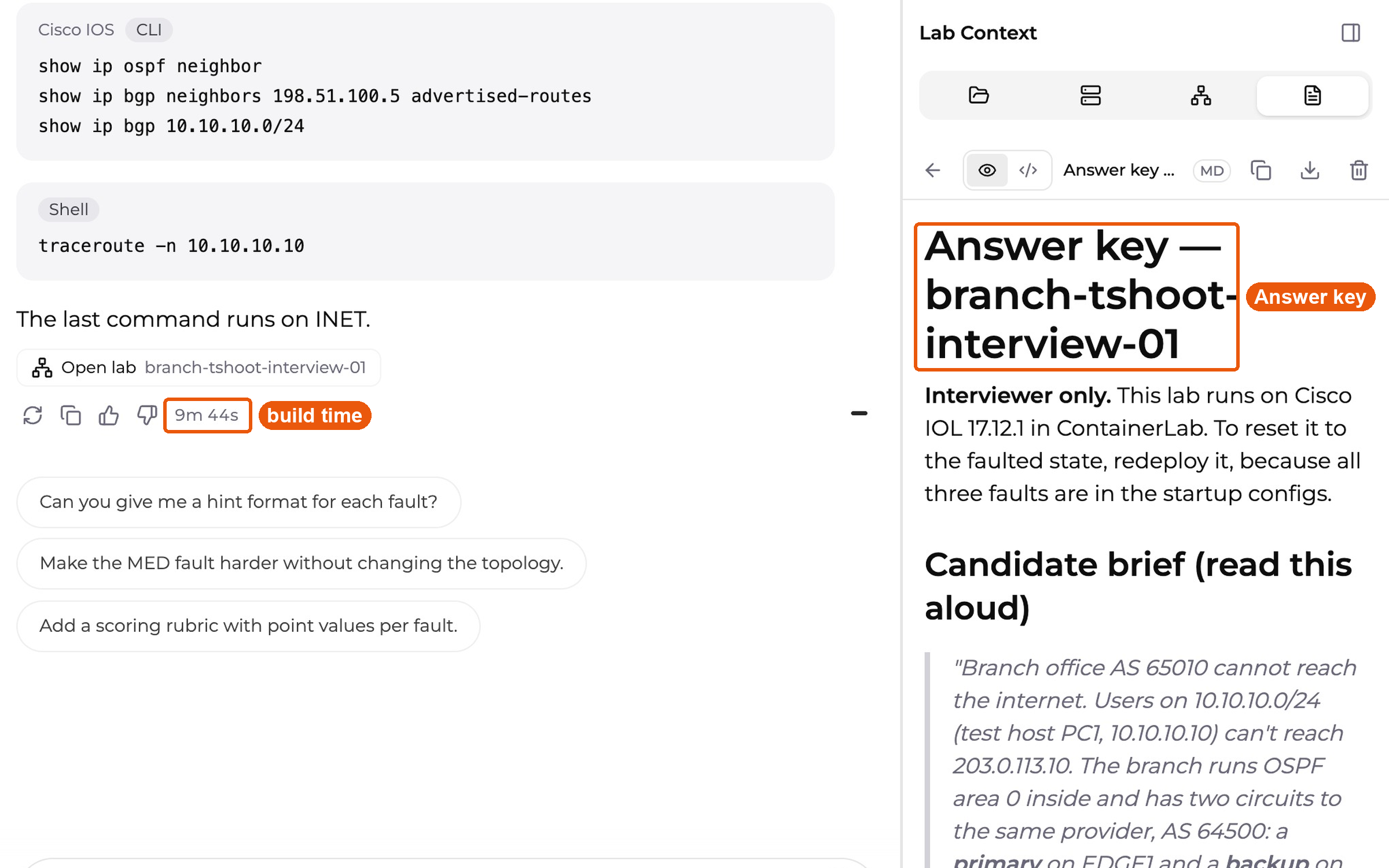
Then the hand-off. The app's Open lab button gives the link. The candidate opens it in a browser with no account to create, clicks a router and gets a terminal. You watch the same lab.
Fault 1 (easy): the OSPF neighbor that won't form
The symptom on PC1: ping -c 3 203.0.113.10 returns 3 packets transmitted, 0 received, 100% packet loss. On CORE, show ip ospf neighbor lists one neighbor, EDGE2. EDGE1 is missing.
The fault is on EDGE1's link to CORE: ip ospf hello-interval 5, which also sets dead 20, against CORE's default 10 and 40. Timers that differ mean no adjacency. The candidate found it with one command:
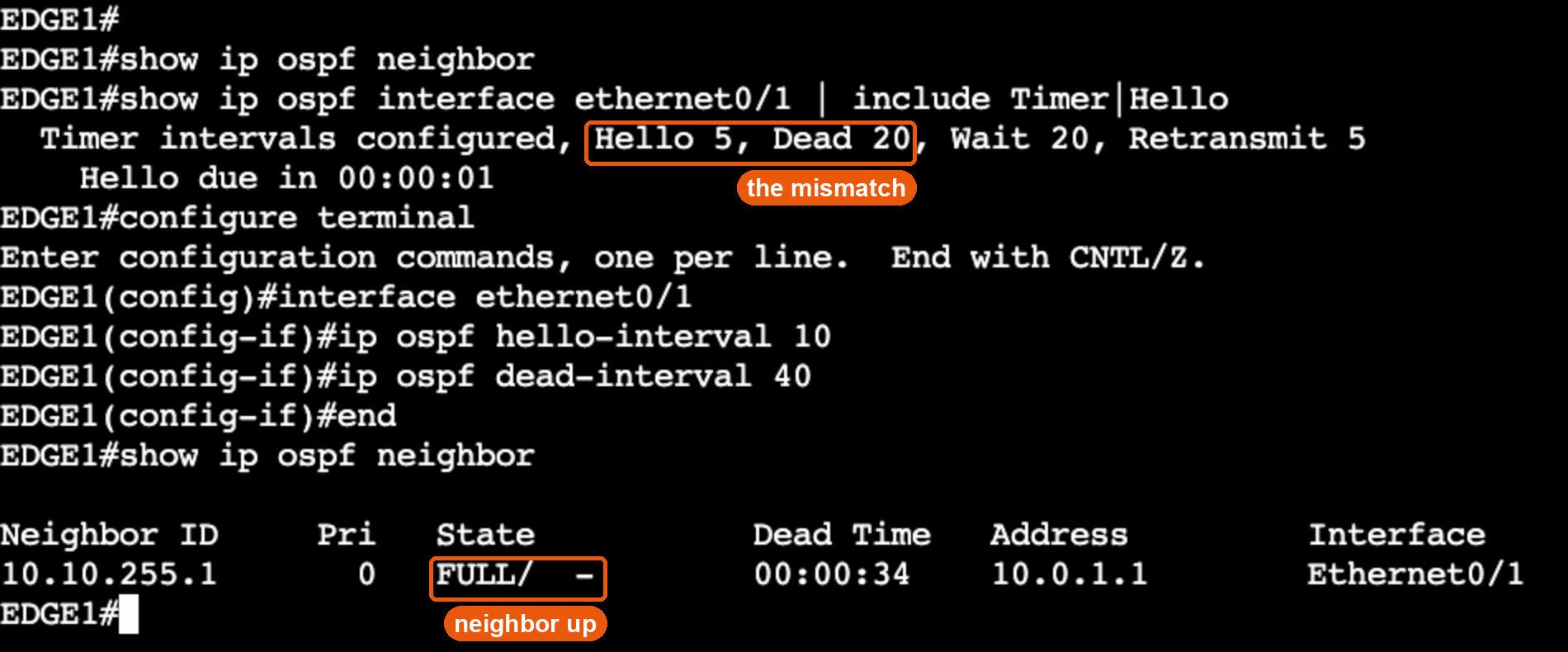
The candidate typed ip ospf hello-interval 10 and ip ospf dead-interval 40. The neighbor came up and PC1's ping went to 3 of 3. Here is the trap: the ticket now looks solved. A candidate who stops here never checks the backup circuit.
Fault 2 (medium): BGP is up and advertises nothing
On EDGE2 the session to the provider is Established and has received its default route. Plenty of candidates read that line and move on. The next command shows nothing goes out:
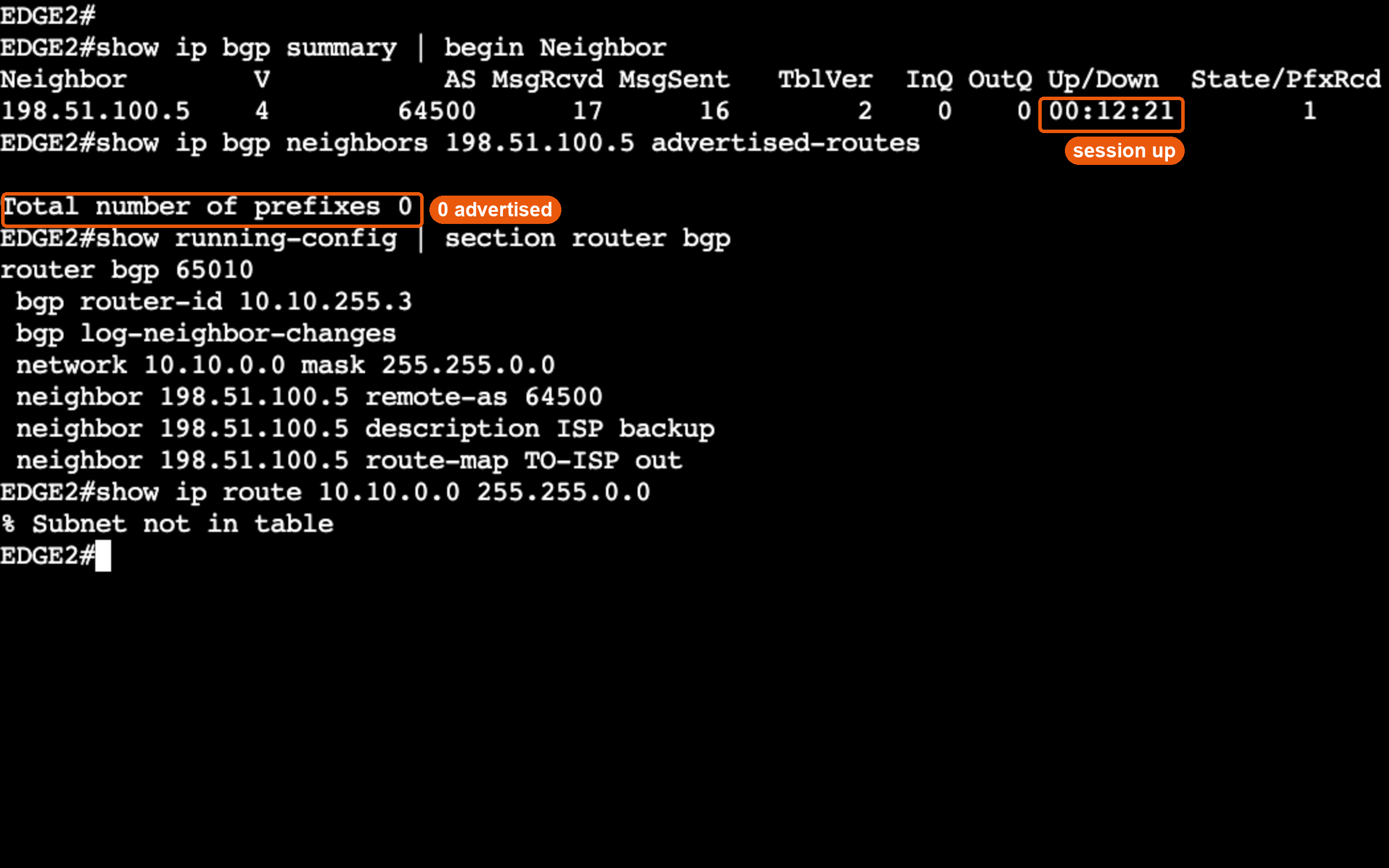
BGP advertises a network statement only when the routing table holds that exact prefix and mask. EDGE2 asks for 10.10.0.0/16, and the table holds 10.10.10.0/24 from OSPF. The fix the candidate typed:
router bgp 65010
 no network 10.10.0.0 mask 255.255.0.0
 network 10.10.10.0 mask 255.255.255.0
advertised-routes then shows *> 10.10.10.0/24 10.0.2.1 20 32768 i and Total number of prefixes 1. And return traffic moves to the backup circuit. That is fault 3 showing itself.
Fault 3 (hard): return traffic takes the wrong exit
Outbound, PC1's traffic leaves through EDGE1. Inbound, a traceroute from INET to 10.10.10.10 shows hop 2 as 198.51.100.6, the backup. The provider's table explains why:
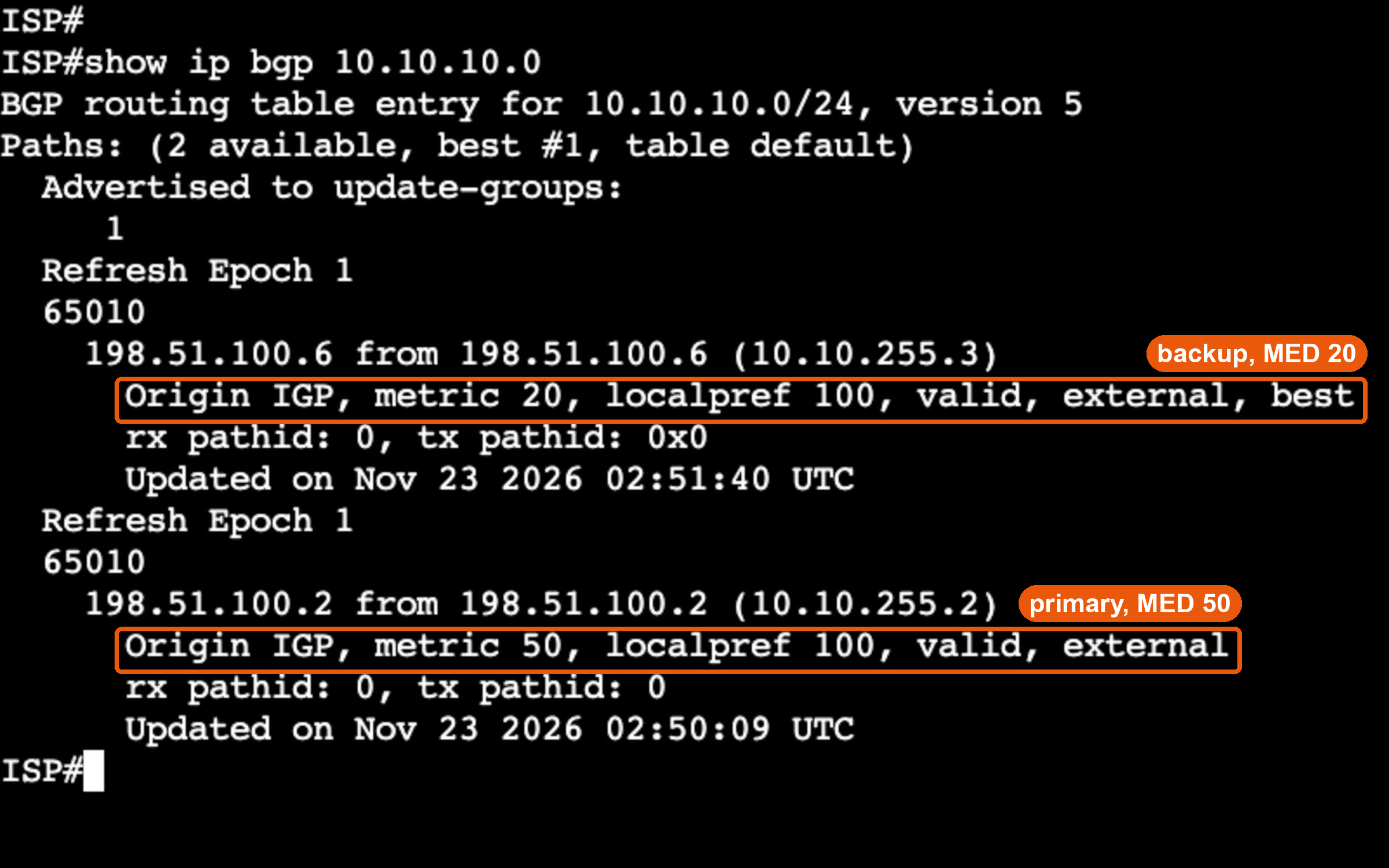
EDGE2 should send MED 200, yet the provider sees 20. On EDGE2, route-map TO-ISP sequence 10 sets metric 200 for prefixes in BRANCH-NETS. The prefix-list reads seq 5 permit 10.10.0.0/16 with no le 24, so it matches only the /16 itself. The /24 misses sequence 10, falls to the bare sequence 20, and leaves with its IGP metric, 20, which beats the primary's 50.
The candidate's first try at the fix hit a real IOS rule:

IOS will not overwrite a sequence in place. Remove the line, add it back with le 24, and refresh the session:
no ip prefix-list BRANCH-NETS seq 5 permit 10.10.0.0/16
ip prefix-list BRANCH-NETS seq 5 permit 10.10.0.0/16 le 24
end
clear ip bgp 198.51.100.5 soft out
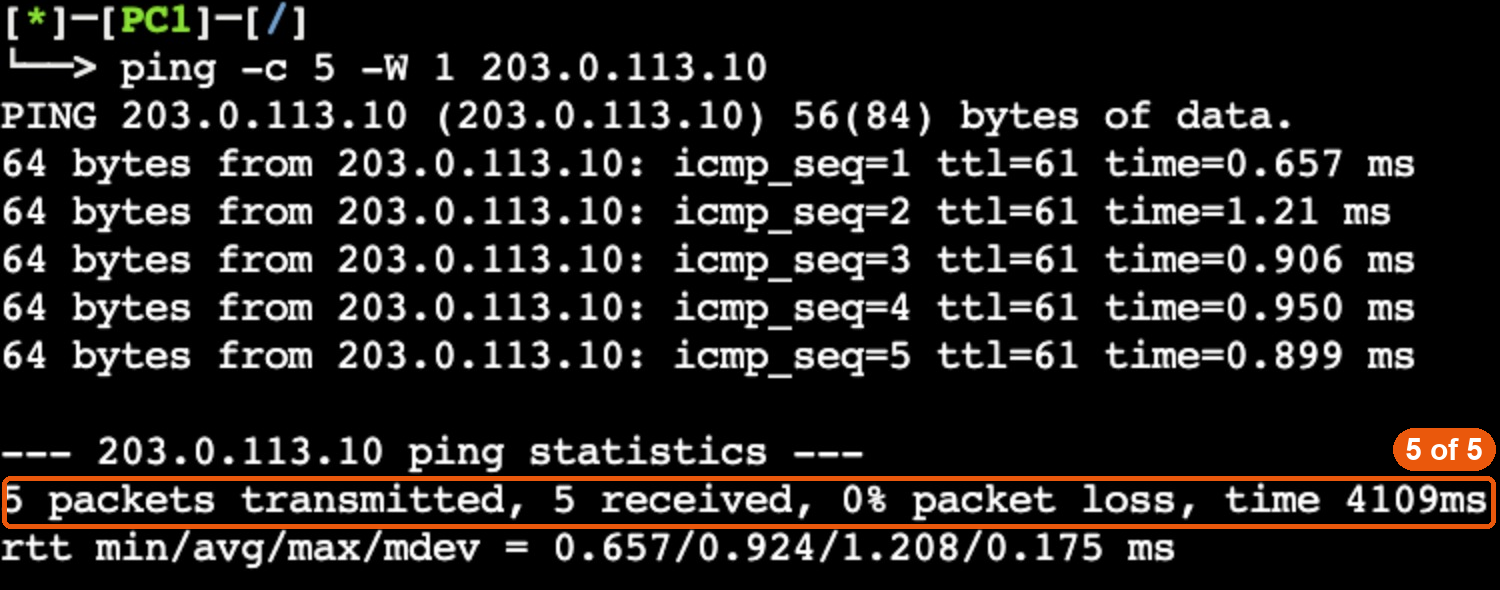
The provider's best path moved to 198.51.100.2 with metric 50, the backup now shows metric 200, INET's traceroute takes the primary, and INET to PC1 answered 5 of 5. The final check from the branch:
The review: what did the candidate change?
When the candidate was done we asked the agent one question:
The candidate is done. What did they change, and is anything still broken?
The answer came back in 50 s: 3 of 3 faults fixed, 3 lines changed on 2 routers, 5 of 5 pings each way, and 4 min 42 s from the first config change to the last, read from the routers' config-session timestamps.
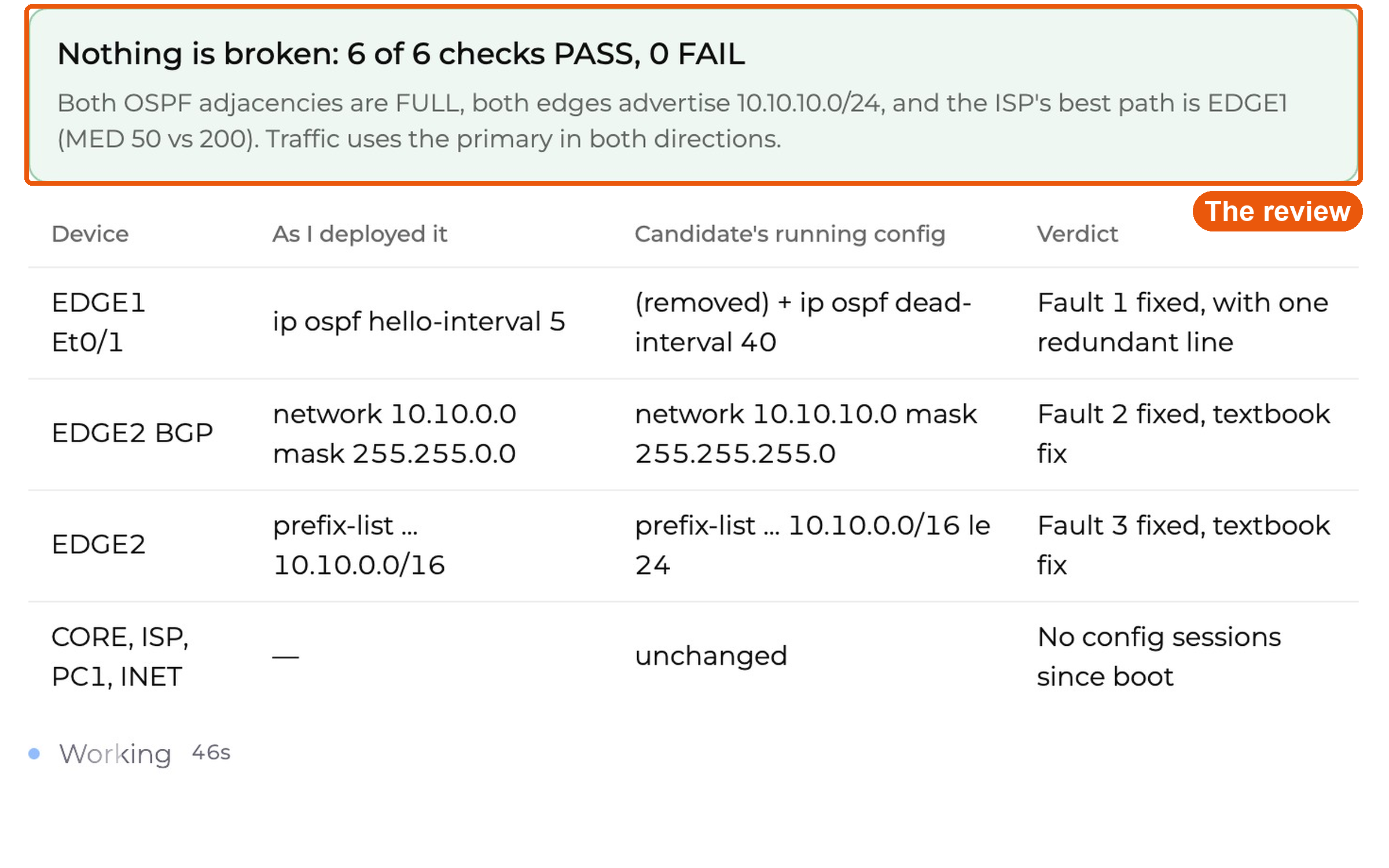
It also gave debrief points: EDGE1 now hard-sets ip ospf dead-interval 40, so ask why. It said its evidence is the end state and the timestamps, not keystrokes, since the routers have no command logging, and that it could not tell whether the candidate saved. To reset for the next candidate, we asked it to redeploy: 2 min 08 s, faults back.
Reading the level
The answer key's scoring guide, as the run produced it:
| Level | Reaches |
|---|---|
| Junior | Fixes fault 1 with show ip ospf interface and stops when pings work |
| Mid | Checks advertised-routes on both edges and fixes fault 2 with the exact-match rule |
| Senior | Notices the asymmetry from traceroutes or the provider's table, follows MED 20 back to the prefix-list, and explains the IGP-metric MED |
You are in the room for all of it, so ask follow-ups while they type: why that command, what they expect to see, what they would check next. That conversation is what a fluent answer read off another screen can't carry.
FAQ
What should a network troubleshooting interview test?
The job: a broken network and a ticket, not a list of definitions. Our lab gives the candidate one line, users at the branch can't reach the internet, and three planted faults on real Cisco routers: an OSPF neighbor that won't form, a BGP session that is up but advertises nothing, and return traffic that comes back through the backup circuit. How far the candidate gets tells you the level.
What OSPF and BGP faults separate a junior from a senior candidate?
In our answer key a junior fixes the OSPF hello and dead timer mismatch with show ip ospf interface and stops when pings work. A mid-level candidate checks advertised-routes on both edges and fixes the BGP network statement that has no exact match in the routing table. A senior notices that return traffic uses the backup circuit, follows MED 20 back to a prefix-list without le 24, and explains why the route left with its IGP metric.
Does the candidate need a NetPilot account to work in the lab?
No. The interviewer sends the lab link, and the candidate opens it in a browser with no account to create. In our run that browser had never signed in to NetPilot, and every router and host took typed commands from it.
How long does it take to build the interview lab?
On our recorded run the prompt to the finished answer took 9 min 44 s: four Cisco routers and two Linux hosts deployed, the three faults planted, each fix proven live, the broken version redeployed and the answer key written. Resetting the lab for the next candidate took 2 min 08 s.
Can the AI tell me what the candidate changed?
Yes. After the candidate finished we asked what they changed and whether anything was still broken. In 50 s the agent returned 3 of 3 faults fixed, 3 lines changed on 2 routers, 6 of 6 checks passing and a device-by-device table. It reads the end state and the routers' config-session timestamps, not keystrokes.
Related
- Network engineer interview lab: run this round with your team
- AI cheating in network engineer interviews: why the question-and-answer round stopped working
- OSPF multi-vendor lab: OSPF adjacencies across Cisco, Arista and Nokia
- BGP peering lab: eBGP across Cisco, Juniper and Arista
Copy-paste ready: the prompt and the lab files with the answer key.