
To prove an SRv6 core design before you build it, run the design on the vendors' own network operating systems, check the locators, the VPN routes and their SIDs on every router, then cut a core link with traffic running and read the gap. This post does that from one prompt. NetPilot built a Cisco XRd PE, a Juniper vJunos PE and two Nokia SR Linux core routers, carried a customer VPN over SRv6 between the two sites, and when the primary core link was cut the VPN moved to the backup path in 0.61 seconds.
An SRv6 migration plan usually reaches the design review as a diagram, a vendor matrix and the line "both vendors support SRv6". The review needs more than that line. It needs each vendor's image qualified, the VPN working across vendors, and a link failure with a number on it.
The design
| Item | Value |
|---|---|
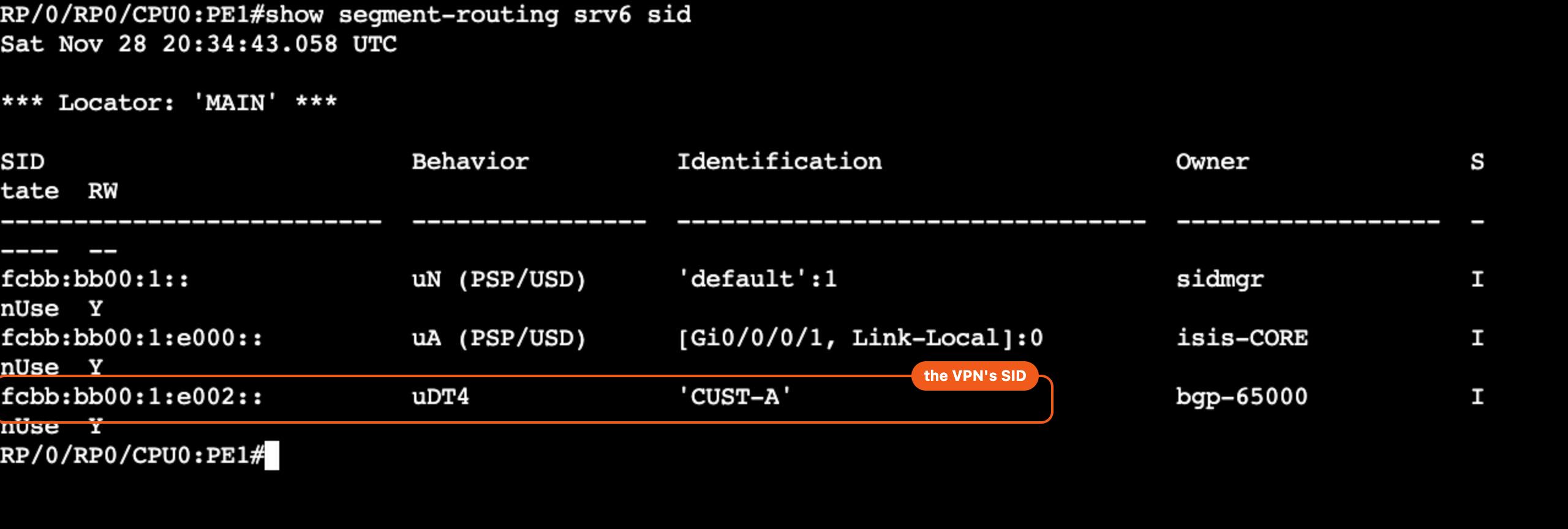
| Cisco PE | PE1, Cisco XRd 26.2.1, micro-SID locator fcbb:bb00:1::/48, VPN SID fcbb:bb00:1:e002:: (uDT4) |
| Juniper PE | PE2, Juniper vJunos router 26.2R1.7, micro-SID locator fcbb:bb00:2::/48, VPN SID fcbb:bb00:2:e000:: |
| Core | C1 and C2, Nokia SR Linux 25.10.1, IS-IS IPv6 transit |
| VPN | VRF CUST-A, iBGP VPNv4 between the PE loopbacks over IPv6, AS 65000 |
| Sites | PC-A 192.168.1.10 behind PE1, PC-B 192.168.2.10 behind PE2 |
The prompt gave none of these numbers. The agent chose the addressing, the locators, the metrics and the BGP design.
The prompt
This is the prompt from the recording, typed as written:
Here's our SRv6 core design. Two PE routers, a Cisco XRd and a Juniper vJunos, and two Nokia SR Linux core routers between them, with each PE linked to both core routers. IS-IS underlay, SRv6 micro-SID locators, and one customer L3VPN over SRv6 between the two PEs with a Linux host at each site. Build it, show me on each router's CLI that it works, then fail the primary core link and show me the VPN traffic moves to the backup path.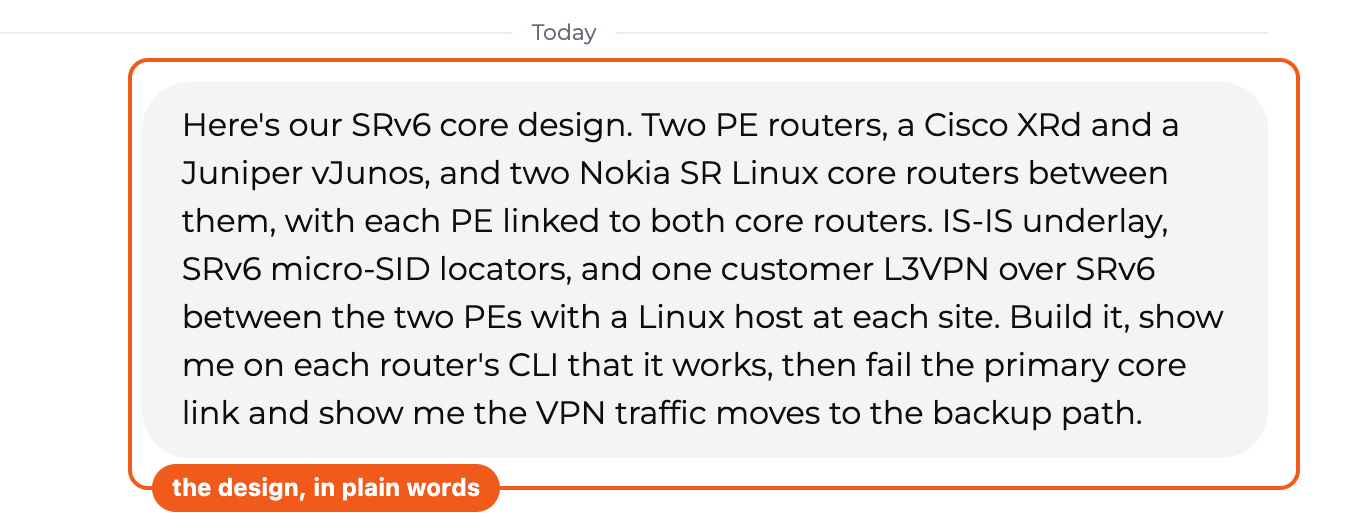
Open the prompt prefilled in NetPilot and swap in your own core.
What each image could do
The first step of any mixed-vendor plan is the qualification a by-hand lab starts with: what does each image really support? The agent read each vendor's device guide, deployed the lab with containerlab and checked on the devices.
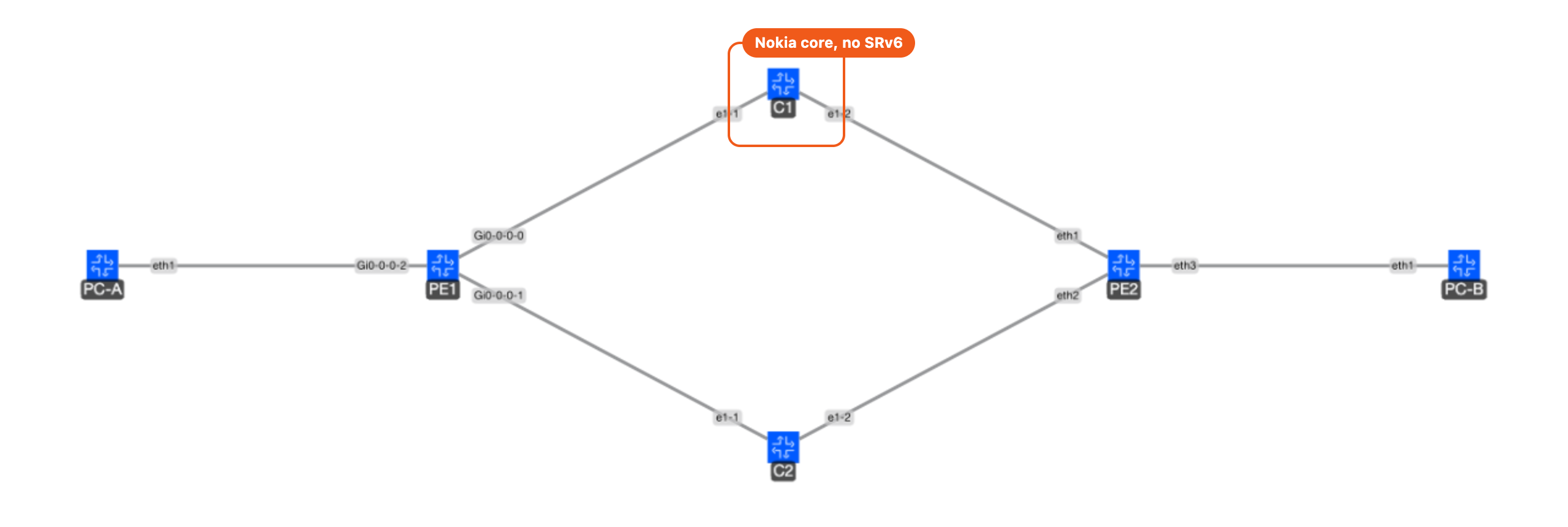
- Cisco XRd and Juniper vJunos both ran SRv6 micro-SID locators, IS-IS SRv6 and the VPN over SRv6.
- Nokia SR Linux has no SRv6 on this image, so the two core routers carry it as plain IPv6. That is all an SRv6 transit router has to do: it installs the PE locators as IS-IS routes and forwards the encapsulated packets.
- Junos refused the first SRv6 commit, because
micro-sidcannot sit next toblock-lengthon a locator. The agent removed that line, rancommit checkagain and applied it.
The VPN, checked on every router
These were typed by hand afterwards in the lab viewer's terminals. On the Cisco PE, the SRv6 SIDs, including the one that belongs to the customer VPN:
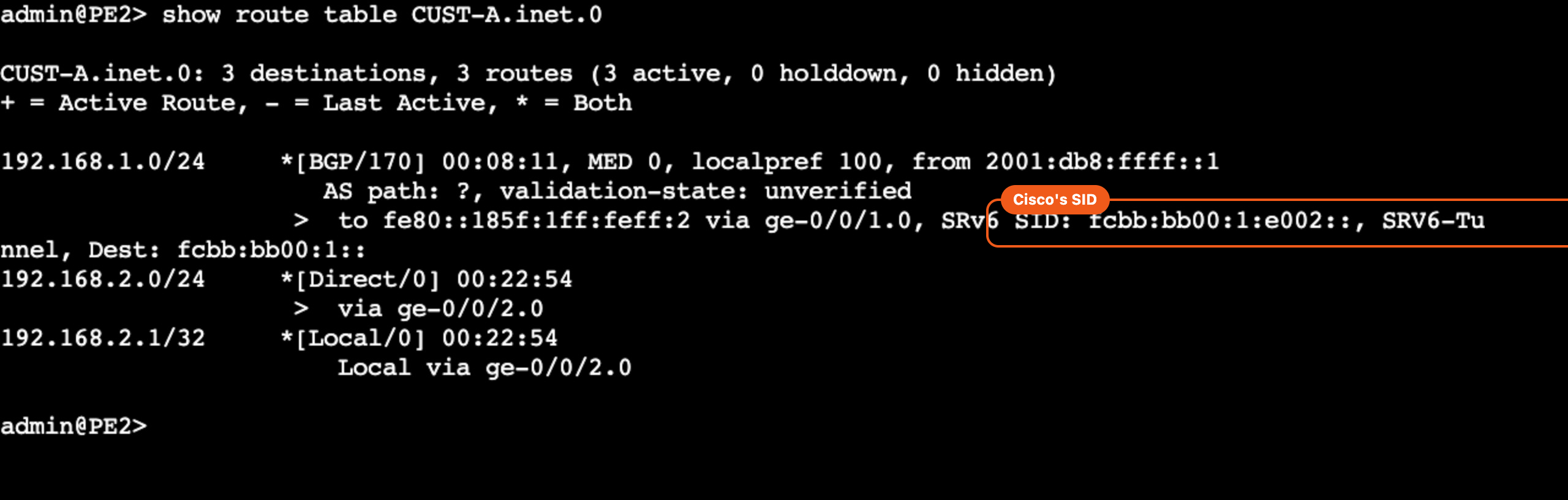
On the Juniper PE, site A's route arrives carrying that Cisco SID:
On the Nokia core, the Cisco locator is an ordinary IS-IS route, and the image lists no SRv6 feature:
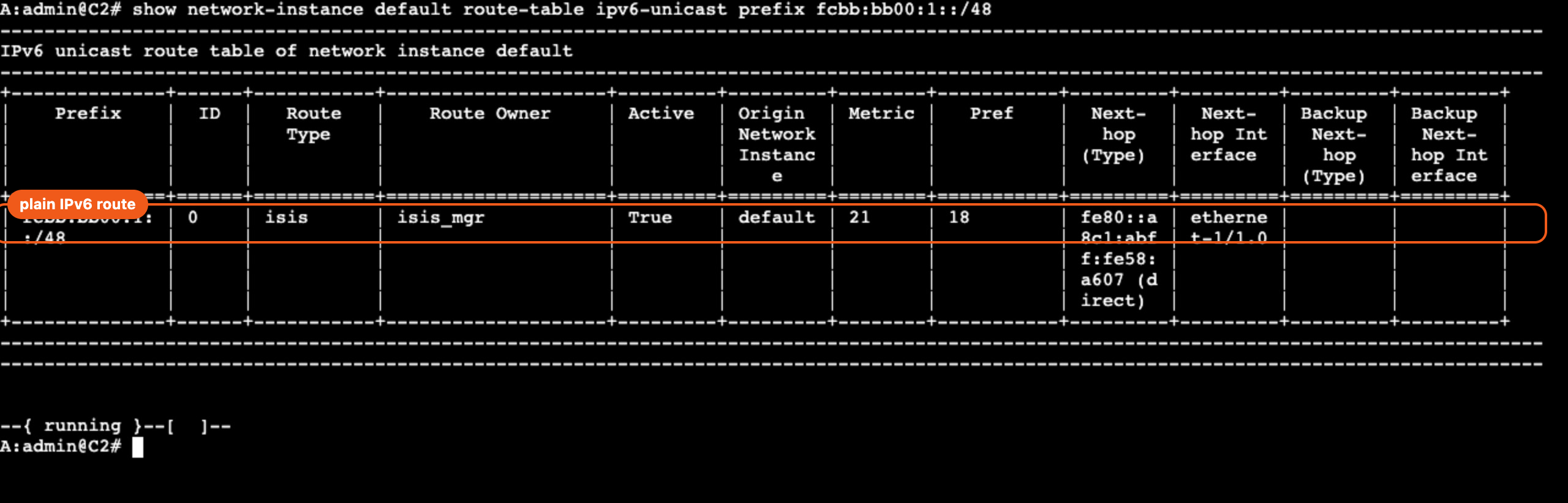
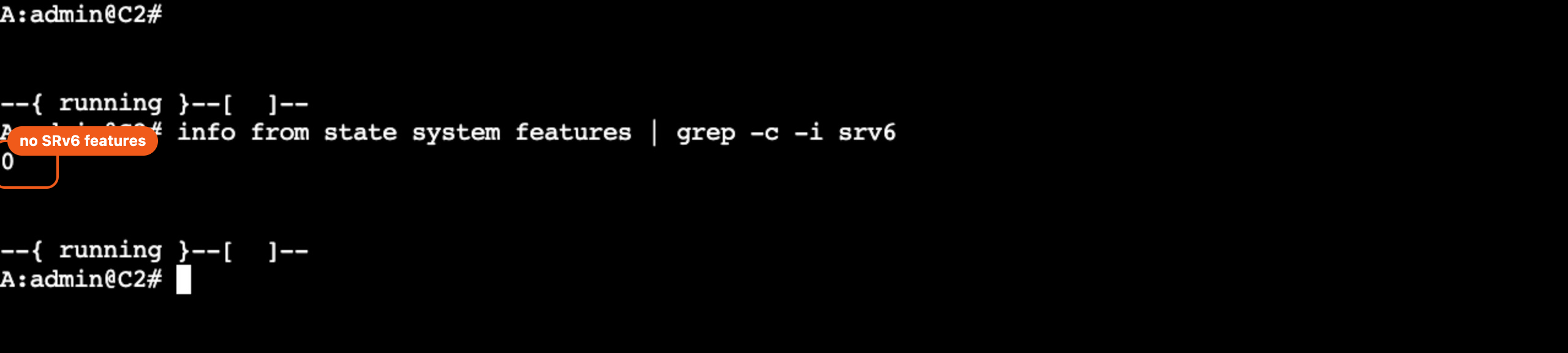
And the host at site A reached site B, 5 of 5. Its traceroute shows three hops: the core is hidden inside SRv6.
The test: cut the primary link
Then the test a design review asks for. With a ping running five times a second between the sites, the agent shut the primary link from the Cisco PE to C1, on both ends (an XRd admin shut does not drop the far side's carrier).
The VPN moved to the backup path through C2 in 0.61 seconds, with 2 of 167 pings lost, and it kept the same SRv6 SIDs:
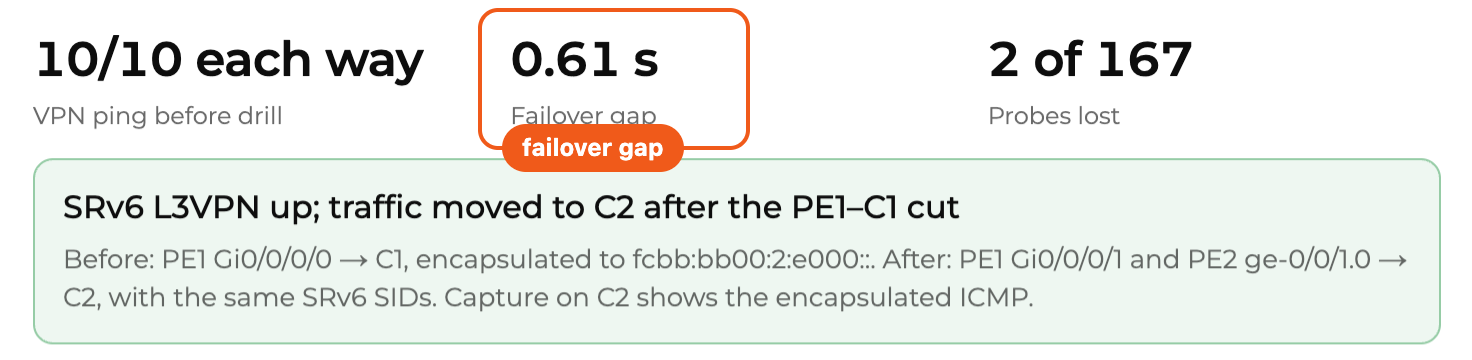
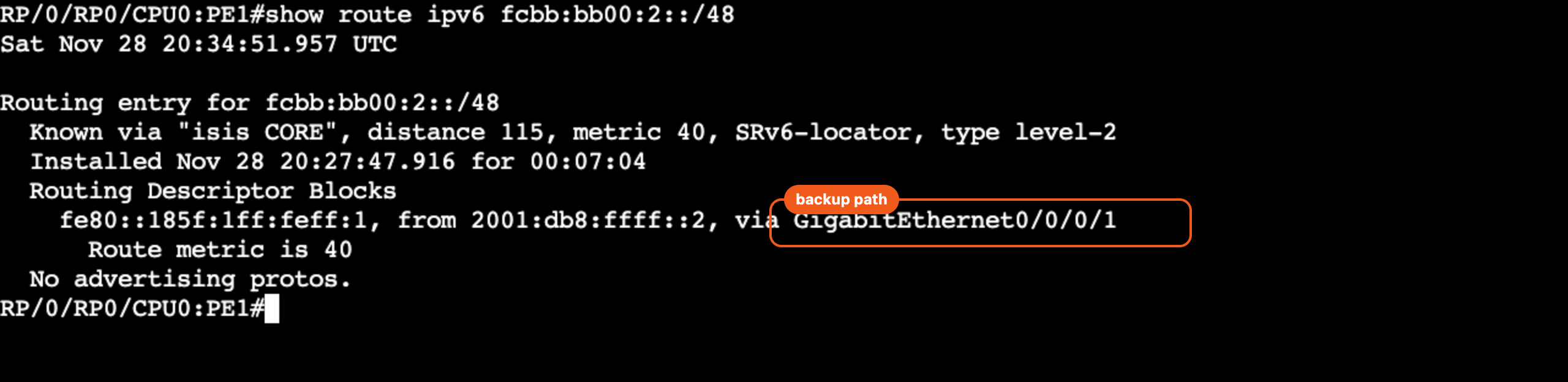
In a second, off-camera step the agent redeployed the lab from its saved startup files with no hand fixes: every check passed again and the primary path came back on C1. Those are the files in the public lab.
What it would take by hand
The same proof by hand starts with qualifying an image for each vendor and finding a host to run them, then the cabling, three configuration languages, the SRv6 and VPN settings each vendor needs to talk to the other, a failure test and a stopwatch. That is weeks of an engineer's time, or a consultant's statement of work, for one design. Here it was one prompt and about half an hour, and the evidence is each router's own output.
What a lab does not prove
Virtual routers prove that the design works: the control plane, the SIDs, the VPN routes and the functional forwarding on each vendor's software. They do not prove throughput, table scale or the convergence time on your hardware. Those stay with the vendor's hardware test, and the lab tells you which design to send there.
Run your own core
Copy-paste ready: the prompt is in the lab library as the SRv6 core design check, with variations to try next, and the topology and startup files from this run are the public lab. Nokia SR Linux is built in. The Cisco XRd and Juniper vJunos nodes run your own images, uploaded once to your lab VM, as the supported devices page describes.
For how SRv6 compares with SR-MPLS on one vendor, see the segment routing lab, and for the MPLS version of a two-vendor VPN, the MPLS L3VPN lab. For provider teams, network labs for ISPs covers the wider set of designs, and network change and design validation covers the same workflow for your own topology.
FAQ
Can Cisco IOS XR and Juniper interoperate for an SRv6 L3VPN?
Yes. In the run on this page a Cisco XRd PE and a Juniper vJunos PE carried one customer VRF over SRv6 micro-SIDs, each PE learning the other's VPN route with its SRv6 service SID, and the hosts at the two sites answered 10 of 10 pings each way. The Juniper side carried extended-nexthop, rfc8950-compliant, preserve-nexthop-hierarchy and srv6-chain-merge for the VPNv4 routes over the IPv6 session.
Does Nokia SR Linux support SRv6 in containerlab?
Not on the SR Linux 25.10.1 image used here: it lists no SRv6 feature, and the segment routing configuration has no SRv6 path. It still works as an SRv6 transit router, because transit only needs IPv6 routing. The two SR Linux core routers installed the PE locators as plain IS-IS routes and forwarded the encapsulated traffic.
How do I test an MPLS to SRv6 migration design without hardware?
Build the target design on the vendors' own network operating systems in a lab, check the locators, the VPN routes and their SIDs on each router, then fail links with traffic running and read the gap. In the run on this page NetPilot built the core from one prompt and measured a 0.61 second outage when the primary core link was cut.
What does a virtual SRv6 lab not prove?
Throughput, scale and hardware failover timing. Virtual routers prove that the design works: the control plane, the SIDs, the VPN routes and the functional forwarding on each vendor's software. Line rate, table scale and the convergence time on your platform's hardware still belong to the vendor's hardware test.