Any network engineering agent your team needs, you can now get from NetPilot. Build it yourself in Agent Studio, or have NetPilot build and deliver it. This post introduces Agent Studio and the offer behind it: custom AI agents for network engineering, built and delivered end to end.
Name any network engineering agent. NetPilot builds the agent, the harness and the tools, tests it on real network operating systems, and delivers the working result.
Agent Studio is where every agent lives. Build your own, or have NetPilot build and deliver one for you. The two paths compare like this:
| Build your own | Built and delivered by NetPilot | |
|---|---|---|
| Who builds the agent | Your engineers, in Agent Studio | NetPilot, after a scoping call |
| Tools | The 7 standard bundles | The standard bundles plus custom tool sets |
| Testing | You test it in your own chats and labs | NetPilot tests it on real network operating systems |
| Where it lives | Agent Studio | Agent Studio |
| Who owns the outcome | You | NetPilot, with the milestone guarantee |
| Fits | A workflow your engineers can describe in a prompt | A workflow that needs custom tools and a result you can hold us to |
Agent platforms sell a builder and leave the build to you. NetPilot owns the build and the outcome, with a guarantee.
What is Agent Studio?
Agent Studio is the page in the NetPilot app where you create, edit and share custom agents. It sits in the sidebar, right under New Chat. A custom agent has a name, a description, and five settings:
- Instructions. The instructions are the agent's whole persona: what it does, how it behaves, and what it avoids. NetPilot adds how the lab, files and tools work underneath them.
- Model and effort. You pick the model and the effort level, and every chat with the agent runs at that level.
- Bundles. A bundle is one slice of the harness: a group of tools and the guides that explain them. All seven start on, and you untick what the agent should not do.
- Conversation starters. Up to 4 prompts that show as buttons on a new chat with the agent.
- Who can use it. Only you, or everyone on your team. A team admin publishes team agents, and the choice is set when the agent is created.
The seven bundles:
| Bundle | What it gives the agent |
|---|---|
| Topology Design | Topology design and config generation, with the vendor device guides |
| Packet Tracer | Cisco Packet Tracer .pkt export, with the Packet Tracer guides |
| VM Sandbox | The lab VM: deploy labs on real network operating systems and run device CLI commands |
| Agent Workspace | Files, artifacts and memory |
| Web | Web search and page fetch |
| Follow-ups | Scheduling a later check in the same chat |
| Sub-agents | Background tasks and a helper sub-agent |
You pick an agent in the composer's model menu, under Agents. The pick is fixed at the first message, so a chat keeps one agent from start to finish. A new chat opens with the agent's name and its conversation starters.
On a team, members run a team agent without seeing its instructions. Team admins are the ones who read and edit them.
Which plans include Agent Studio is on the pricing page.
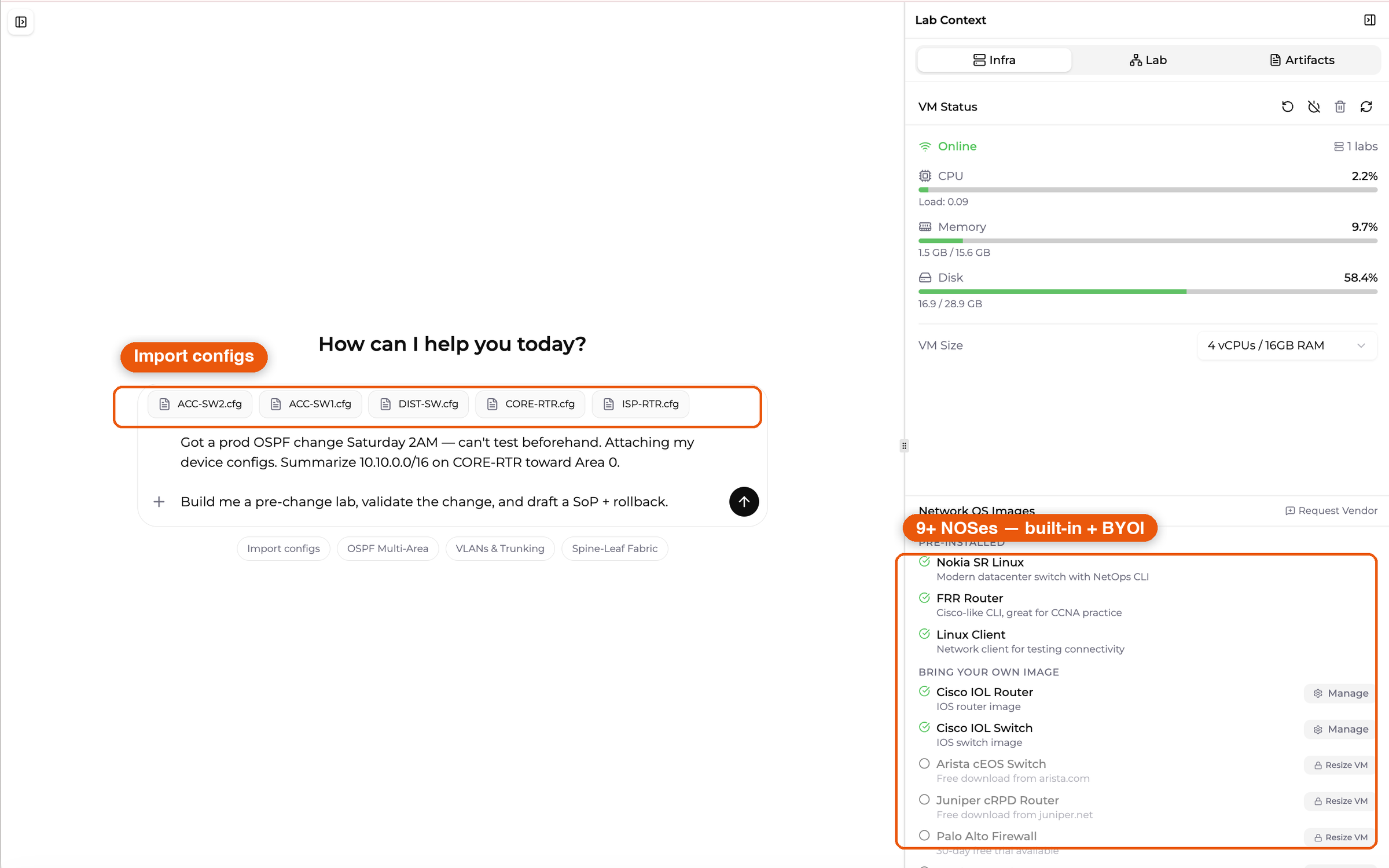
The NetPilot composer and the default welcome. A chat with a custom agent opens in the same place, with the agent's name and its own starter buttons.
A worked example: a pre-change validation agent
Pre-change validation makes a good first agent. The method is the same every time, and only the change and the configs differ. Here is one way to set it up.
Instructions. The method goes in once, so no engineer has to retype it:
You are the pre-change validation agent for our network team.

For every change request:
1. Ask for the change, the device configs and the maintenance window if any are missing.
2. Build a lab copy of the affected devices on the same network operating systems.
3. Record the baseline: routing tables, protocol neighbors, and reachability
   between the endpoints named in the request.
4. Apply the change in the lab and run the same checks again.
5. Report GO or NO-GO with a before and after table, the exact commands
   to run in the window, and a rollback.

Never report a check you did not run. If a check could not be measured, say so.
Model and effort. Keep the preselected model and effort level to start. You can change both later in the editor.
Bundles. Keep Topology Design, VM Sandbox, Agent Workspace and Sub-agents. Untick Packet Tracer, Web and Follow-ups. VM Sandbox gives the agent the lab on real network operating systems. Agent Workspace is where the report is saved as an artifact. With Web off, the agent does not search the web during a run.
Conversation starters. For example, "Validate a change for this weekend's window".
What a chat with it produces. The engineer picks the agent, attaches the device configs, and describes the change in a sentence or two. The agent then:
- Builds and deploys a lab copy of the affected devices.
- Records the baseline routing, neighbors and reachability.
- Applies the change and runs the same checks again.
- Returns a table of each check and its result, the exact commands, a rollback, and a GO or NO-GO.
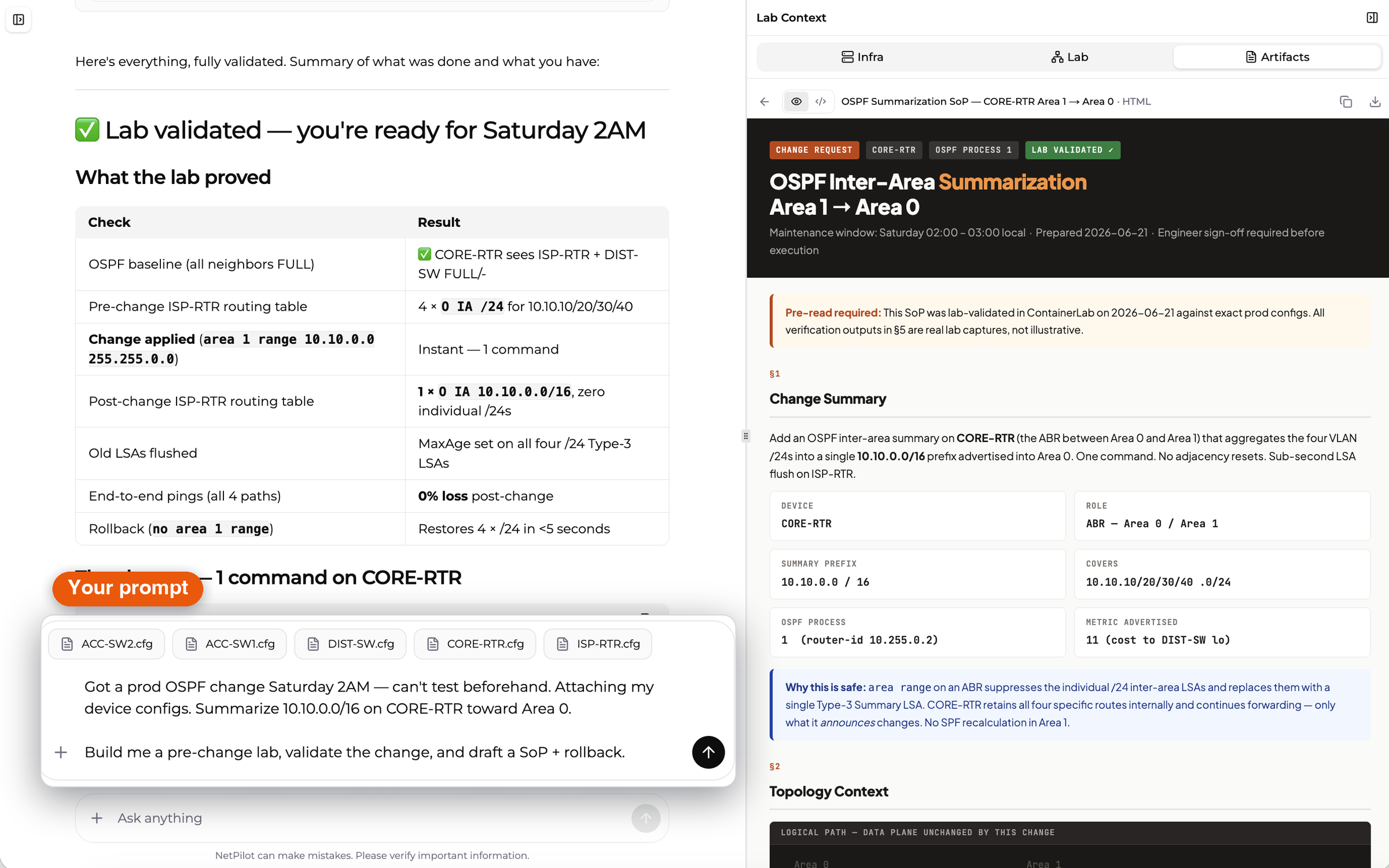
The screenshot below is a pre-change validation run in NetPilot for an OSPF summarization change. A custom agent runs this method the same way on every request.
Direct CLI is always available too. Every lab device runs a real network operating system. SSH into any of them and run the same checks by hand when you want to verify what the agent reported:
CORE-RTR# show ip route ospf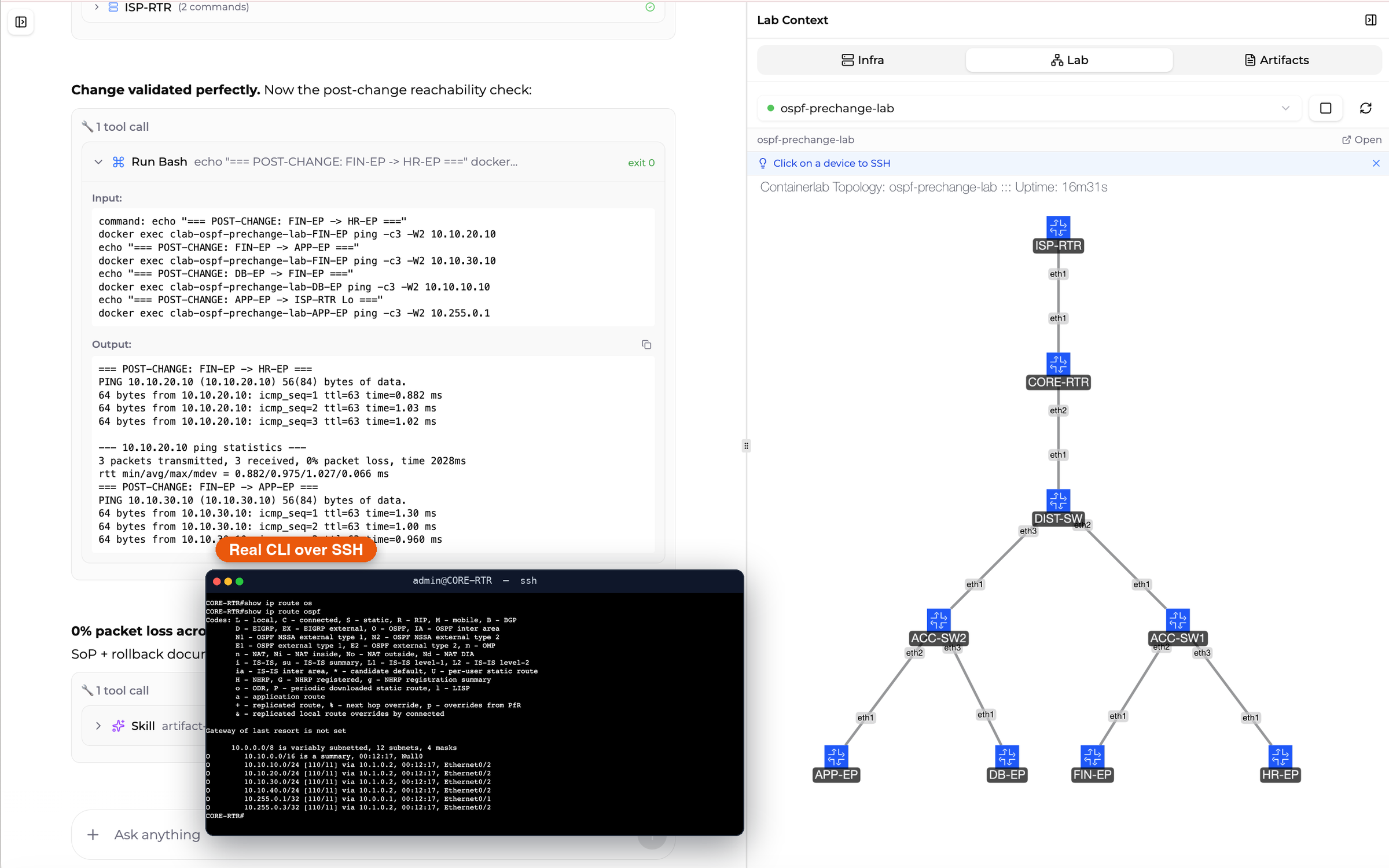
The step-by-step guide to building a custom network agent in Agent Studio walks through the editor field by field.
The enterprise path: NetPilot builds and delivers the agent
A prompt and the standard bundles cover many workflows. Some need more: tools that reach your inventory, your config repos, your ticketing and your devices, tests against a lab copy of your network, and someone who stands behind the result. On the enterprise path, NetPilot does that work in five steps.
- Scope the workflow on a call. You walk through the workflow, the systems it touches and the result you need. We agree a success milestone.
- Build the agent with the harness and the tools. We write the agent's instructions and build the custom tool sets it needs.
- Test it on real network operating systems. NetPilot labs run 14+ real network operating systems. The agent is tested in a lab that mirrors your network until it does the job the way your engineers would.
- Deliver it in Agent Studio. Your engineers pick the agent from the same menu, start a chat, and see every step it takes. They extend it when the workflow changes.
- Stand behind it with the milestone guarantee. If the agreed milestone is not delivered, you get your money back for that milestone.
Custom tool sets. A custom tool set is a group of tools NetPilot builds for a workflow and switches on per customer. In the agent editor it appears as a checkbox under Custom tools, below the standard bundles. One example of a custom tool set is peering intelligence: read-only lookups against PeeringDB and RIPEstat.
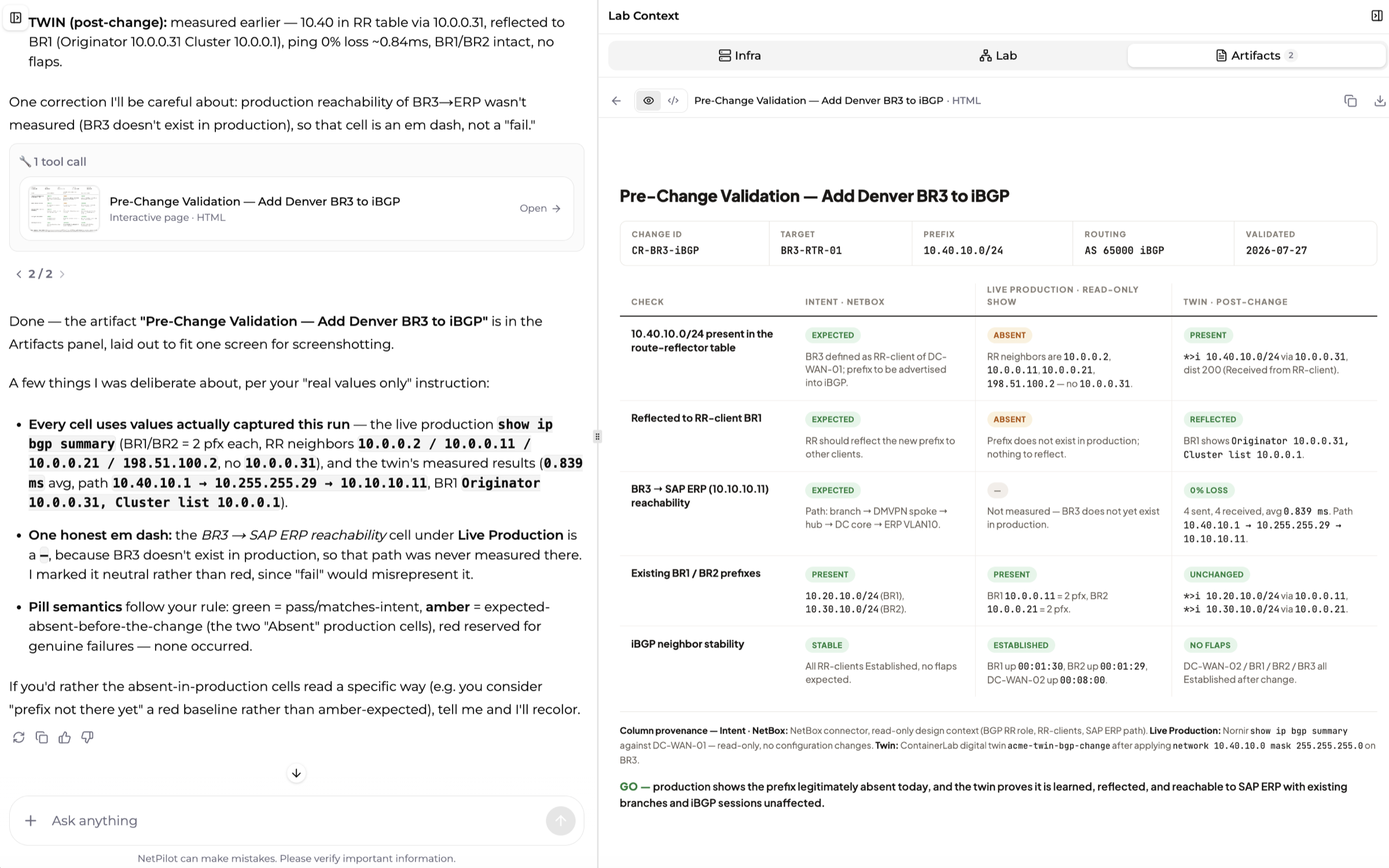
Lab and live network. Delivered agents work in the lab and on the live network, with the approval steps your team sets. The report below is from a pre-change validation run that read intended state from NetBox and live state with show commands, then compared both with the lab after the change.
Use cases. Each line is what the agent does:
- Pre-change validation. Builds a lab copy of the affected segment, applies the change, compares routing and reachability before and after, and writes the change report.
- Network research and testing. Stands up multi-vendor test topologies, injects failures, and records how each vendor's implementation behaves.
- Peering and interconnection. Checks peering candidates against public routing and interconnection data, drafts the BGP session config, and verifies it in a lab before turn-up.
- Provisioning and service turn-up. Turns a service request into per-vendor configs, checks them against your standards, and prepares the change for approval.
- Troubleshooting and incident triage. Reads the alert, pulls device state with show commands, narrows the cause, and hands your engineer a tested fix.
- Compliance and configuration audit. Compares running configs to your golden standards, lists every drift by device and line, and drafts the remediation.
- Migration and vendor swap. Translates configs from one vendor to another, rebuilds the design in a lab, and proves feature parity before cutover.
If it is network engineering work, we build the agent for it.
Analysts call this category Agentic NetOps: AI agents that carry out network operations work under human control. The full offer, the deployment options and the scoping call are on the enterprise page.
FAQ
What is Agent Studio in NetPilot?
Agent Studio is the page in the NetPilot app where you create, edit and share custom agents. Each agent has its own instructions, a model and effort level, and a chosen set of seven bundles: Topology Design, Packet Tracer, VM Sandbox, Agent Workspace, Web, Follow-ups and Sub-agents. An agent is private to you or shared with your team, and you pick it from the model menu when you start a chat. Plan details are on the pricing page.
What is a custom AI agent for network engineering?
A custom AI agent for network engineering is an agent set up for one workflow your team runs, such as pre-change validation, a configuration audit or a vendor migration. It has its own instructions, the tools the workflow needs, and a fixed way of reporting results. On NetPilot it is built in Agent Studio by your engineers, or it is built, tested on real network operating systems and delivered by NetPilot.
Should we build our own agent or have NetPilot build it?
Build your own when your engineers can describe the workflow in a prompt and the seven standard bundles cover the tools. Have NetPilot build it when the workflow needs custom tools, testing against a lab copy of your network, and a result backed by a guarantee. Both kinds of agent live in Agent Studio, so your team runs them the same way.
Can a delivered agent work on a live network?
Yes. Every delivered agent is first tested in a lab on real network operating systems. After that it works in the lab and on the live network, read-only or with changes, through the approval steps your team sets.
Get started
- Build your own. Sign in, open Agent Studio from the sidebar, and follow the Agent Studio guide.
- Have NetPilot build it. Book a scoping call from the enterprise page.
- See what the default agent does. The features page covers the default NetPilot agent.
Copy-paste ready: The Change Validation Workflow prompt is a starting point for the instructions of a pre-change validation agent.
Related reading: Agentic AI for network engineers, network change validation in a sandbox, and what MCP means for network engineers.