
A fabric design usually reaches the review as a diagram and a list of claims: the underlay comes up, the overlay carries the VLAN and the VRF, the WAN default route reaches every leaf, and the hosts survive losing a spine. This post tests each claim on real routers before anything is built. One prompt described a BGP EVPN VXLAN fabric on Arista and Nokia SR Linux leaves with a Cisco WAN edge. NetPilot built it in minutes, checked it on each device's own CLI, then took a spine down. The fabric held, and the test found an 8.52 second outage that the design did not mention.
The design
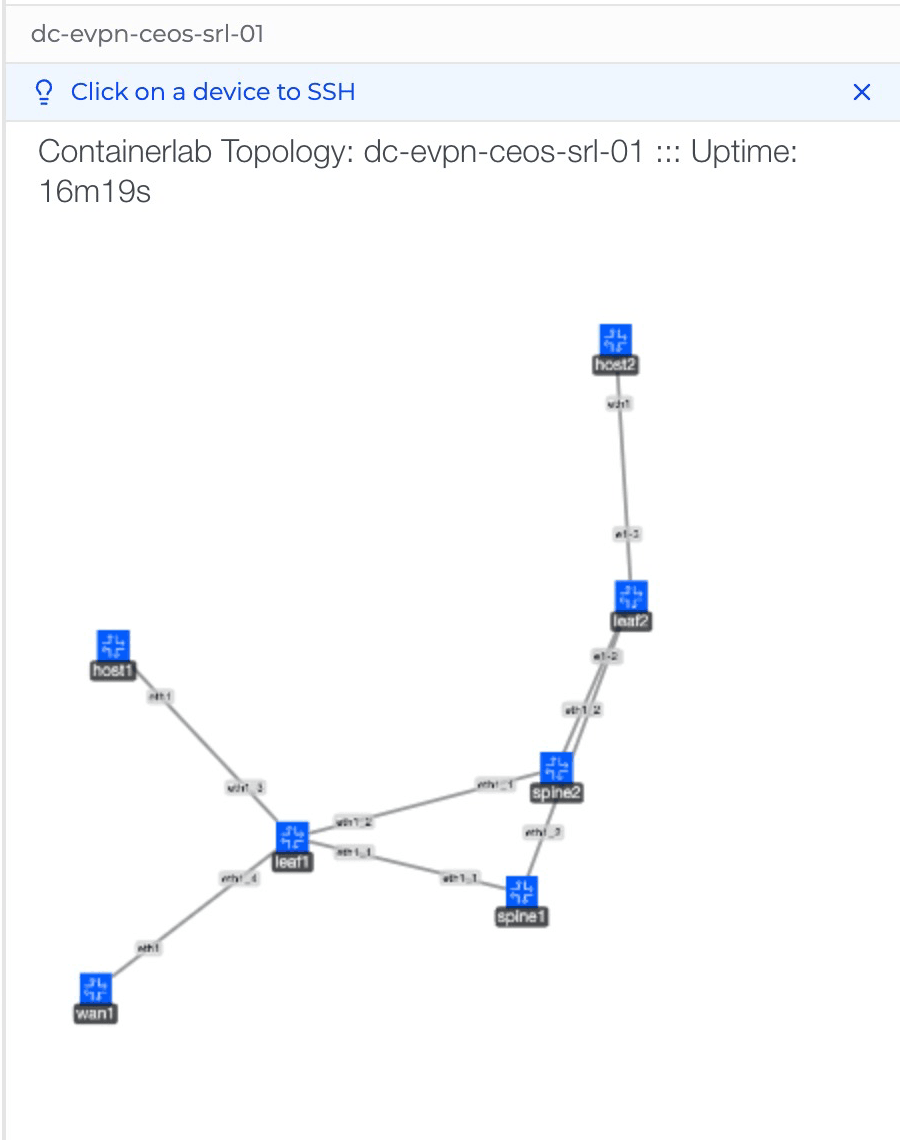
Two Arista spines, an Arista border leaf, a Nokia SR Linux leaf, a Linux host on each leaf, and a Cisco router as the WAN edge.
| Item | Value |
|---|---|
| Spines | spine1 and spine2, Arista cEOS 4.36.1F, AS 65100, EVPN route servers |
| Border leaf | leaf1, Arista cEOS, AS 65001, VTEP 10.255.0.11, eBGP to the WAN edge inside VRF TENANT |
| Leaf | leaf2, Nokia SR Linux 25.10.1, AS 65002, VTEP 10.255.0.12 |
| WAN edge | wan1, Cisco IOL 17.12.1, AS 65500, sends a default route into the VRF |
| Stretched VLAN | VLAN 10 on VNI 10010, anycast gateway 10.10.10.1 |
| Routed VRF | TENANT on L3 VNI 50001 (EVPN type 5) |
| Hosts | host1 10.10.10.11 on leaf1, host2 10.10.10.12 on leaf2 |
The prompt gave none of these numbers. The agent chose the plan itself: the ASNs, the loopbacks, the VNIs, the anycast gateway, and the spines as EVPN route servers.
The prompt
This is the prompt from the recording, typed as written. It states the design and the proof, with no IP plan:
Here's my data center fabric design. Two Arista spines. Two leaves: an Arista border leaf and a Nokia SR Linux leaf. eBGP underlay, BGP EVPN overlay, one stretched VLAN and one routed VRF, with a Linux host on each leaf. A Cisco router is the WAN edge, peering with the border leaf and sending a default route into the VRF. Build it, then show me on each device's CLI that it works, and that the hosts still reach each other with one spine down.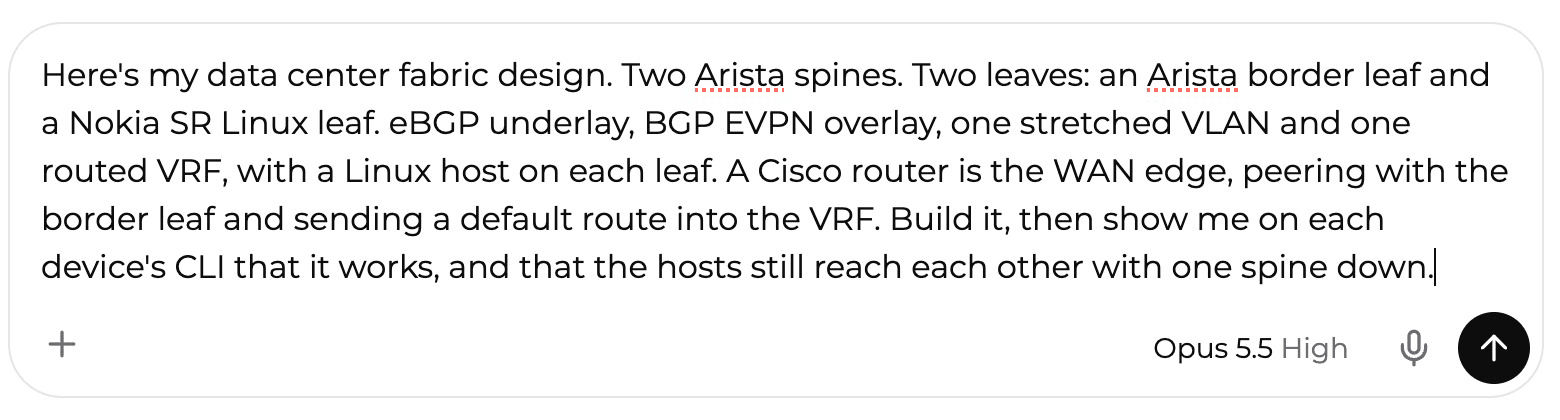
Open the prompt prefilled in NetPilot and swap in your own design.
The build
The agent read the device guide for each vendor, wrote the configurations in three syntaxes (Arista EOS, Nokia SR Linux and Cisco IOS), and deployed the lab dc-evpn-ceos-srl-01 with containerlab. The two leaves derive automatic route targets differently, so it set the route targets by hand on both, and wrote out the Nokia leaf's MAC-VRF, IP-VRF and VXLAN interfaces. The whole first turn, build and checks and the spine test, took minutes.
Underlay and overlay checks
The agent logged into each device and checked every session from both ends. All 9 BGP sessions were Established: 4 underlay, 4 EVPN overlay and 1 VRF session from leaf1 to wan1. The result card's tile counted 13 sessions. The agent caught that in its own answer and corrected it to 9, which is the right count for this design.
- Underlay (eBGP): on leaf1, leaf2's loopback 10.255.0.12 has two next hops, one through each spine.
- Overlay (BGP EVPN): host1 to host2 answered 5/5 in both directions across the Arista and Nokia leaves, over the stretched VLAN.
- EVPN type 5 into the VRF: the Nokia leaf receives the Cisco edge's default route as an EVPN route into VRF TENANT, pointing at leaf1 on VNI 50001. Each host reached 203.0.113.1, a loopback on the Cisco edge, 5/5 through that default route.
You can ask the agent for any check by name ("show me the EVPN routes on leaf2") and it picks the right command for each vendor. Every device also has its own terminal, covered below.
The spine failure: the outage the design did not mention
The prompt asked for the hosts to keep reaching each other with one spine down. The agent first ran a capture to find which spine carried the traffic between the leaves. It was spine1, so it froze spine1 for about 71 seconds while four ping flows ran.
All 4 flows came back 5/5. The design holds. But the hosts lost traffic while the fabric moved onto spine2:
- host1 to host2: 8.52 seconds
- host2 to the WAN: 8.31 seconds
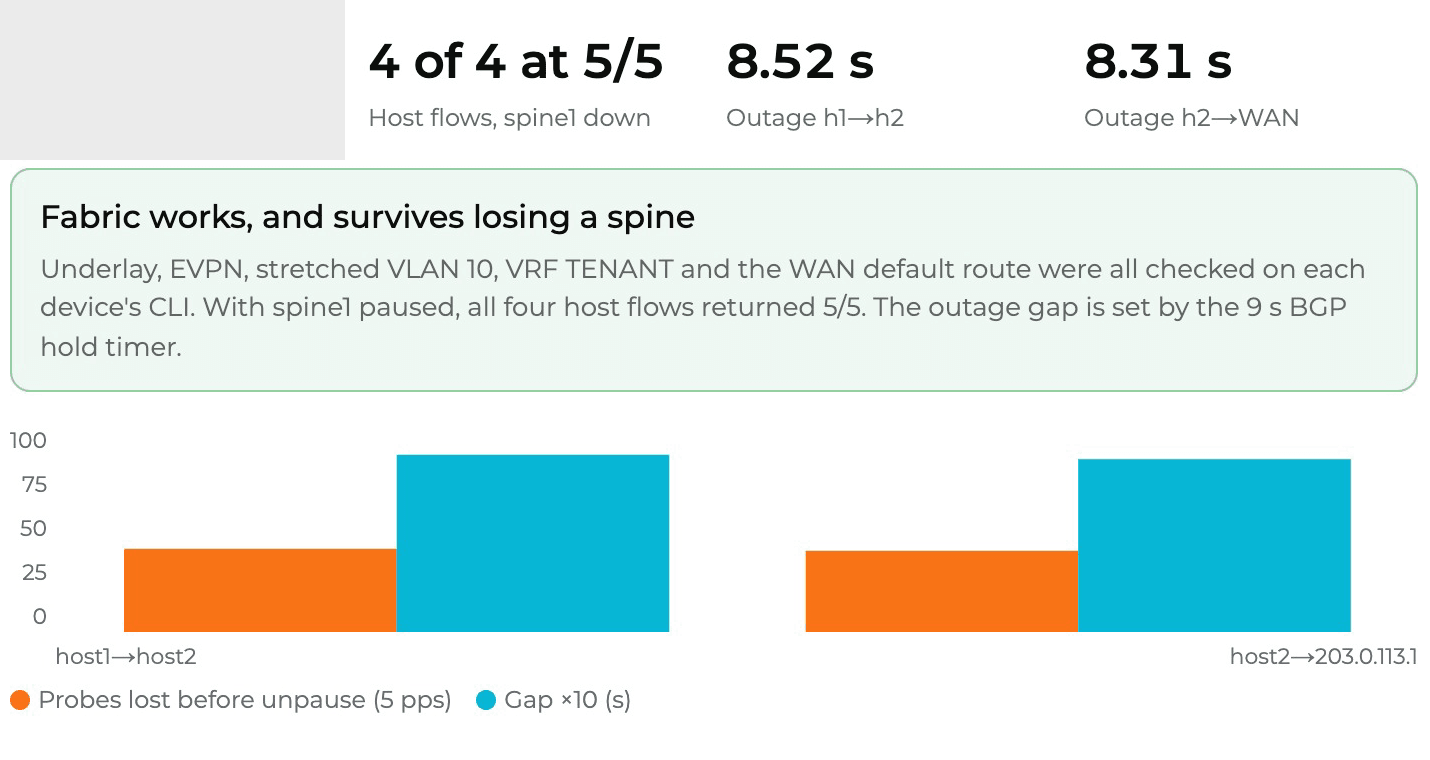
The 9 second BGP hold timer set the outage. A frozen spine sends no link-down, so each leaf waits for the hold timer to expire before it drops the session and moves the traffic.
That number is what a design review wants before the order goes in. "Survives losing a spine" is true, and now it has a measured cost.
The fix: BFD, tested again
A follow-up prompt in the same chat:
Add BFD to the underlay sessions and run the same spine test again. How long is the outage now?Open it prefilled after the first prompt has built the lab.
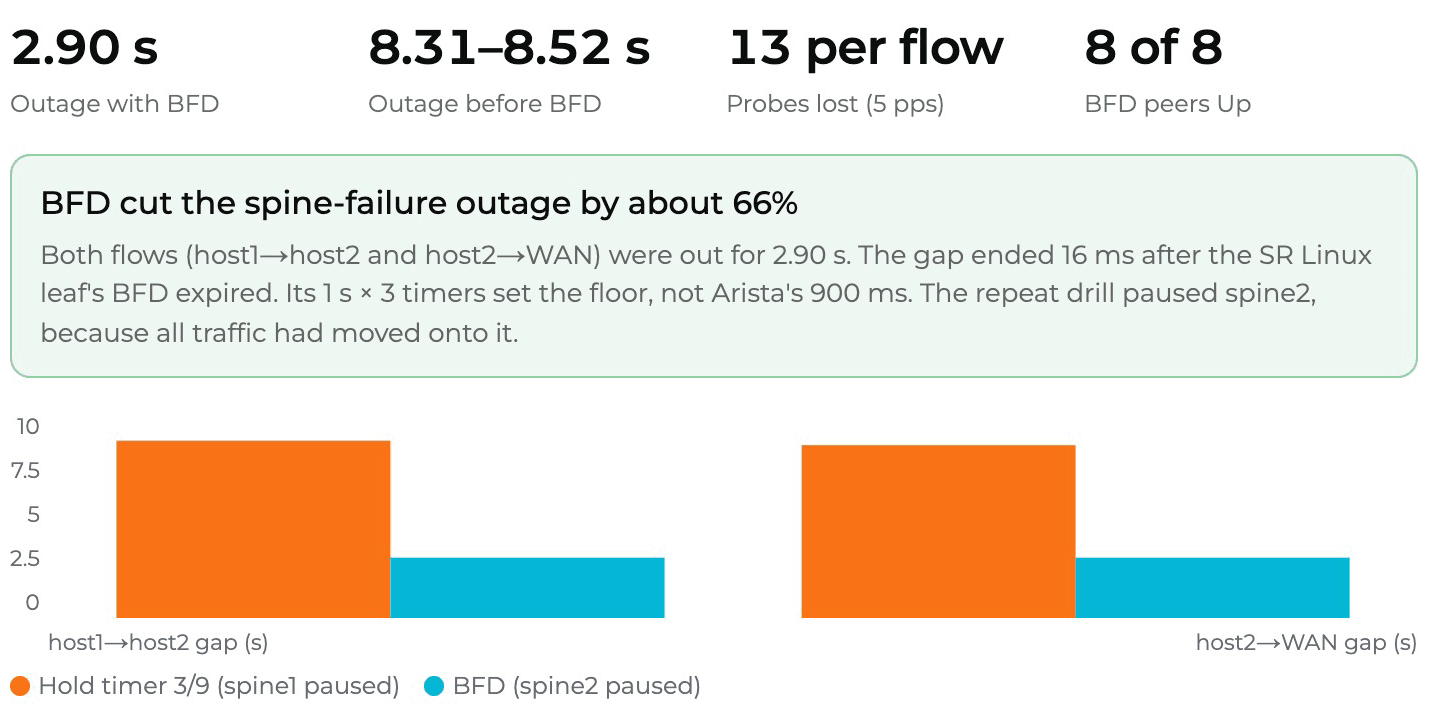
The agent added BFD live, without resetting any BGP session: 300 ms by 3 on the Arista devices and 1 s by 3 on the Nokia leaf. All 8 BFD peers came Up. After the first test every flow had moved onto spine2, so failing spine1 again would have shown nothing. The agent noticed and froze spine2 this time.
The outage dropped to 2.90 seconds on both flows, down from 8.31 to 8.52 seconds, about 66% shorter. The turn took minutes.
What the run found
The second finding is the one worth carrying into the design. In this lab the Nokia leaf's 1 s by 3 BFD timers set the floor. The gap ended 16 ms after its BFD expired, while the Arista side had already dropped the spine. Going lower in this fabric means a faster BFD timer on that leaf, not more tuning on the Arista side.
A third prompt saved BFD into the startup files and redeployed the lab from them: BFD came back up on all 8 sessions and all 4 host pings answered 5/5. Those are the files in the public lab below.
Check it yourself on each CLI
You do not have to trust the chat. The reply links a lab viewer with a terminal per device. These were typed by hand after the BFD test.
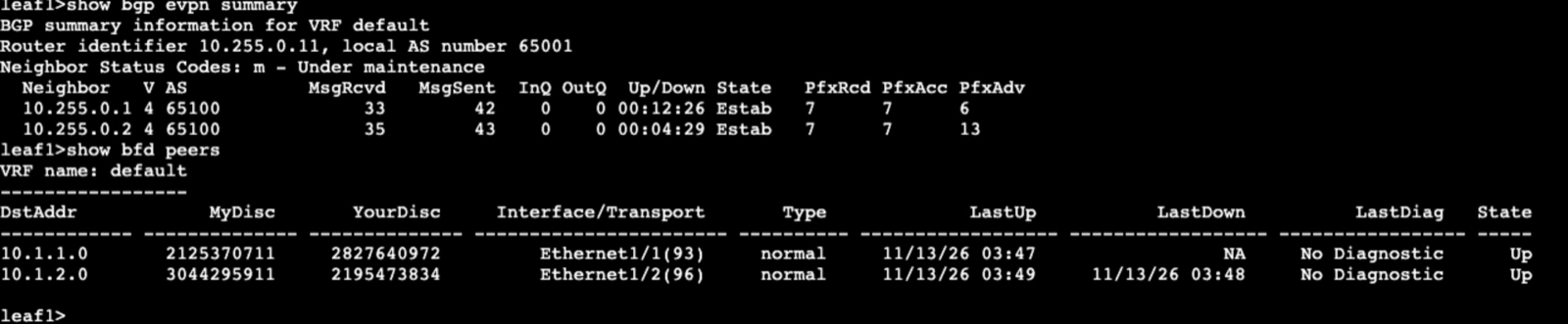
Arista border leaf (leaf1): show bgp evpn summary lists 10.255.0.1 and 10.255.0.2, AS 65100, both Estab with 7 prefixes received each. show bfd peers shows two peers Up.
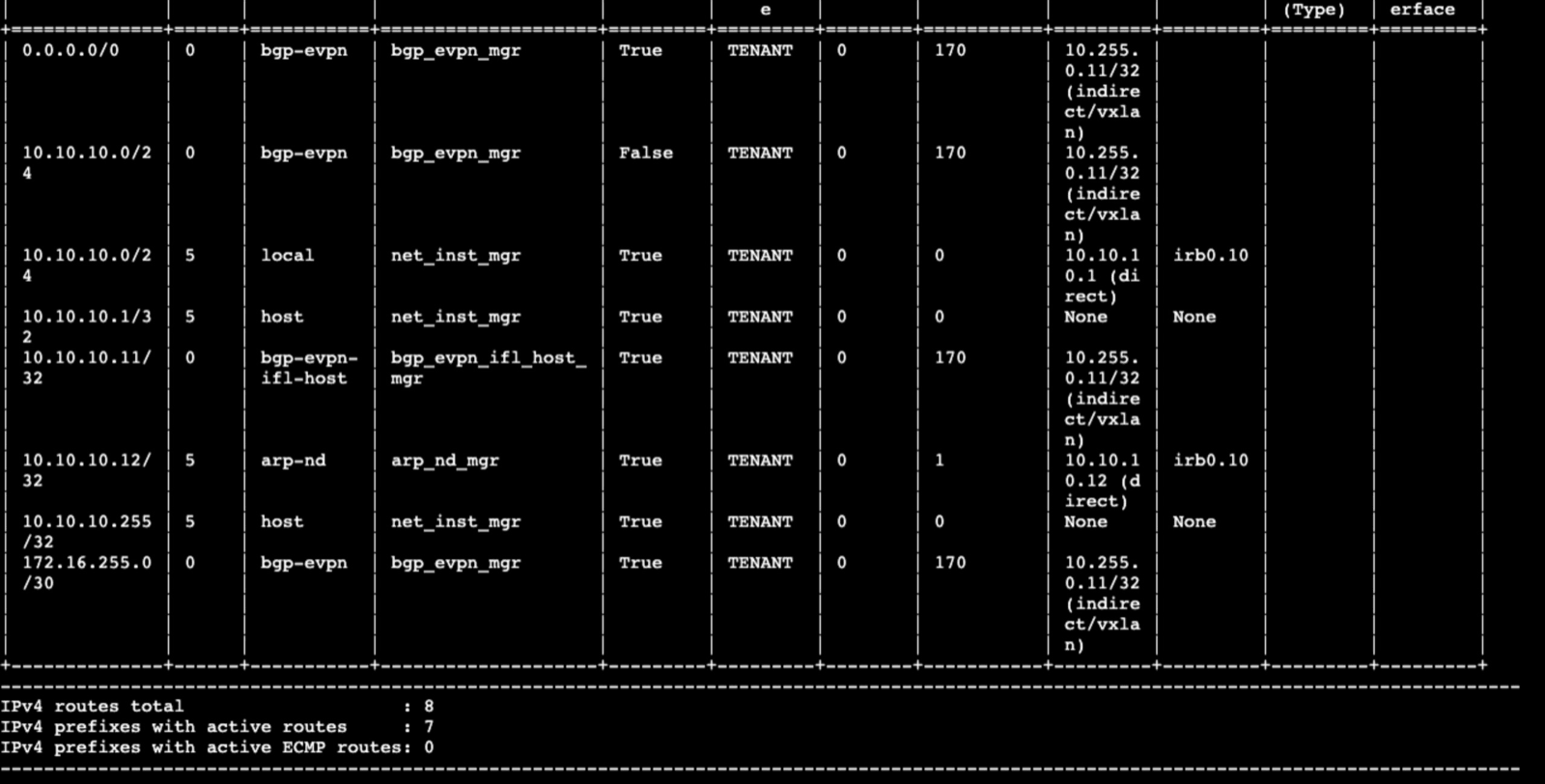
Nokia leaf (leaf2): show network-instance TENANT route-table ipv4-unicast summary shows 0.0.0.0/0 from bgp-evpn via 10.255.0.11 over VXLAN. That is the Cisco edge's default route, carried as an EVPN type 5 route.
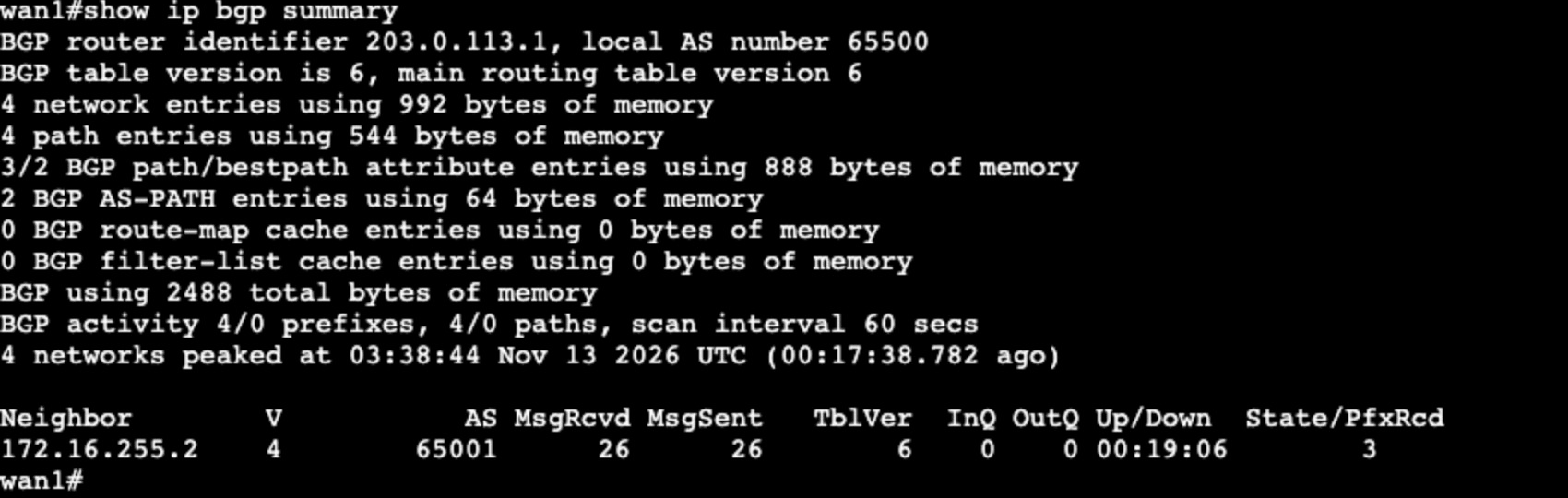
Cisco WAN edge (wan1): show ip bgp summary shows neighbor 172.16.255.2, AS 65001, up 19 minutes, 3 prefixes received.
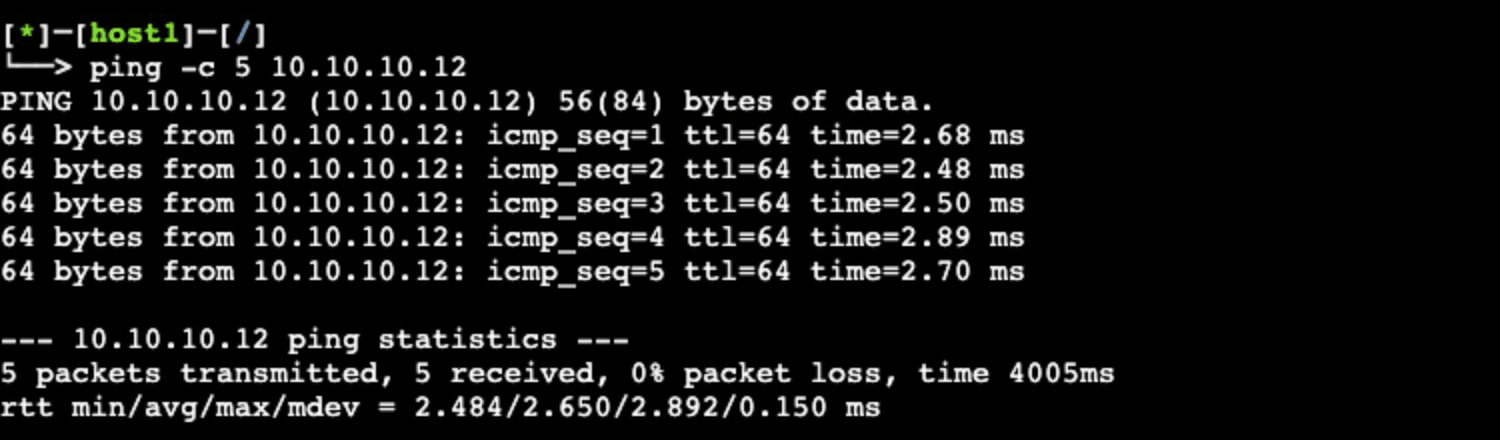
host1: ping -c 5 10.10.10.12 returns 5 transmitted, 5 received, 0% loss, average 2.65 ms.
Run your own design
Copy-paste ready: the prompt is in the lab library as the EVPN-VXLAN fabric design check, with variations to try next, and the topology and startup files from this run are the public lab. Nokia SR Linux is built in. The Arista cEOS and Cisco IOL nodes run your own images, uploaded once to your lab VM, as the supported devices page describes.
For how the layers of an EVPN fabric fit together, start with the EVPN-VXLAN data center guide. The spine-leaf architecture lab covers the eBGP Clos underlay on its own, and the Juniper EVPN-VXLAN lab builds a single-vendor fabric on vJunos. For a network team that reviews designs and changes before they ship, network change and design validation covers the same workflow for your own topology.
FAQ
Do Arista and Nokia SR Linux interoperate for EVPN-VXLAN?
Yes. In the run on this page an Arista cEOS border leaf and a Nokia SR Linux leaf shared one stretched VLAN on VNI 10010 and one routed VRF on L3 VNI 50001, with Arista spines as EVPN route servers. All 9 BGP sessions were Established on both ends, host to host pinged 5/5 both ways, and the Nokia leaf learned the Cisco edge's default route as an EVPN route into the VRF. The route targets were set by hand on both leaves, because the two vendors derive automatic route targets differently.
How do I test an EVPN fabric design without hardware?
Describe the design in plain words to NetPilot: the spines, the leaves and their vendors, the underlay, the overlay, the VLANs and VRFs, and the checks you want. It plans the addressing and ASNs, writes each vendor's configuration, deploys the fabric on real network operating systems on your lab VM, and quotes each device's CLI. Then take a spine down in the same lab and measure what the hosts lose.
How long does a fabric lose traffic when a spine fails?
In this lab the hosts lost traffic for 8.52 seconds (host1 to host2) and 8.31 seconds (host2 to the WAN) when a spine froze, set by the 9 second BGP hold timer on the underlay. With BFD on the underlay sessions the same test measured 2.90 seconds on both flows, about 66% shorter.
Why did BFD not bring the outage lower than 2.90 seconds?
In this lab the Nokia leaf ran BFD at 1 second by 3 and the Arista devices at 300 ms by 3. The gap ended 16 ms after the Nokia leaf's BFD expired, so in this lab its timers set the floor. Going lower means a faster timer on that leaf, not more tuning on the Arista side.
Test the design before the order
Describe your fabric the way you would draw it, name the vendors, and ask for the failure you worry about. Open the design prompt in NetPilot to start.