
Ask ChatGPT for a multi-vendor lab and you usually get configs nobody has run. With the NetPilot plugin from ChatGPT's plugin directory, the same chat builds the lab on real network operating systems and quotes what the routers say. This run asked for a Cisco router, an Arista router and a Junos router in OSPF area 0, in one prompt. A few minutes later every neighbor was FULL on each router's own CLI, and a ping crossed all three, five out of five.
The plugin works the same way in Claude and any AI assistant that connects to MCP servers. The connect steps for each are on the connection guide.
The lab
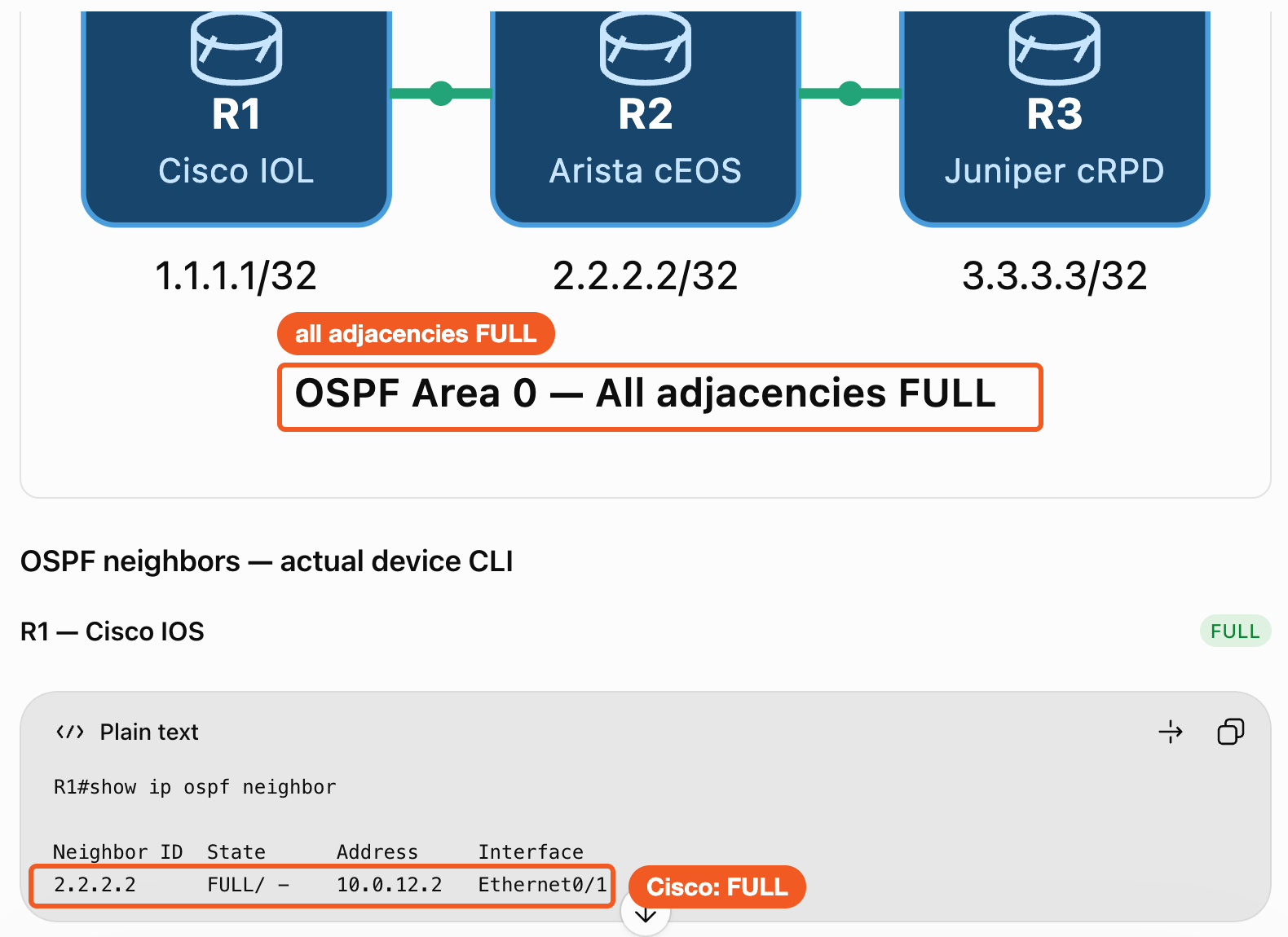
Three routers in a line, one vendor each, every link and loopback in OSPF area 0.
When it works, the Arista router in the middle has two FULL neighbors, the Cisco and Junos routers one each, and a ping from R1's loopback reaches R3's loopback.
Step 1: Pick NetPilot and send one prompt
Add NetPilot from the Plugins page in ChatGPT once (the ChatGPT setup guide shows the install). In a new chat, type @NetPilot in the composer and pick it, then paste the prompt. This is the prompt from the recording, typed exactly:
Build a three-vendor OSPF lab on my lab VM: R1 a Cisco router, R2 an Arista router, R3 a Juniper router, connected in a line R1 - R2 - R3, all in OSPF area 0. Give each router a loopback (1.1.1.1, 2.2.2.2, 3.3.3.3) and advertise it into OSPF. Deploy it, show me each router's OSPF neighbors on its own CLI, and ping 3.3.3.3 from 1.1.1.1.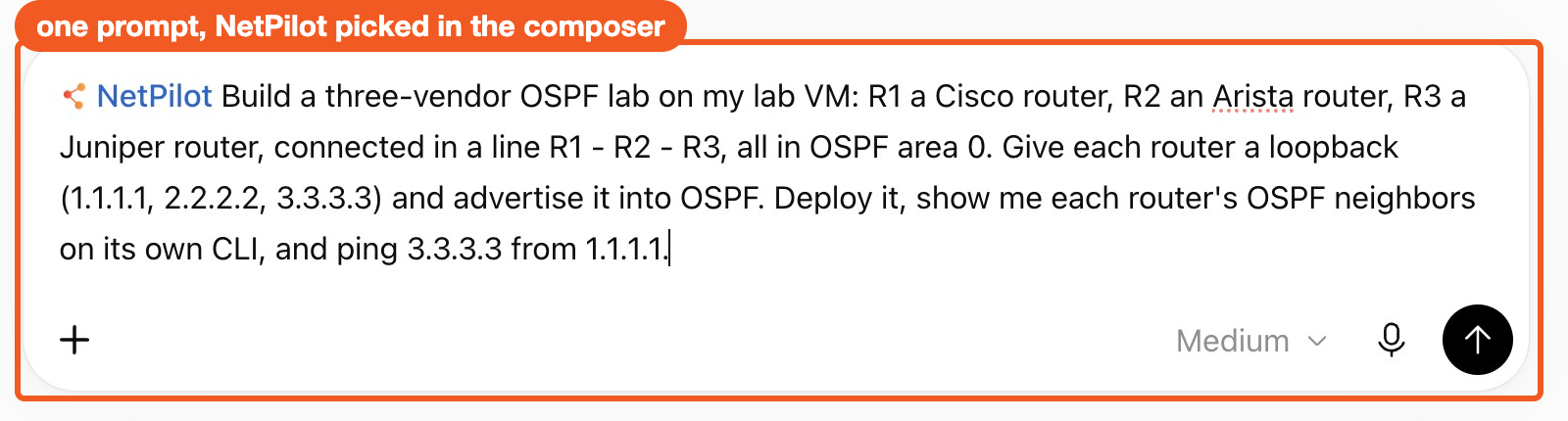
Copy-paste ready: the prompt is in the From ChatGPT section of the multi-vendor OSPF prompt, with variations to try next. In the NetPilot web app the same prompt opens prefilled.
Step 2: What ChatGPT does
Each step shows in the chat. ChatGPT checked the lab VM and the installed images, read the device guide for each vendor, wrote three startup configurations in three different syntaxes, and deployed the lab with containerlab. Then it logged into each router to check the neighbors and ran the ping.
The part worth noticing came next. Its first check found the Cisco to Arista adjacency not FULL yet, and the first ping failed. ChatGPT did not report the lab as done. It checked the Cisco interface and OSPF settings, ran the checks again, and reported only when everything passed.
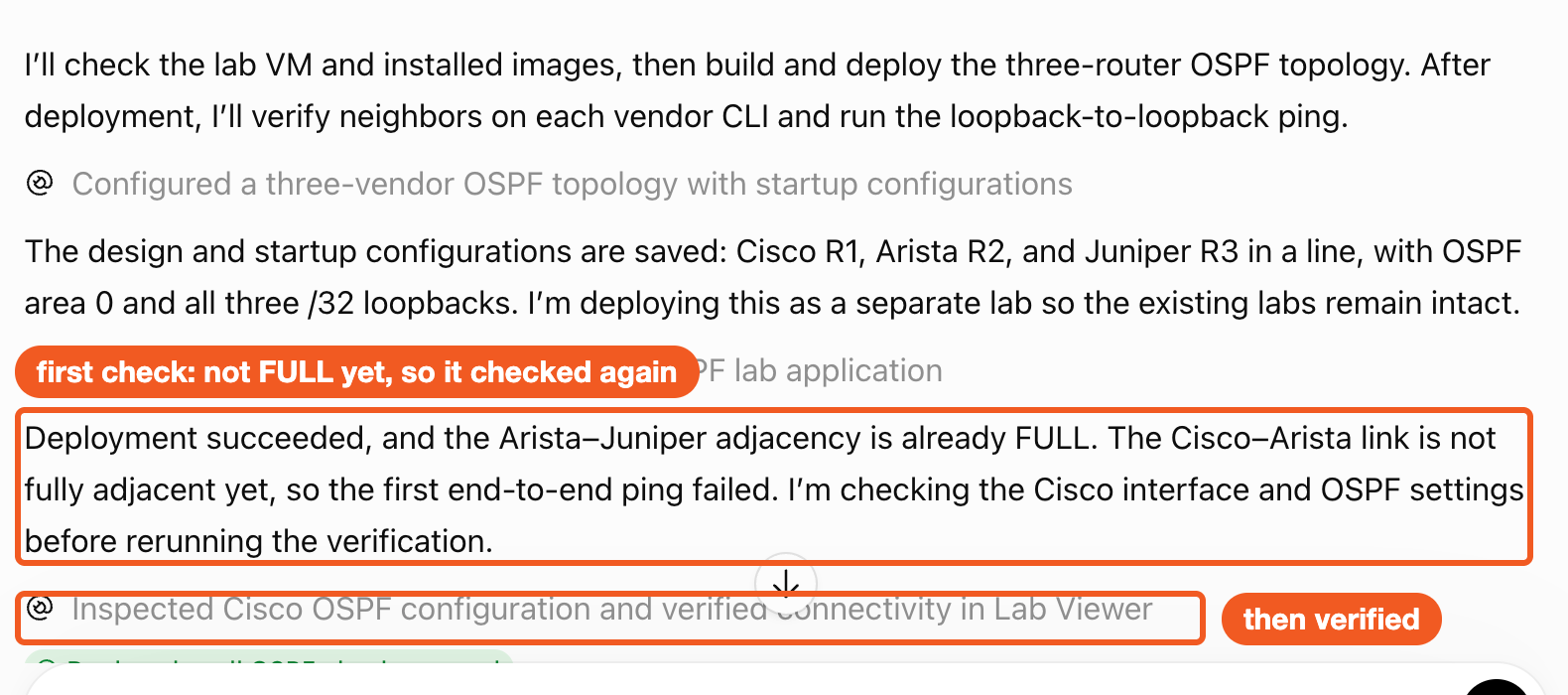
It also handled the detail that stalls this lab when it is built by hand. The Junos router takes its MTU from the container link, larger than the 1500 the Cisco and Arista routers use, and an OSPF MTU mismatch keeps the adjacency from ever reaching FULL. ChatGPT set the MTU to 1500 on both ends of the Arista to Junos link:
interfaces {
 eth1 {
  mtu 1500;
  unit 0 {
   family inet { address 10.0.23.2/30; }
  }
 }
}interface Ethernet1/2
description to-R3
no switchport
ip address 10.0.23.1/30
ip ospf network point-to-point
mtu 1500Step 3: What came back
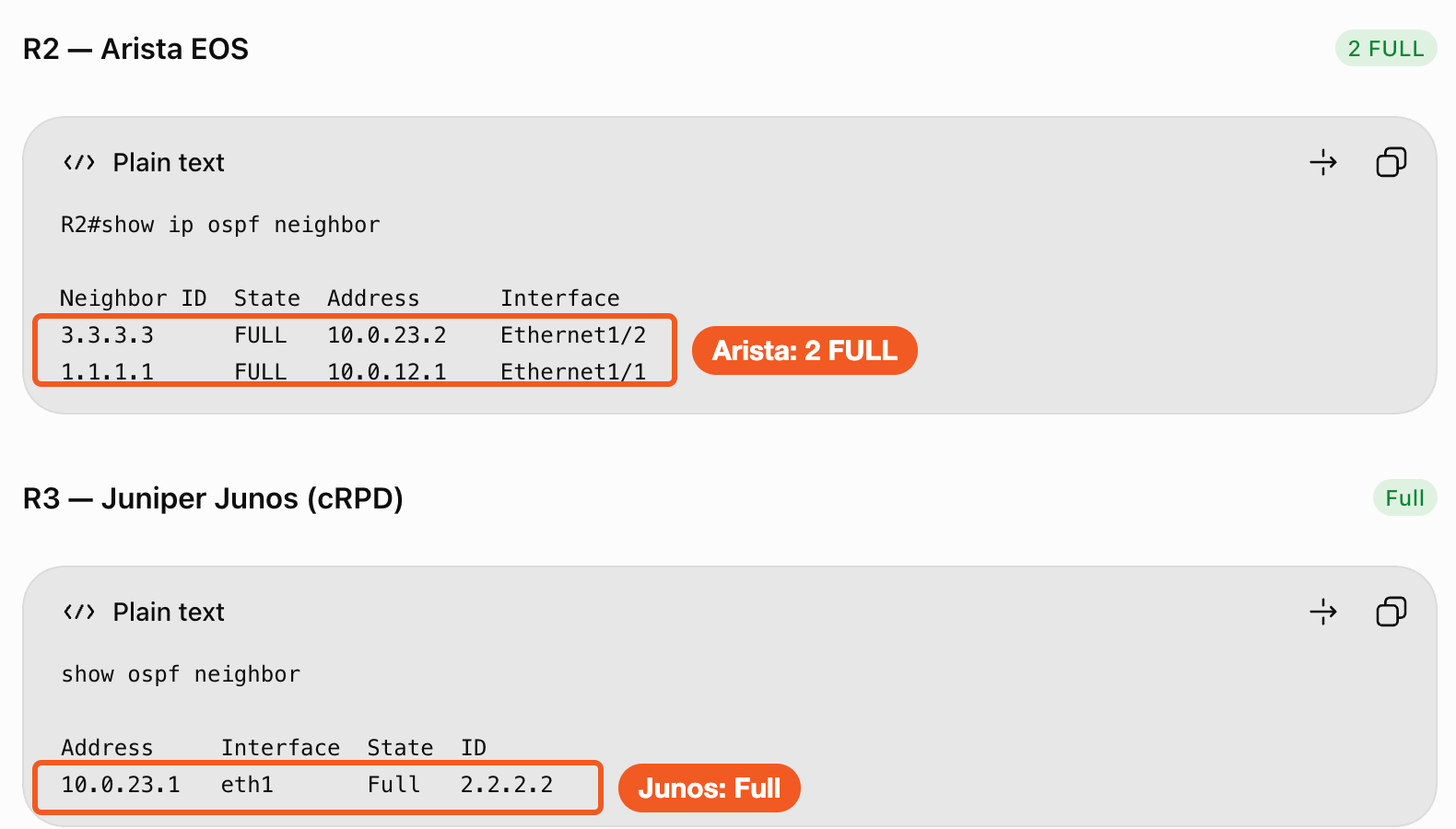
ChatGPT quoted each router's own output. The Arista router reports two neighbors FULL, toward the Cisco and the Junos router, and the Junos router reports Full toward the Arista router:
The Cisco router has its one neighbor FULL:
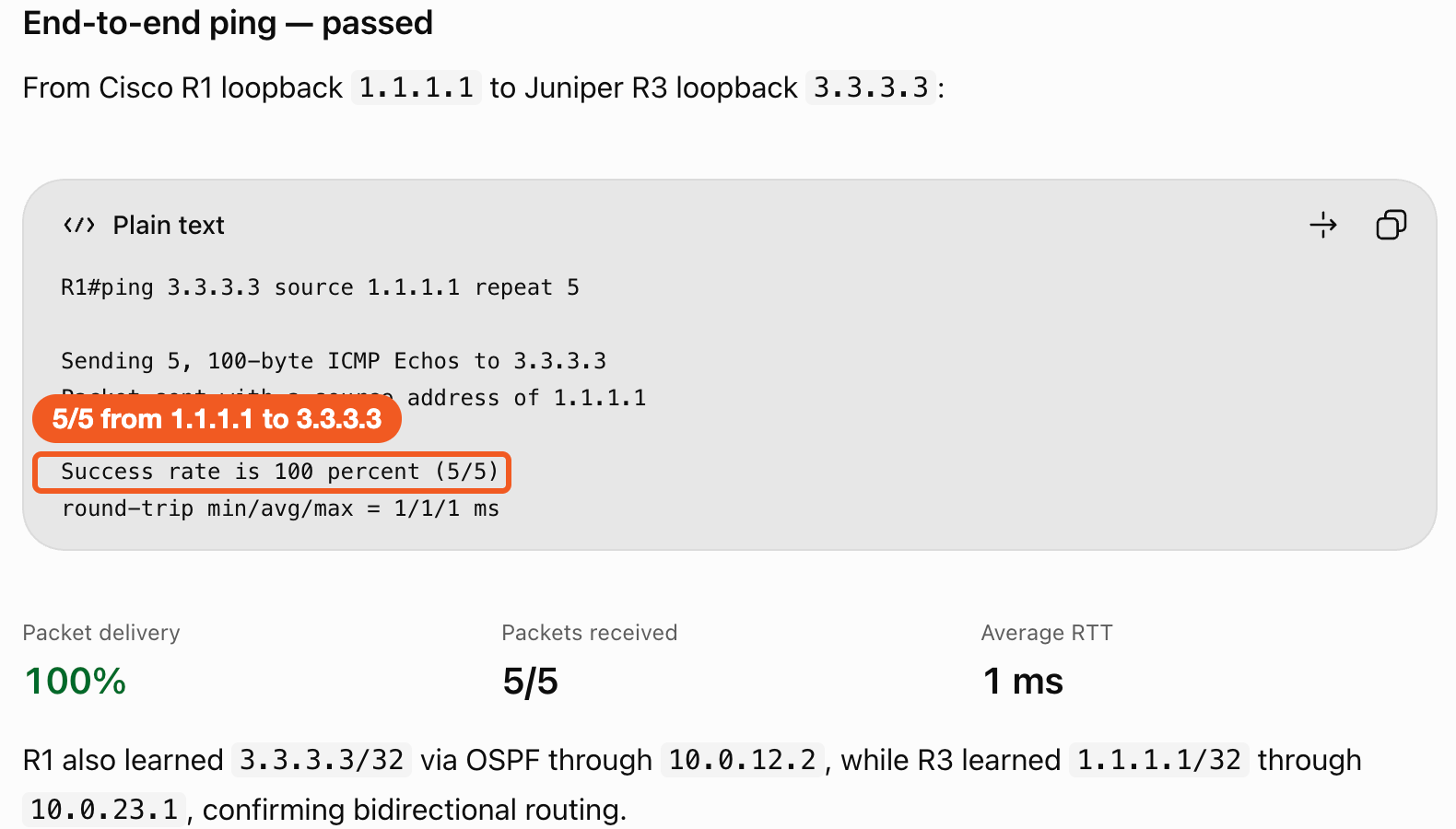
And the ping from the Cisco router's loopback to the Junos router's loopback crossed the Arista router, five out of five:
Step 4: Check it yourself on the Junos CLI
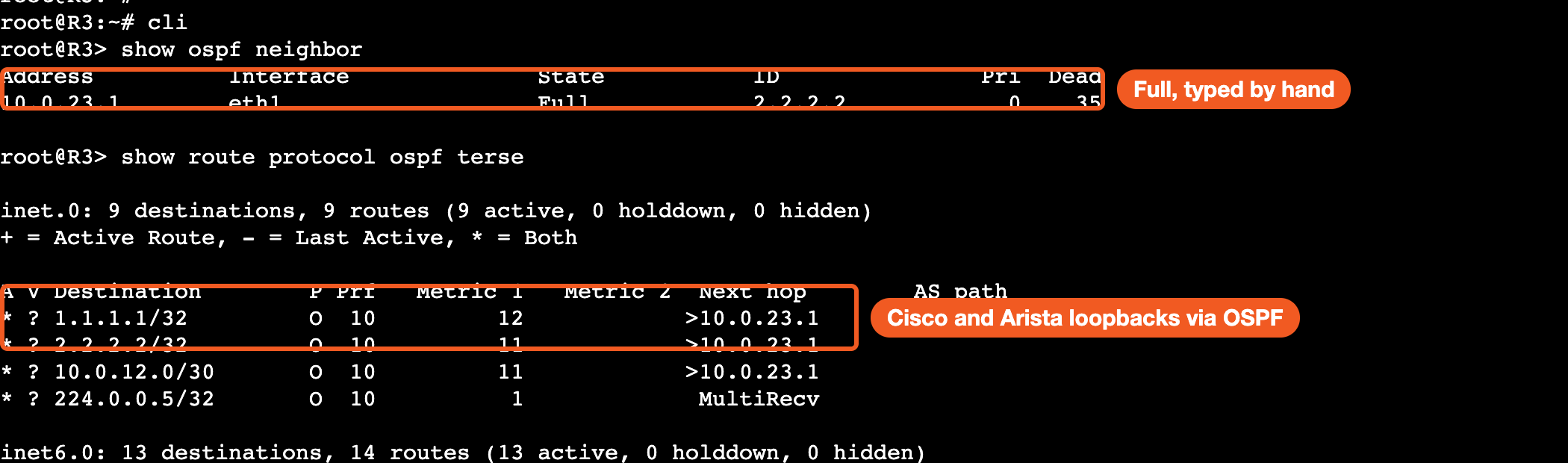
You do not have to trust the chat. The reply links a lab viewer with the running topology and a console per router. Click R3, open its terminal, enter the Junos CLI and type the checks yourself:
root@R3> show ospf neighbor
Address          Interface              State           ID               Pri  Dead
10.0.23.1        eth1                   Full            2.2.2.2            0    35
show route protocol ospf lists the Cisco and Arista loopbacks, 1.1.1.1/32 and 2.2.2.2/32, learned through OSPF via 10.0.23.1.
When you are done, ask ChatGPT to stop the lab VM. The lab stays saved for the next session.
Lab files from the recording
- ospf-three-vendor.clab.yml: three routers and two links
- R1.partial.cfg, R2.partial.cfg, R3.partial.conf
- PROVENANCE.md: where the files came from and what was changed
The same files are the public lab in the NetPilot lab library. The three routers run your own Cisco, Arista and Juniper images, uploaded once to your lab VM, as the supported devices page describes.
FAQ
Can ChatGPT build a multi-vendor network lab?
Yes, with the NetPilot plugin from ChatGPT's plugin directory. In the run on this page one prompt built a Cisco router, an Arista router and a Junos router in OSPF area 0 on a lab VM, checked every neighbor on each router's own CLI and pinged loopback to loopback across all three. ChatGPT alone writes configs. With the plugin it deploys real network operating systems and quotes their output.
Do I need to build an MCP server or host the routers myself?
No. NetPilot is in the ChatGPT plugin directory and runs the routers on your own NetPilot lab VM in the cloud, so nothing is installed on your machine and no MCP server is built. The same plugin works in Claude and any AI assistant that connects to MCP servers.
Which vendors can I mix?
Name them in the prompt. NetPilot runs 17+ network operating systems, including Cisco IOS, IOS XR and NX-OS, Arista EOS, Juniper Junos, Nokia SR Linux, SONiC and FRR. The supported devices page lists which are built in and which you bring as your own image.
How do I know the lab is real and not text the chat made up?
ChatGPT quotes each router's own show output, and the reply links a lab viewer with a console per router. Open the Junos router's terminal and type show ospf neighbor yourself: the router answers, not the chat.
Build your own from the chat
Open ChatGPT, pick NetPilot in the composer, and name the vendors you need. Start with the prompt above and swap a vendor, add a router or change the protocol. The same multi-vendor run in Claude, with Arista, Nokia and FRR in eBGP, is on the NetPilot in Claude page. For a network team, NetPilot for teams covers shared labs and your own agents connecting over MCP.
Sign in to NetPilot to set up your lab VM before you connect.